24B2n2200G.pdf - 第6页
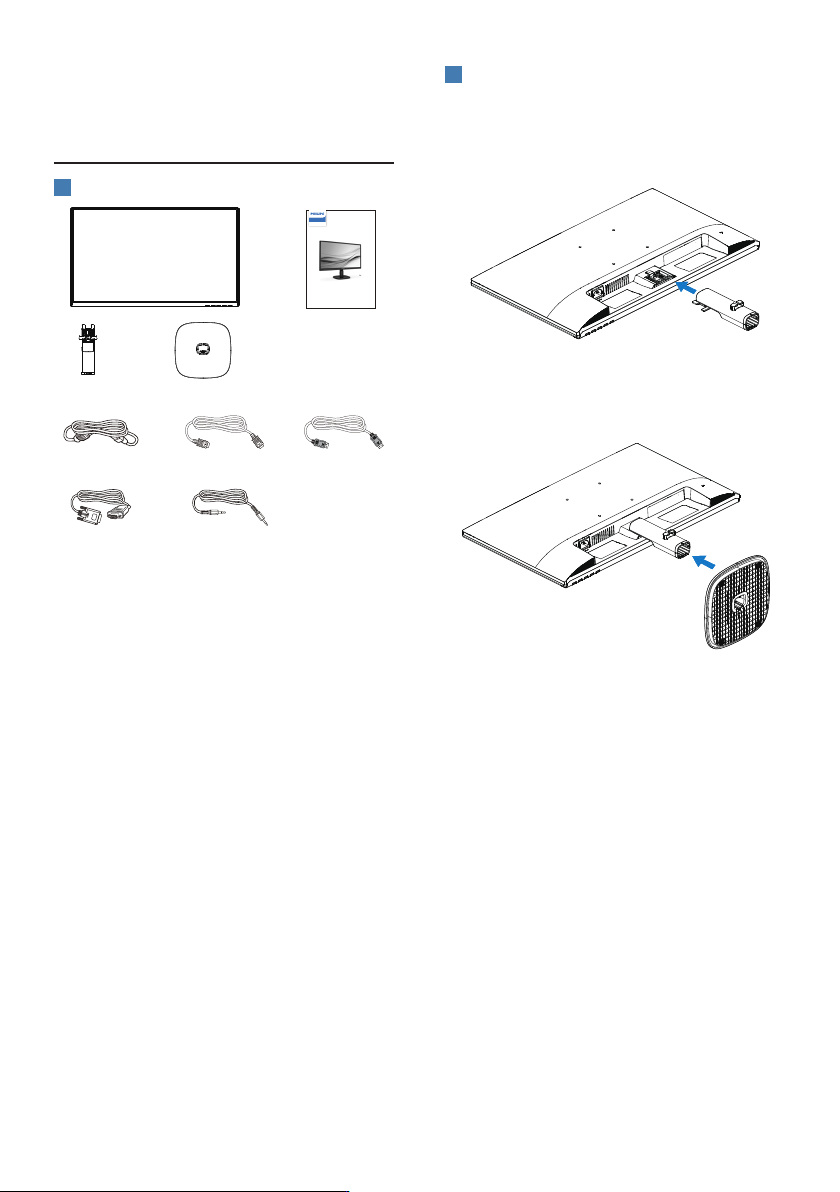
4 2. 设置显示器 2. 1 安装 1 包装箱内物品 Quick Start Register your product and get support at www.philips.c om/welcome 24 B2N2200 Bu si ne ss Monitor 2 00 0 Series Power *HDMI *VGA *Audio cable *DP * 视国家(地区)而定 2 安装底座 1. 将显示器正面朝下放在平滑柔…
3
1.3 产品和包装材料的废弃
废旧电气和电子设备 - WEEE
This marking on the product or
on its packaging illustrates that,
under European Directive 2012/19/
EU governing used electrical and
electronic appliances, this product
may not be disposed of with normal
household waste. You are responsible
for disposal of this equipment
through a designated waste electrical
and electronic equipment collection.
To determine the locations for
dropping off such waste electrical
and electronic, contact your local
government office, the waste
disposal organization that serves your
household or the store at which you
purchased the product.
Your new monitor contains materials
that can be recycled and reused.
Specialized companies can recycle
your product to increase the amount
of reusable materials and to minimize
the amount to be disposed of.
All redundant packing material has
been omitted. We have done our
utmost to make the packaging easily
separable into mono materials.
Please find out about the local
regulations on how to dispose of your
old monitor and packing from your
sales representative.
Taking back/Recycling Information for
Customers
Philips establishes technically and
economically viable objectives
to optimize the environmental
performance of the organization's
product, service and activities.
From the planning, design and
production stages, Philips emphasizes
the important of making products
that can easily be recycled. At Philips,
end-of-life management primarily
entails participation in national take-
back initiatives and recycling programs
whenever possible, preferably in
cooperation with competitors,
which recycle all materials (products
and related packaging material) in
accordance with all Environmental
Laws and taking back program with
the contractor company.
Your display is manufactured
with high quality materials and
components which can be recycled
and reused.
To learn more about our recycling
program please visit
http://www.philips.com/a-w/about/
sustainability.html
4
2. 设置显示器
2.1 安装
1
包装箱内物品
Quick Start
Register your product and get support at www.philips.com/welcome
24B2N2200
Business
Monitor
2000 Series
Power *HDMI
*VGA
*Audio cable
*DP
*视国家(地区)而定
2
安装底座
1. 将显示器正面朝下放在平滑柔软的表面
上,注意不要刮擦或损坏屏幕。连接/
滑动显示器的底座支柱,直至将其卡入
到位。
2. 用双手拿住显示器底座支撑臂,用力将
底座支撑臂插入底座支撑柱。
5
3
连接到PC
AUDIO
OUT
D-SUB
AUDIO
IN
1
2 3 4 5
6
7
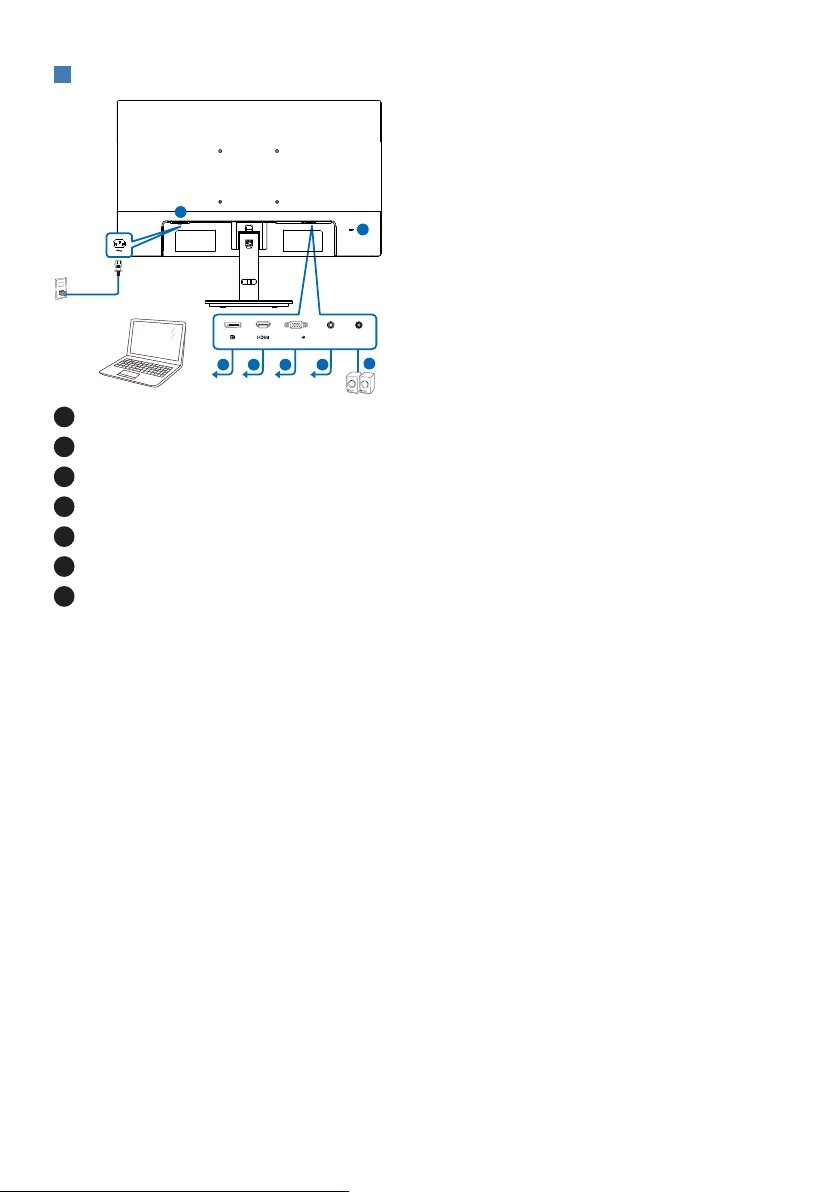
1
交流电源输入
2
DisplayPort 输入
3
HDMI 输入
4
VGA 输入
5
音频输入
6
音频输出
7
Kensington防盗锁
连接到PC
1. 将电源线牢固连接到显示器背面插口。
2. 先关闭电脑,再拉出电源线。
3. 将显示器信号线连接到计算机背面的视
频接口。
4. 将计算机和显示器的电源线插入附近的
插座。
5. 打开计算机和显示器的电源。如果显示
器显示图像,则安装完毕。