00197717-02_VB_Traceability4.1_DE_EN.pdf - 第27页
Requirements Software Requirements SIPLACE Traceability 4.1 27 3 3 R e q u ir e m e n t s Requirements 3.1 3 . 1 S o f t w a r e R e q u ir e m e n t s Software Requirements To run the Traceability 4.1 syste m, you must …
Traceability Interfaces
26 SIPLACE Traceability 4.1
Requirements
Software Requirements
SIPLACE Traceability 4.1 27
3
3 Requirements
Requirements
3.1
3.1 Software Requirements
Software Requirements
To run the Traceability 4.1 system, you must install the following software:
▪ SIPLACE Pro 12.1 (recommended), 12.0 (compatible)
▪ Setup Center 7.1 (recommended), 7.0 (compatible)
▪ SIS 12.1 (recommended), 12.0 (compatible)
▪ Trace Service 4.1
▪ Trace Monitor 4.1 (optional) with SIPLACE Studio
▪ Station software:
– 407.05 (SIPLACE 80 F4, F4-6, S20; F5, F5 HM, S23)
– 505.05 SP2 (SIPLACE S25 HM, S27 HM, HS50, HS 50+, HS60, HF, HF3)
– 605.03 SP2 (SIPLACE X2, X3, X4; D1, D2, D3, D4)
– 705.x (SIPLACE X2, X3, X4, X4I, SX1, SX2, SX4, DX1, DX2, DX4)
– 706.0 (SIPLACE X2, X3, X4, X4I, SX1, SX2, SX4, SX1 V2, SX2 V2, DX1, DX2, DX4)
– 706.1 (SIPLACE X2, X3, X4, X4I, SX1, SX2, SX4, X4i S, X4 S, X3 S, SX1 V2, SX2 V2, DX1,
DX2, DX4)
– 707.xx (SIPLACE X2, X3, X4, X4I, SX1, SX2, SX4, X4 Si, X4 S, X3 S, X2 S, X4 S micron, X4i S
micron, SX1 V2, SX2 V2, DX1, DX2, DX4)
– 708.xx (SIPLACE X2, X3, X4, X4I, SX1, SX2, SX4, X4 Si, X4 S, X3 S, X2 S, X4 S micron, X4i S
micron, SX1 V2, SX2 V2, DX1, DX2, DX4)
3.2
3.2 Time Sync
Time Sync
To ensure that you can trace board production data properly at a later date, it is important that all systems
involved have synchronized time keeping. The individual times in the various systems can be automat-
ically synchronized with the SIPLACE Time Sync tool.
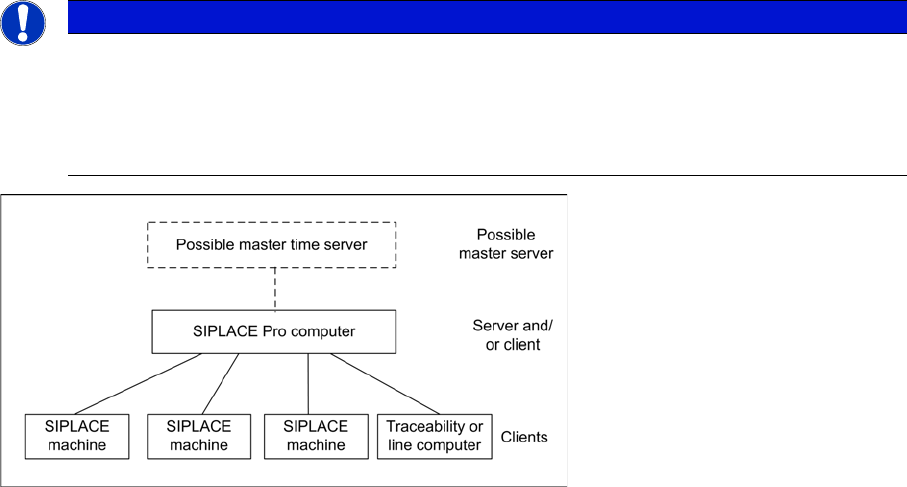
SIPLACE Time Sync is a client server application, which helps to synchronize the time at all SIPLACE
machines and all traceability or line computers (client) via the SIPLACE Pro computer or a central time
server (server). Time Sync is installed and configured on one particular computer as a time server and
on one or more other computers as a client.
The SIPLACE Pro line computer has proven to be an ideal time server.
NOTICE
Time Sync
After installing the Time Sync server and Time Sync client, check the settings for "Time Sync"
and correct the times where necessary, at the Time Sync client.
The current Time Sync software and software instructions can be found on one of the Support
Media DVDs (item no: 00388693-xx or 00388694-xx), supplied with each software product.

Requirements
Optional Hardware Requirements
28 SIPLACE Traceability 4.1
3.3
3.3 Optional Hardware Requirements
Optional Hardware Requirements
▪ Splice sensor
– For X feeders: Hardware installation only see also "Job Guide Feeders 8-88 mm X" (item no:
00194487-xx) or"Service SIPLACE X Feeder Care (item no 00196601-xx (German) or
(0019602-xx (English))"
– For S feeders: only available for machine versions 407 and 505
Hardware installation only (table controller V2.0; Hub V2.31)
see also “Retrofitting instructions Splice Sensors 8 - 72 mm” (item no: 00193365-xx)
▪ Board barcode reader: in accordance with the machine type:
– see "PCB Barcode Assembly Instructions" (item no.: 00193891-xx)) for hardware installation and
software configuration via the CLV barcode reader software at SIPLACE F/S/HS/HF/X and D se-
ries machines
– see "PCB Barcode Assembly Instructions for SIPLACE SX1/SX2" (item no.: 00196625-xx) for
hardware installation and software configuration of barcode readers at SIPLACE SX1/SX2 se-
ries machines
▪ Reading the PCB barcode:
– with internal PCB camera (licensed required and dependent on station software)
– with an external scanner
NOTICE
Splice sensors
Splice sensors for X feeders are available for X and SX series machines only.