German Added as Machine Languages.pdf
SMT Software Engineering Group IMOperation sYAMAHAMOT ORCO.,LTD. 1/15 German A d ded as Machine L angu age Contents. Germ an Added as M achi ne Language .. ....... ................ ....... .................. ...…
SMT Software Engineering Group
IMOperationsYAMAHAMOTORCO.,LTD.
1/15
German Added as Machine Language
Contents.
German Added as Machine Language...........................................................................................................................1
1.
Introduction .........................................................................................................................................................................2
2.
Summary..............................................................................................................................................................................2
3.
Limitations............................................................................................................................................................................3
4.
Method of Switching Language................................................................................................................................3
4.1. Installation of Language ................................................................................................................ 3
4.2. Switching language to German.................................................................................................... 4
5. Method of Version Downgrade......................................................................................................................................9
6.
Method of System Backup /Restore................................................................................................................... 10
6.1. System backup acquisition method .......................................................................................... 10
6.2. System Backup Restore Method .............................................................................................. 13
Revision
Version Chapter Revised Contents
00 V3.27STD R1.000 ALL -
01 V3.27STD R3.000 2
4.1
6
German is installed as one of the initial
languages.
Added how to acquire and restore
system backup.
SMT Software Engineering Group
IMOperationsYAMAHAMOTORCO.,LTD.
2/15
1. Introduction
The target model and the target version of this specification are as follows.
Table1 Target Machine and Software
Item Name Object Remarks
Model YS Series Mounter,YG12 Series Mounter, YSP
YSC1, YSH20
Version V3.27STD R1.000 or later
2. Summary
This function is to install only required languages at the time of installation.
Since Japanese, English, Chinese, Korean, and German are already installed as the initial
setting, you can display these languages, just changing the following setting of machine
application.
[Machine (VmSpec)] - [Option Setting] - [Message] combo box
Moreover, you can delete unnecessary languages.
Since one kind of language needs approximately 10 MB, you can save the capacity of D
drive by deleting an unnecessary language at the time of upgrade.
SMT Software Engineering Group
IMOperationsYAMAHAMOTORCO.,LTD.
3/15
3. Limitations
If you want to downgrade to earlier than V3.27STDR1.000, please change the language to
English on the machine setting before that. (Refer to "5. Method of version down ").
The machine doesn't start if downgraded with German selected.
4. Method of Switching Language
To display the new language on the machine, please install your language, and select it on the
machine setting (VmSpec).
4.1.
4.1.4.1.
4.1.Installation of Language
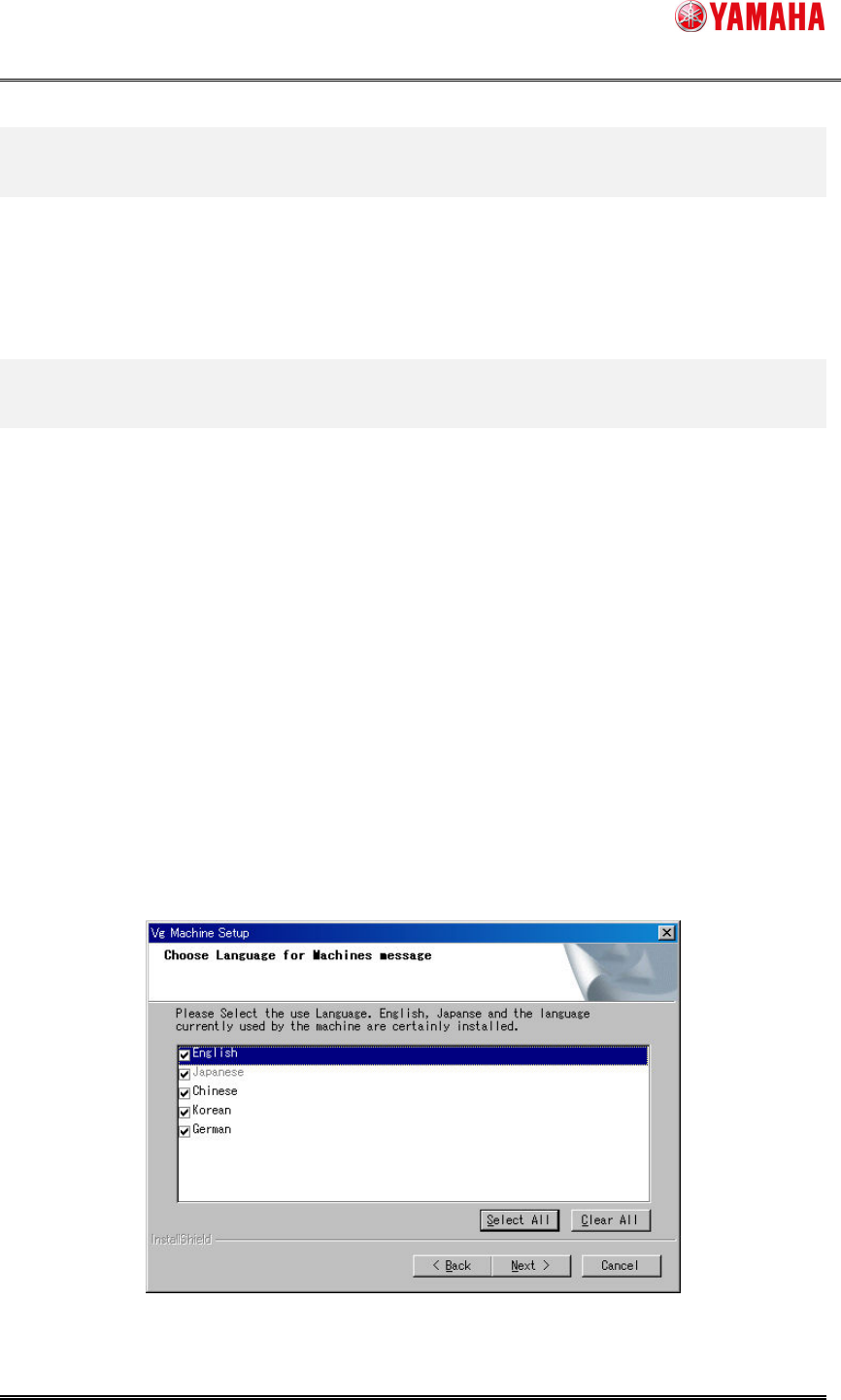
Check the box of your language on the screen displayed during the installation or an upgrade.
Unchecked languages are not installed.
Japanese, English, and a language selected on the machine setting must be installed. You can’t
uncheck the languages indicated in gray.
At the initial installation, the check boxes are displayed with English, Japanese, Chinese, and
Korean checked.
At a version upgrade, the check boxes are displayed with only the languages checked which
have been selected at the initial installation or the last upgrade.
Figure 4.1.1
Language selection screen