TK52705.PickHeightTeaching.pdf - 第10页
Product Engineering Division SMT Sect ion Robotics Operations Y AMAHA MOTOR CO., L TD. MDOC-SOFT50389 10/26 W riting condition ・ Som e parts are mounted in auto-runni ng. or ・ The [Feedback ] button is pres sed o…
Product Engineering Division
SMT Section
Robotics Operations
YAMAHA MOTOR CO., LTD.
MDOC-SOFT50389
9/26
input [Body Size Z] accurately as [Tray Height] is calculated based on measured height
of parts above. When [Body Size Z] is not accurate, it is not possible to calculate the
applicable pick height.
- It is necessary to input parts pitch, tray pitch and pallet pitch accurately. If not, it is not
possible to measure the pick height at the correct position.
- To perform [Inner Pickup] for connector parts, you need to set [Parts]-[Pick]-[Nozzle Touch
Point Offset (mm)] properly before executing height measurement. This function
calculates pick height considering the [Nozzle Touch Point Offset (mm)] value. If this item
is blank at measurement, it is not possible to calculate the applicable pick height.
- [Auto Measure] is not supported. Tray parts are skipped.
- When the measurement point and nozzles are touched with nozzle tip open, measured
result may not be accurate.
3.4 Pick Height Take Over Function
When [TakeOver PickHeight] is enabled in the machine setting, “Pick Height” is taken over
to other board data, so that you do not need to perform pick height teaching for every
board data.
To take over pick height, the target parts need to be used for production, or the board data
is saved after pick height feedback. Target pick height is written and read through a
takeover file at reading board data, or when the feeder is removed and attached.
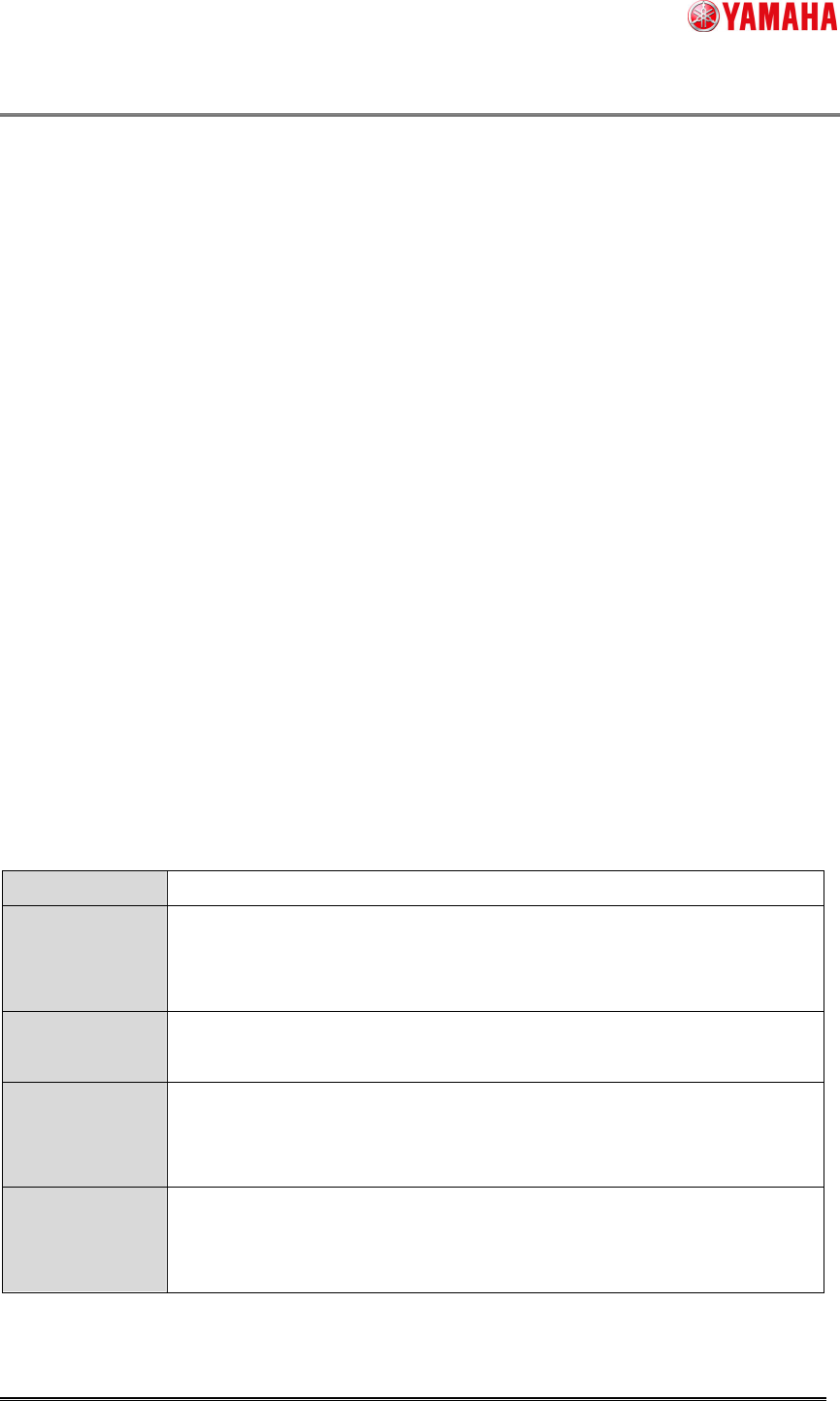
File name
Feeder_(Feeder ID)@(Parts Name).sts
File contents
・Pick Height
* When the “Parts Data Auto Tuning” function is used, the tuning data is
also included.
Reading (take
over) timing
・When board data is read
・When feeder is attached
Take over
condition
・[Feeder ID] and [Parts Name] match
・Feeder is attached at reading board data.
・Writing conditions are not satisfied at attaching feeder.
Writing timing
・Before board data is read.
・Power OFF
・When the target feeder is removed
Product Engineering Division
SMT Section
Robotics Operations
YAMAHA MOTOR CO., LTD.
MDOC-SOFT50389
10/26
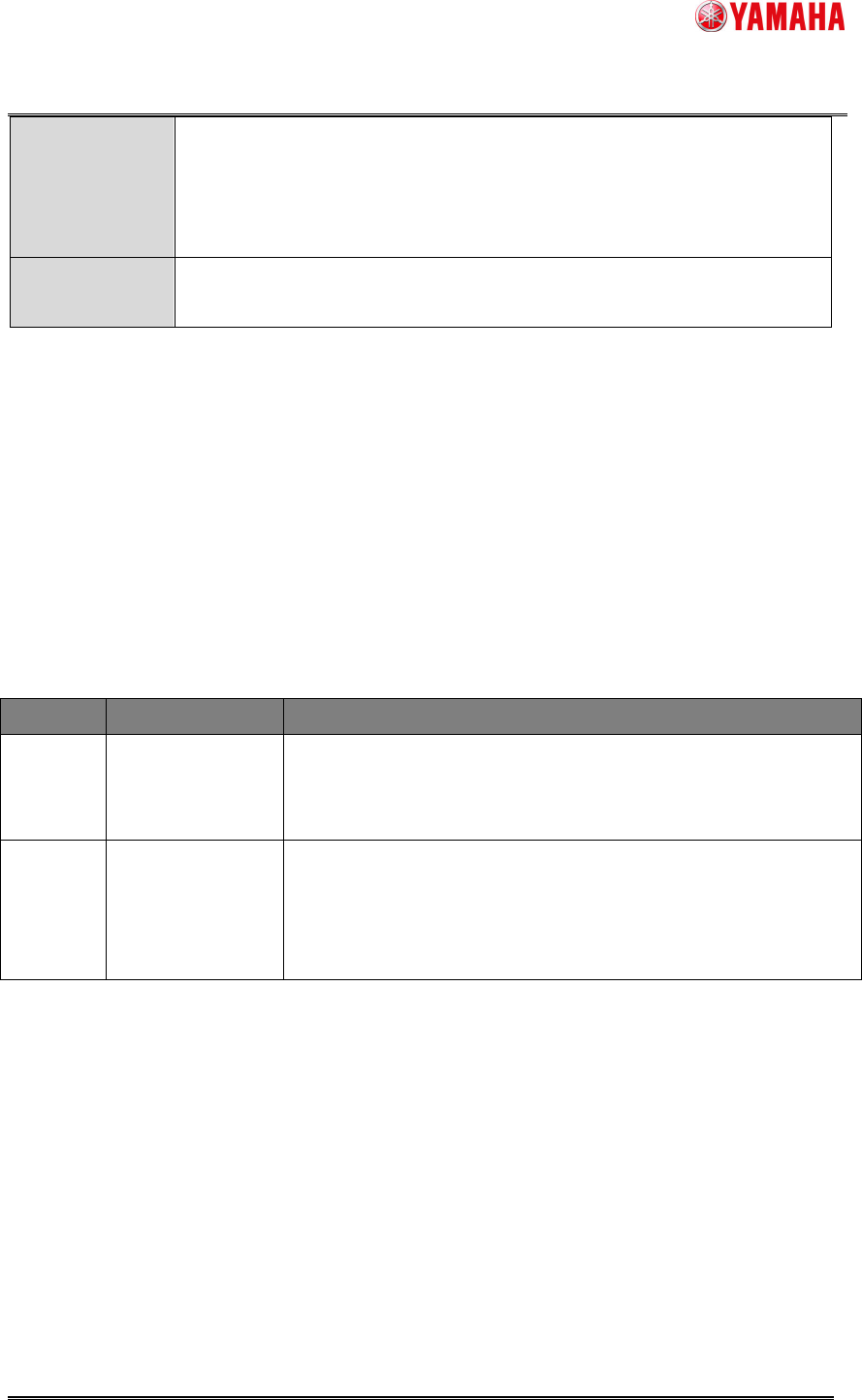
Writing
condition
・Some parts are mounted in auto-running.
or
・The [Feedback] button is pressed or [Pick Height] is edited, then the
board data is saved.
Delete timing
and condition
・When board data is read. (When server path is undefined, and takeover
files are over 2000, the older files are deleted.)
< Note >
・ File saving path is “D:¥Machine¥Status¥PartsTakeOver¥”, and can be changed on the
[Software Setting]-[Monitor]-[Parts Data Take Over] dialog.
・ When reading or writing of takeover file is failed, “Ea12994:
Failed to write parts data
take over file” or “Ea12995:
Failed to read parts data take over file” is recorded in the
error log.
3.5 Error Message
The below is the error messages added for this function.
Error No. Title Cause and Solution
2793
PICK HEIGHT
TEACH FILE
READ ERROR
Failed to read following file.
Restore the machine data with System Backup.
Re-install the software.
2794
PICK HEIGHT
TEACH FILE
WRITE ERROR
Unable to write the setting file of Pick Height Teach.
Remove read-only, and try it again.
Restore the machine data with [System Backup]-[Restore], and
try it again.

Product Engineering Division
SMT Section
Robotics Operations
YAMAHA MOTOR CO., LTD.
MDOC-SOFT50389
11/26
Error No. Title Cause and Solution
2980
PICK HEIGHT
TEACH FAILED
Causes
- Nozzle is clogged, so that change of vacuum level will not be
detected correctly.
- There is an unknown object that can bother the measurement.
- Surface of the measure point is uneven.
- The target feeder or tape is not attached.
- 12mm or larger feeders are measured on upper surface of the
parts. Feeding of the feeder may have failed.
(▲4)
Solutions:
- Clean the nozzle.
- Check the measure point.
- Check the condition of the target feeder and tape.
- 12mm or larger feeders are measured on upper surface of the
parts. Check whether the parts exist or not.
(▲4)
2981
FEEDER GUIDE
RECOGNITION
FAILED
Causes:
- The recognition position is unclean.
- The recognition mark data is not correct.
Solutions:
- Clean the position, and ensure no unknown object is there.
- Check the mark data.
2982
PICK HEIGHT
TEACH RESULT
LIMIT OVER
Causes:
- Nozzle is clogged, so that change of vacuum will not be
detected correctly.
- There is an unknown object that can bother the measurement.
- Surface of the measurement position is uneven.
- The target feeder or tape is not attached.
Solutions:
- Clean the nozzle.
- Check the measurement position.
- Check the condition of the target feeder and tape.
2983
PICK HEIGHT
TEACH ERROR
SET NUMBER
Unable to measure the pick height on the following feeder setting
position. Release auto-measurement and execute individual
measurement.