00198765-02_VD_SSW_713.1_R20-1_EN_DE.pdf - 第9页
Station Software 713.1 (R 20-1) / V ersion Description 05/2020 Edition 9 3 Compatible Mode Some station softwar e versions may be used as lower versions in c ompatible mode. This mea ns that the new functions of the curr…
Station Software 713.1 (R20-1) / Version Description 05/2020 Edition
8
2.3 Languages
User Interfaces SIPLACE Station and SIPLACE Vision
The basic software contains German, English and Simplified Chinese versions. As for Simplified
Chinese a preliminary version is provided.
The final version of Simplified Chinese and other languages contained in the Language Pack are
optional. The Language Pack can be downloaded from the ASM Download Center.
Available languages for station software and SIPLACE Vision
– Bulgarian
*)
– Chinese (simplified)
– Czech
*)
– French
– Hungarian
– Italian
– Japanese
– Korean
– Polish
*)
– Portuguese (Brazil)
– Romanian
*)
– Russian
*)
– Spanish (Mexico)
– Vietnamese
*)
*)
GUI only (online help English)

Station Software 713.1 (R20-1) / Version Description 05/2020 Edition
9
3 Compatible Mode
Some station software versions may be used as lower versions in compatible mode. This means
that the new functions of the current version can be used in the compatible version as far as
possible.
The compatible mode is provided to operate stations with lower line software versions in order to
keep the line software version in case of a station upgrade.
The 713.1 station software version can be operated as Version 712.3 in compatible mode.
The visibility and functionality of the new functions in compatible mode are explained in the
following table.
Compatible Mode
Meaning
Complete
Complete function support.
Compatible
The function is visible and executable at the station. However, new add-
ons in the station software or in the line products are not supported.
Hidden
The function is invisible/inactive, e.g. due to licensing or unsupported
SIPLACE Pro download/upload.
Not supported
The function is not supported, e.g. because of failing hardware.
Table 3-1: Visibility and functionality in compatible mode
The respective visibility/functionality in compatible mode is specified for the new features in
chapter 4.
The compatible mode can be activated under Settings – SIPLACE station interface clients on
the GUI.
Please also refer to chapter 7.
Station Software 713.1 (R20-1) / Version Description 05/2020 Edition
10
4 Features of the 713.1 Station Software Version
All features of the previous 7xx station software versions are also supported in the 713.1 station
software version. The main new features of the 713.1 station software version are listed below.
NOTICE
Detailed information on the individual functions can be found in the Online help for the
station software.
4.1 Adjusting Sigma Level for Accuracy Check Tool (ACT) Results
Compatible mode: Complete
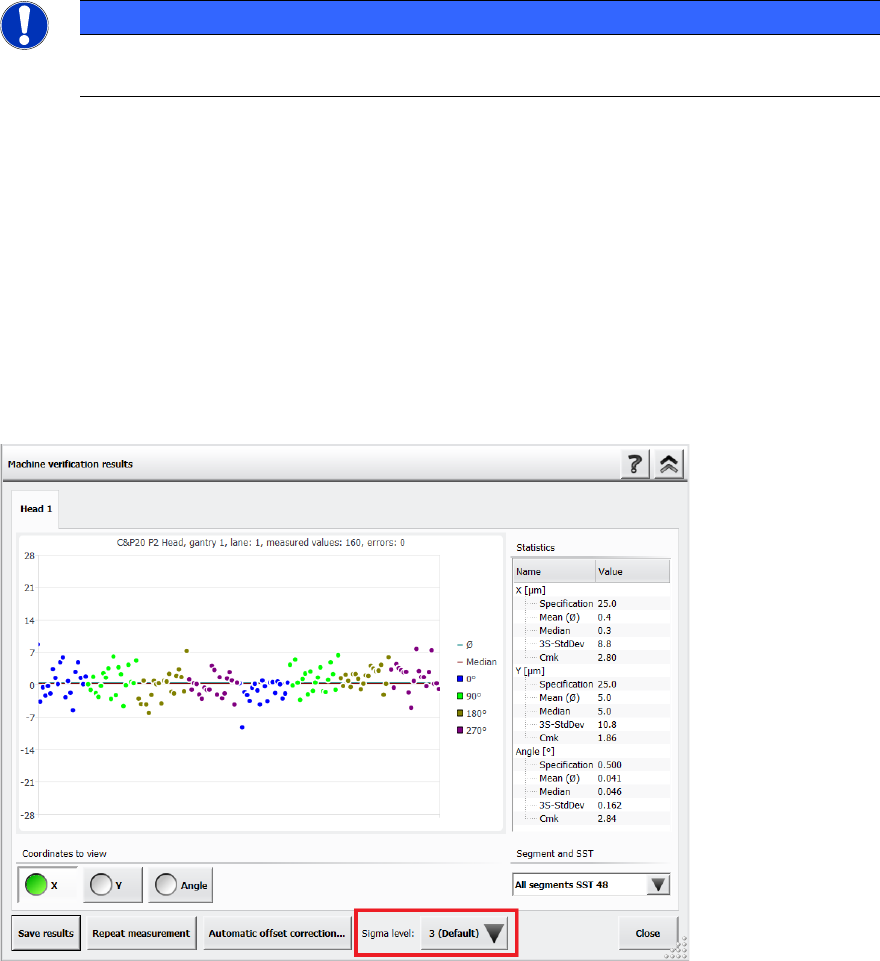
The Accuracy Check Tool (ACT) is used to determine the placement accuracy of a specific
placement head and, if necessary, correct it. If an ACT check is performed, components are
measured after placement and the results are displayed in the Machine verification results
dialog.
It is now possible to adjust the sigma level in this Machine verification results dialog via the new
Sigma level drop-down list. The selectable sigma levels in the list range from the configured
default value (usually 3 or 4) up to maximum level 6.
Figure 4-1: Adjusting the sigma level in the ACT Results dialog
If a new measurement is done, the results in the Machine verification results dialog are displayed
according to the default sigma level value that has been configured for the station. When you
change the sigma level, the results within the Machine verification results dialog are refreshed
accordingly. Additionally, the +/- specification values for X, Y and Angle are listed in the statistical
results on the right side of the dialog.