00196376-0102_UM S-Feeder_EN.pdf - 第26页
Tape Feeder Modules Operating Tape Feeders - General Operating Controls - Function 26 User Manual SIPLACE S-Feeder 2.1.2.1 Controls for Feeders with One Track This operating contro l is used for the 12/16 , 24/32 , 44 , …
Tape Feeder Modules
Function Operating Tape Feeders - General
User Manual SIPLACE S-Feeder 25
2 Tape Feeder Modules
2.1 Operating Tape Feeders - General
This sections provides a general description of how to operate the tape feeders. This description applies
equally to all tape feeders.
Detailed descriptions which only apply to specific tape feeders can be found in the separate sections for
the individual devices.
2.1.1 Function
The feeders described below are used to handle components on tapes in the placement machines of the
SIPLACE family. Information about the components which can be used with these feeders and about the
step sizes to be set can be found in "1.3 Technical Data" [ ➙ 10].
▪ The step size can be set using the buttons on the control unit at the back of the feeder.
▪ The tape is moved over a transport wheel, which is driven by a geared motor. The gearing trans-
mission has been designed to ensure that a power feed of 2 mm precisely corresponds to one
revolution of the motor.
▪ The positioning accuracy is achieved by the drive moving the component past the pickup position
and then back to a defined stopper. The number of motor revolutions is determined by a sensor.
▪ When using the
3x8 mm S
,
8mmSII
and
12/16 mm S
feeders, the component to be processed is
held in the pickup position by a component cover controlled by a lifting magnet and is released just
before pickup, by pulling back the component cover. After pickup, the component cover is closed
again, to prevent components jumping during tape transport.
▪ The cover tape on the tape is pretensioned with the help of a rocker (rocker 1) which is removed
during transportation. This cover tape is discarded by being fed into a foil container by the combing
action of two motor-driven toothed wheels. At the same time, the rocker is retensioned.
▪The
SDP
tape feeders have the same basic design as the respective
S
feeders. The main difference
is a greater tape feed through for high components. Operation of the
SDP
tape feeders does not
differ form operation of the "normal" S feeders of the same design.
2.1.2 Operating Controls - Function
The controls for the various tape feeders follow the same basic design and differ only in the number of
tracks addressed by the controls and the type of output shown on the controls.
All controls have the following buttons:
▪ The green "Index" button for manual tape transport
▪ The yellow "Foil" button for foil removal
The 3x8 mm S feeders also have the blue "Select" button with which you can select the track to be
operated.
Tape Feeder Modules
Operating Tape Feeders - General Operating Controls - Function
26 User Manual SIPLACE S-Feeder
2.1.2.1 Controls for Feeders with One Track
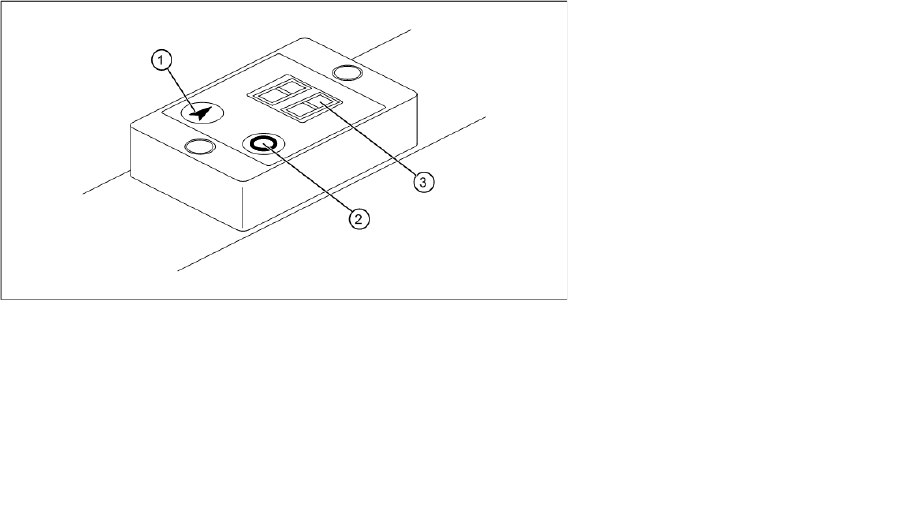
This operating control is used for the
12/16
,
24/32
,
44
,
56
,
72
,
88 mm S
and
24/32
,
44
,
56 mm S DP
feeders.
Operating controls for feeders with one track
▪ After connecting the power cable to a 30 V voltage supply, the LED display is automatically switched
on for 5 secs and shows the step size last set in mm.
▪ The LED display remains switched on as long as one of the two buttons is pressed. After the button
is released, the display stays on for another 5 secs.
▪ The LED display will remain on and flashing while a feeder malfunction is present.
Legend:
1 "Index" button for manual tape transport
2 "Foil" button for foil removal
3 LED display
Shows the function states and errors
Tape Feeder Modules
Operating Controls - Function Operating Tape Feeders - General
User Manual SIPLACE S-Feeder 27
2.1.2.2 Controls for Feeders with Three Tracks
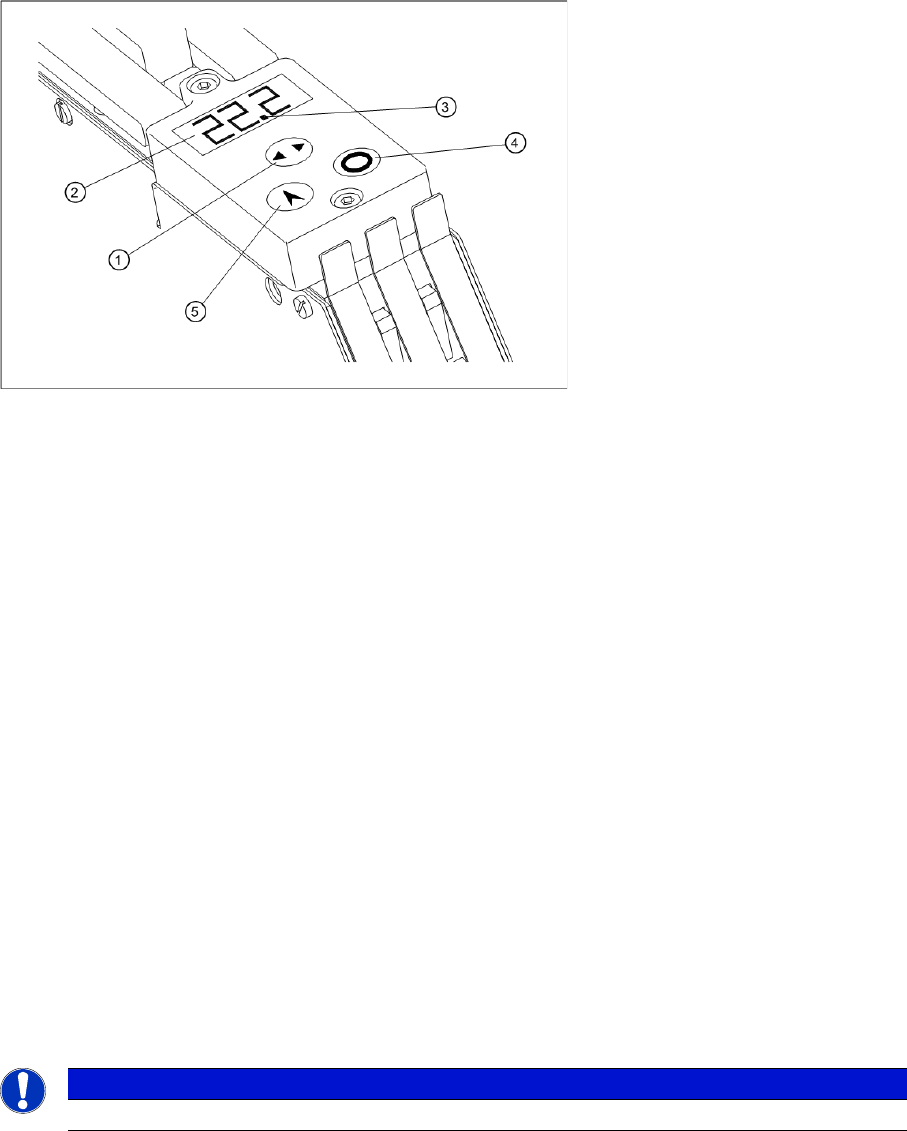
This operating control is used for 3x8 mm feeders (
3x8 mm S
,
3x8 mm SL
,
3x8 mm S for 0201/
0402 components
and
3x8 mm S for 01005 components
).
Operating controls for feeders with three tracks
2.1.2.3 Manual Tape Transport
►When using feeders with 3 tracks (
3x8 mm S
), first press the "Select" button to select the track to be
used.
►Briefly press the "Index" button and then release immediately.
The tape will be moved by the set step size.
2.1.2.4 Manual Operation of Foil Removal
►When using feeders with 3 tracks (
3x8 mm S
), first press the "Select" button to select the track to be
used.
►Press the "Foil" button.
The foil removal motor will run until the foil rocker is no longer in the light barrier.
Legend:
1 "Select" button for selecting the track to be used
2 Display
Continuously shows the set step size for each track
3 Marks the selected track
4 "Foil" button for foil removal
5 "Index" button for manual tape transport
NOTICE
Manual operation of the foil removal only functions if the foil rocker is not tensioned.