00197700-01_IM_SetupCenter7.0_EN.pdf - 第70页
Barcode-Scanner Installation Motorola Scanner 6.3.3 Mobile Scanner Prer equisites Setup 70 Installation Manual SIPLACE Setup Center 7.0 ► Execute the Mobile Scanner Prerequisites (1) setup. 6.3.3.1 6 . 3 . 3 . 1 S t e p …
Barcode-Scanner Installation
6.3.1 System Requirements Motorola Scanner
Installation Manual SIPLACE Setup Center 7.0 69
6.3
6.3 Motorola Scanner
Motorola Scanner
6.3.1
6.3.1 System Requirements
System Requirements
The following components are required for the operation of the scanner:
▪ WLAN-infrastructure (not included)
▪ Motorola scanner integrated in WLAN-infrastructure and accessible with "ping" windows-command.
▪ Required scanner firmware versions
– MC70: 05.43
– MC75: 02.37
– MC3090: 01.13
– MC3190: 03.26
6.3.2
6.3.2 Configurate WLAN on Scanner
Configurate WLAN on Scanner
Please configure the barcode scanner for the operation within WLAN network - as described in docu-
ment Installation Manual WLAN Infrastructure for SIPLACE (item no. 00195606-xx).
6.3.3
6.3.3 Mobile Scanner Prerequisites Setup
Mobile Scanner Prerequisites Setup
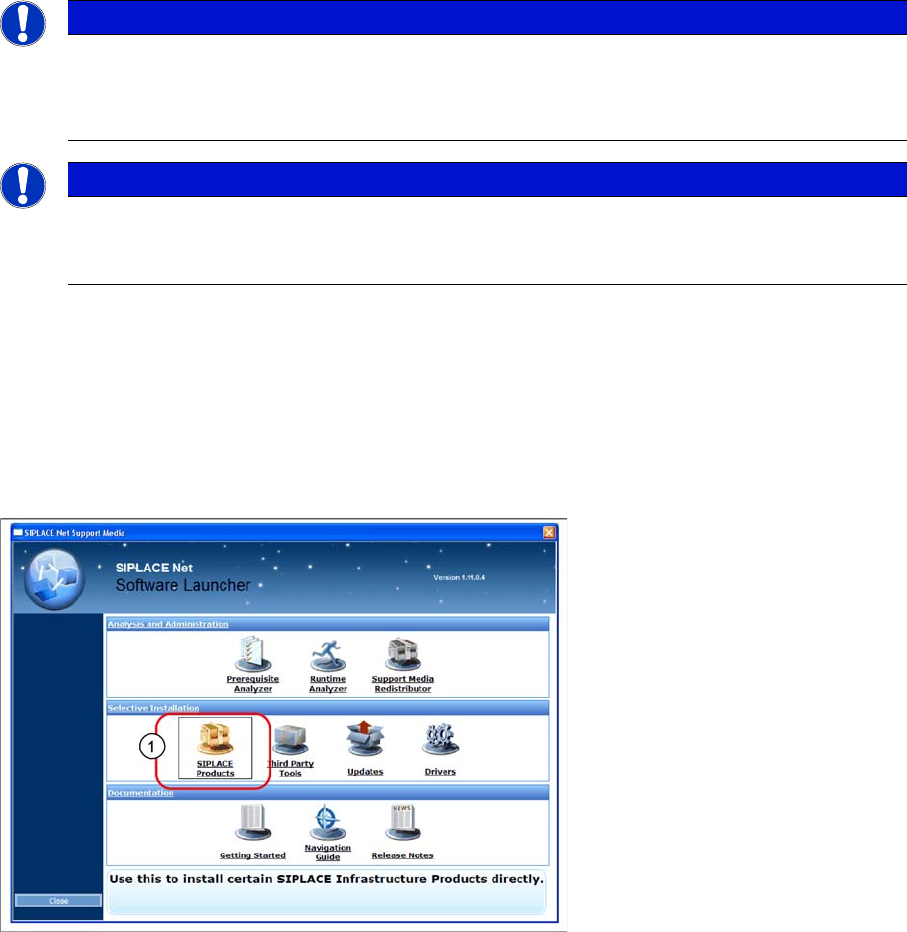
The installation for mobile scanner prerequisites setup is located on the DVD "SIPLACE Support Media
DVD1" in the Selective Installation section.
► Open SIPLACE Products (1).
NOTICE
The scanner might be delivered with a different firmware version. Please install the firmware
version listed above. It is located on the software DVD "SIPLACE Support Media DVD1” in the
section “SIPLACE Products” (See "6.3.3 Mobile Scanner Prerequisites Setup" [➙69]). Please
observe by all means the enclosed documentation.
NOTICE
Mobile scanner menus in Chinese
If you want the menus on the Motorola scanner to appear in Chinese, you first need to install a
localized (Simplified Chinese) operating system.
Barcode-Scanner Installation
Motorola Scanner 6.3.3 Mobile Scanner Prerequisites Setup
70 Installation Manual SIPLACE Setup Center 7.0
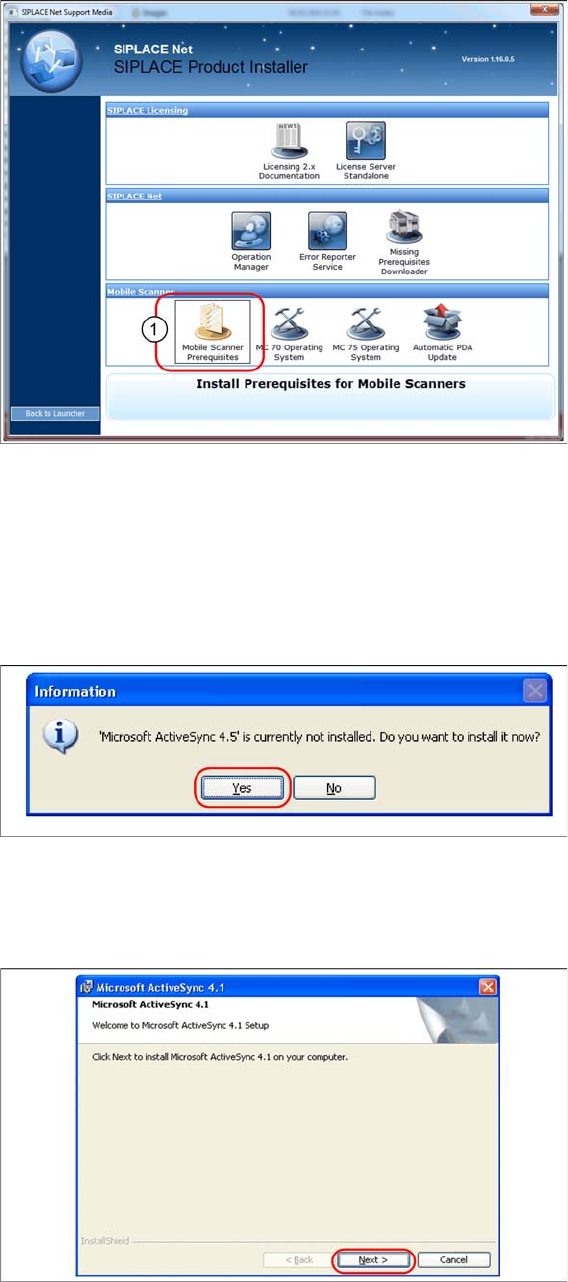
► Execute the Mobile Scanner Prerequisites (1) setup.
6.3.3.1
6.3.3.1 Step 1: ActiveSync / Mobile Device Center
Step 1: ActiveSync / Mobile Device Center
The Mobile Scanner Prerequisites Setup checks if the necessary communication program (ActiveSync
or Mobile Device Center) is present. If this is not the case, the program can be installed.
Windows XP: ActiveSync
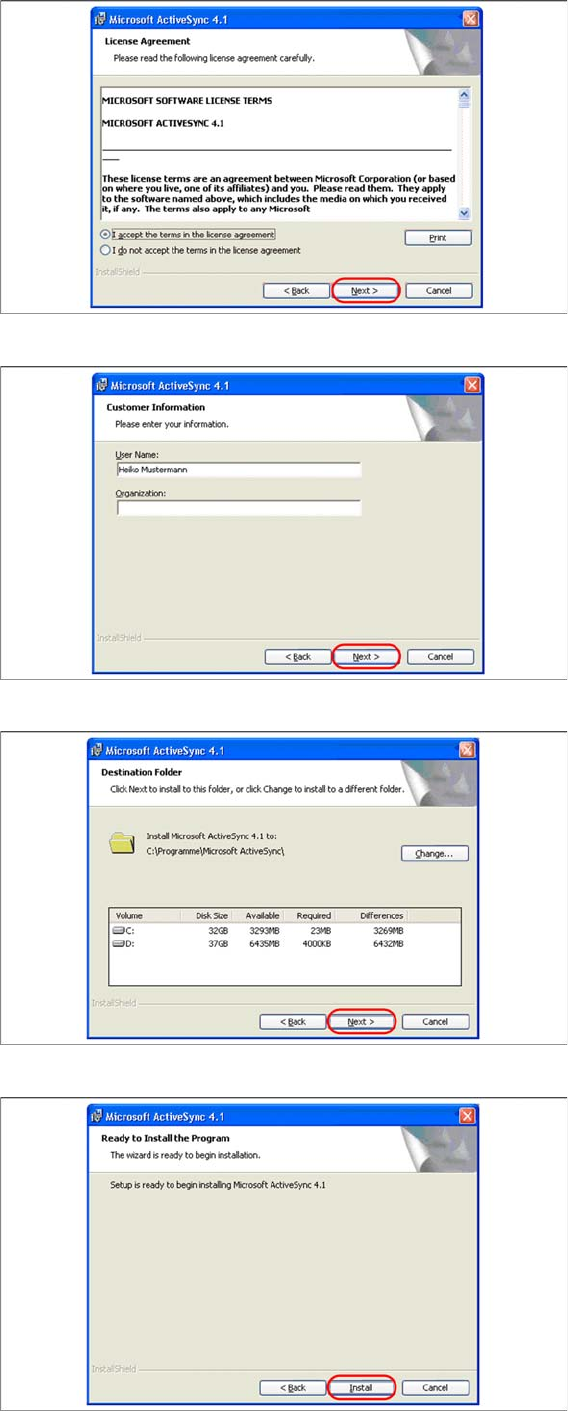
If ActiveSync is not installed on the system, the following message box appears.
► Select Yes to start the installation of Microsoft ActiveSync. Make sure that the scanner is not yet con-
nected to the basic station.
Install ActiveSync
► Click on "Next" to proceed.
Barcode-Scanner Installation
6.3.3 Mobile Scanner Prerequisites Setup Motorola Scanner
Installation Manual SIPLACE Setup Center 7.0 71
► Accept the licensing agreements and select "Next".
► Enter your user information and select "Next".
► Select the path for copying the installation files and select "Next".
► Select "Install" to start with the installation of Microsoft ActiveSync.