00197700-01_IM_SetupCenter7.0_EN.pdf - 第86页
Barcode-Scanner Installation Motorola Scanner 6.3.5 Motorola / Symbol Scanner Configuration 86 Installation Manual SIPLACE Setup Center 7.0
Barcode-Scanner Installation
6.3.5 Motorola / Symbol Scanner Configuration Motorola Scanner
Installation Manual SIPLACE Setup Center 7.0 85
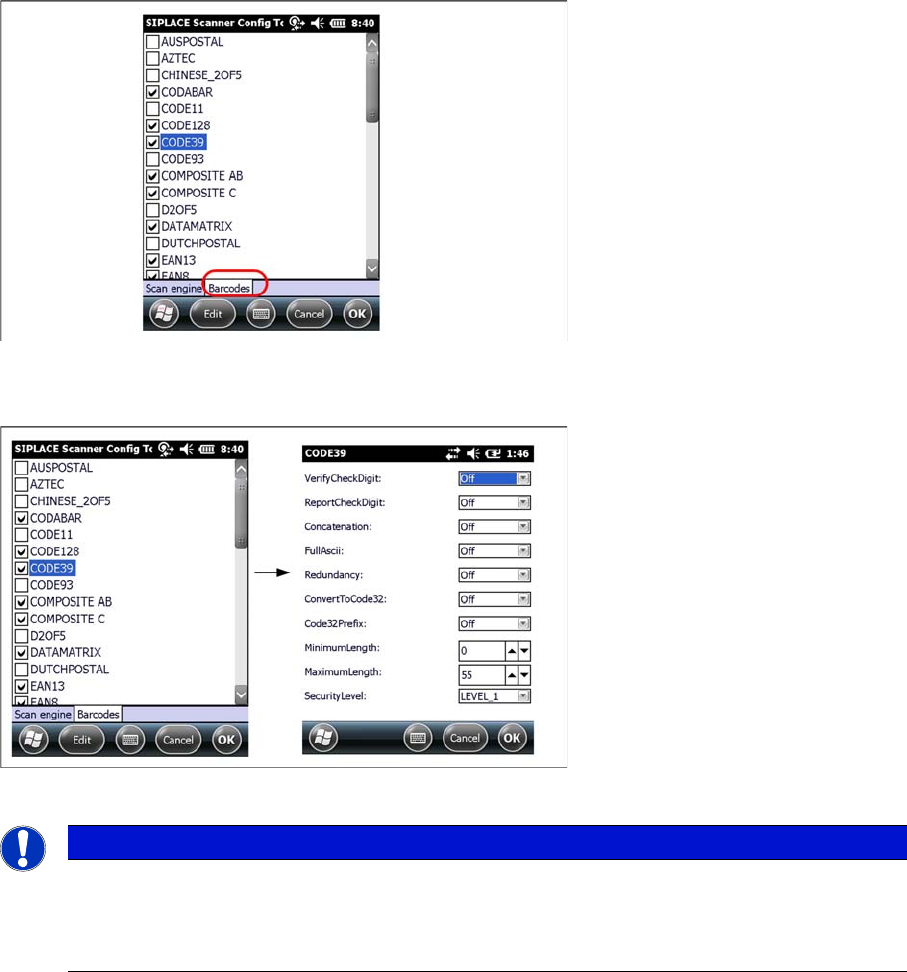
Setting 1D or 2D barcodes for Mobile Scanners
► Select the Barcode tab
► Choose the allowed 1D or 2D barcodes for your mobile scanner here.
► Select the barcode and press Edit to open the additional barcode settings.
► Press Ok to save the settings.
NOTICE
Context menu
Click and hold on a barcode to open the context menu:
All Off: Select none of the barcodes in the list
All On: Select all the barcodes in the list
Barcode-Scanner Installation
Motorola Scanner 6.3.5 Motorola / Symbol Scanner Configuration
86 Installation Manual SIPLACE Setup Center 7.0
Docking Station Installation
Safety Instructions
Installation Manual SIPLACE Setup Center 7.0 87
7
7 Docking Station Installation
Docking Station Installation
To obtain more details about using the docking station for X-Series and SX-Series tables, please refer
to the current version of the operating manual.
7.1
7.1 Safety Instructions
Safety Instructions
DANGER
Make sure that nobody is using the connected change over table, when you switch the power
on.
The device must not be opened or tampered with.
WARNING
Do not connect the device during placement or when installed inside the placement machine.
DANGER
Never cover the air discharge opening in the integrated fan and the ventilation slits on the side
of the device!
Covering these could lead to overheating and destruction of the power pack.