00196715-04_IM_SSW_704_03_SP1_DE_EN.pdf - 第46页
Station Software 704.03 SP1 / Installation Manual Ausgabe 10/2011 Edition 7.7 Necessary calibration steps After upgrading from station software 701.xx and first booting of the station software, some calibration steps are…
Station Software 704.03 SP1 / Installation Manual Ausgabe 10/2011 Edition
7.5 Checking/Updating the embedded software
If the correct eSW versions are not available on the machine, the machine boot gets interrupted.
► In this case, perform an eSW download.
► Start an overall reference run for the machine.
7.6 Storage location of the machine files (calibration data etc.)
The machine-specific configuration, measurement and parameter data is stored in XML files under
C:\Sirio\Work\Individual. These XML files contain all the calibration data.
45
Station Software 704.03 SP1 / Installation Manual Ausgabe 10/2011 Edition
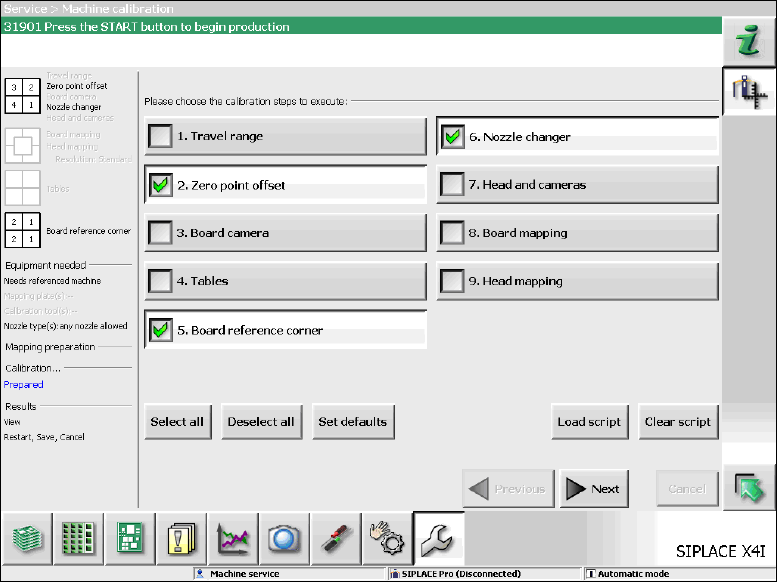
7.7 Necessary calibration steps
After upgrading from station software 701.xx and first booting of the station software, some
calibration steps are required.
Requirements:
– The eSW versions have been updated.
– The reference run has been successfully performed.
– A calibration nozzle (1235) has to be available on every C&P20A placement head at segment
1.
Figure 7-9: Required calibration steps
► Select the calibration steps that are highlighted in the figure and click on Next.
► Select all possible components in the following input masks (all conveyor lanes, all gantries, all
nozzle changers).
46
Station Software 704.03 SP1 / Installation Manual Ausgabe 10/2011 Edition
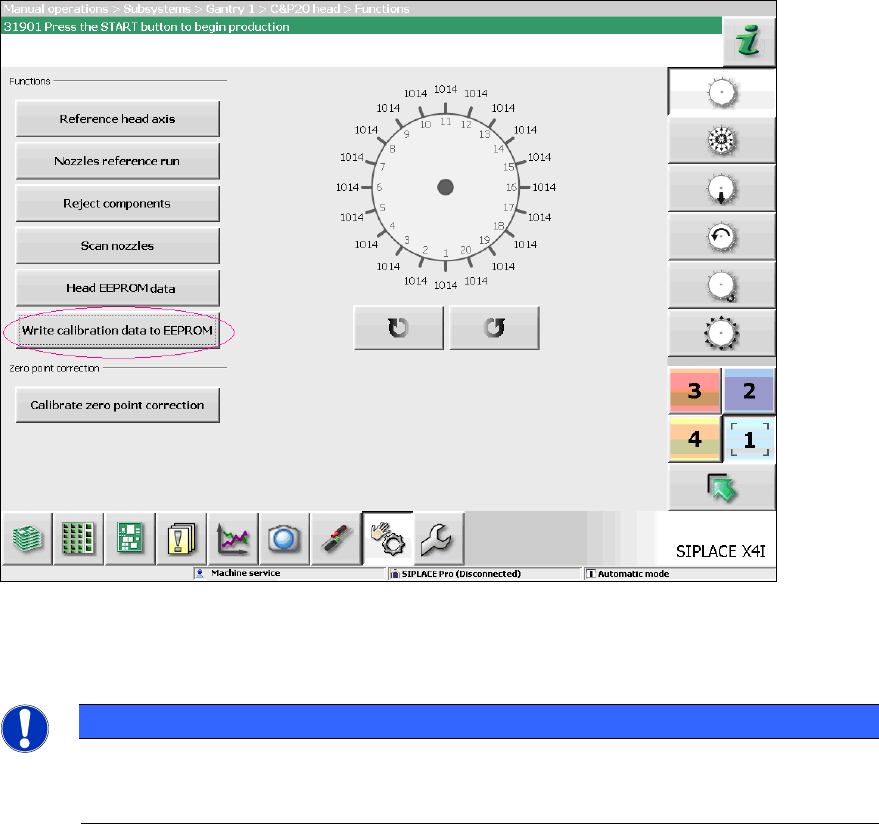
7.8 Storing calibration data in the EEPROM
In order to use the fast head exchange feature, the head specific calibration data has to be stored
in the EEPROM after upgrading from station software 701.xx. For placement heads with no head
specific calibration data stored within the EEPROM, the available data on the station computer will
be stored in the EEPROM of the respective placement head as follows.
Requirement:
– The eSW versions have been updated.
Figure 7-10: Storing calibration data in the EEPROM
► Perform the highlighted function for each placement head.
NOTICE
After the storing calibration data step, the message 37200 Changed heads
detected should disappear. Otherwise you will have to reboot the machine. If the
message still is displayed after rebooting, please inform the SIPLACE Service.
47