00192801-01.pdf - 第40页
4 The function keys User M anual V 1.15 - P roductivity Lift Software version V 40. 1 1 Edition 01/2001 32
User Manual V 1.15 - Productivity Lift 4 The function keys
Software version V 40.11 Edition 01/2001
31
7KHIXQFWLRQNH\V
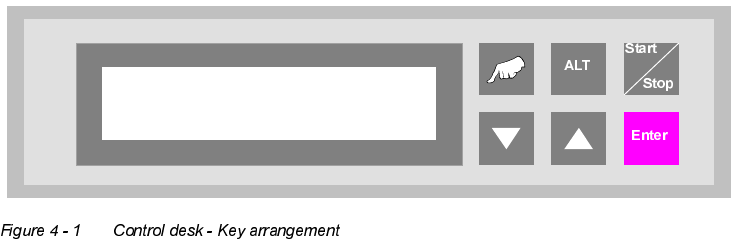
7KHNH\VRIWKH&$13FRQWUROGHVNDUHDUUDQJHGDVIROORZV
"Hand" : Calls up the test operation functions.
"▲" and "ALT" : Call up the configuration menu.
"ALT" : Calls up the parameter menu.
"Start / Stop" : Starts the automatic operating mode and switches to the stand-by mode.
"▼" : Cursor key to scroll downwards in the selection menus.
"▲" : Cursor key to scroll upwards in the selection menus.
"Enter" : This is used to confirm modified settings and proceed to the next input menu
within the menus. Acknowledgement of alarm signals.
Prod. Lift
V 40.1x
4 The function keys User Manual V 1.15 - Productivity Lift
Software version V 40.11 Edition 01/2001
32
User Manual V 1.15 - Productivity Lift 5 Configuration
Software version V 40.11 Edition 01/2001 5.1 Language
33
&RQILJXUDWLRQ
The configuration serves to set the required operating parameters. These are basic settings,
which need generally only be set during the initial system installation. These settings can be mod-
ified at a later date, but only by personnel with the relevant expertise.
Numerical values can be entered as follows using the cursor keys and the ALT key:
1. The ALT key can be used to move the flashing cursor to the position to be changed. The cursor
moves from left to right from position to position.
2. The cursor keys "▲" and "▼" can be used to increase or decrease the numerical value at the
relevant position.
If selection options are given in the menus, the cursor keys can be used to scroll through them in
both directions.
Data is only entered in the menus if the "Enter" key is pressed after modifying the settings. The
user is then taken automatically to the next menu. It is possible to return to the stand-by mode via
the last menu.
If entries are not confirmed, the "Start/Stop" key must be pressed instead of the "Enter" key.
In stand-by mode, the configuration menu is called up using the "▲" and "ALT" keys. These keys
must be actuated immediately one after the other.
/DQJXDJH
This menu is used to set the language of the display. The options are German and English.
Language
English