DECAN_S1_Operation_EN.pdf - 第54页
It ems t o b e inspe ct e d du r ing p r oduction Chap ter 4 Nex t Generation, Multi- Funct ional Placer DE CAN S 1 Ope ra tio n Han db oo k 4-9 This chapter describes the methods for temporary stop of the machine(Contin…

Items to be inspected during production
Chapter 4
Next Generation, Multi-Functional Placer
DECAN S1 Operation Handbook
4-8
This chapter describes the methods for temporary stop of the
machine(Continue / Start mode), emergency stop (by manual/ by
system) and the restarting the production after emergency stop when
checking errors or other items and taking measures during production.
Take measures of instantaneous stop > Part exhaustion
Take measures of instantaneous stop
Items to be inspected during production
4. Part exhaustion
◈Reel placement
When changing the reel, press the STOP button on the OP panel corresponding
to the section where a reel needs to be changed in order to stop the machine
temporarily.
For more details, refer to "1. Continue mode: Halts the production
temporarily and then restarts the production" (page 4-9).
For more details regarding reel replacement, refer to "1. Change
the part reel" (page 6-14).
◈Splicing
When performing splicing, it is not necessary to stop the machine.
For more details regarding splicing,refer to "2. Tape Connection
Method (Paper Type)" (page 6-17).
5. Measures against dump box error
◈Incorrect installation
ㆍ If the dump box is not installed properly, the dump box installation sensor detects this
and the MMI displays an error message.
ㆍ Install the dump box properly by placing it on the dump box rack horizontally.
① Dump Box Installation Sensor
Items to be inspected during production
Chapter 4
Next Generation, Multi-Functional Placer
DECAN S1 Operation Handbook
4-9
This chapter describes the methods for temporary stop of the
machine(Continue / Start mode), emergency stop (by manual/ by
system) and the restarting the production after emergency stop when
checking errors or other items and taking measures during production.
Temporary stop > Continue mode: Halts the production temporarily and then restarts the production
Temporary stop
1. Continue mode: Halts the production temporarily
and then restarts the production
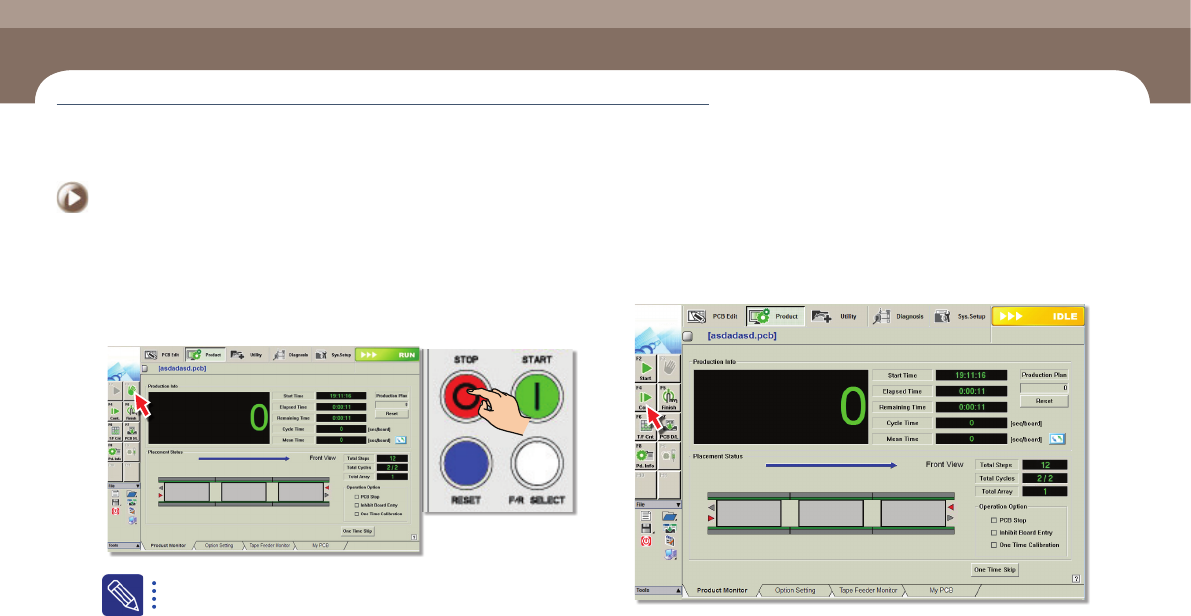
Step 1.
Select the 'Stop' submenu or press the 'STOP' button of the
operation panel to stop the production
In order to restart the production in the Continue Mode, the occurred
error must not be the one that does not allow the production to be
started again.
Step 2.
Select the 'Cont.' submenu
ㆍ Check the necessary items, take action, and select 'Cont.' submenu.
Temporary stop
Items to be inspected during production
Chapter 4
Next Generation, Multi-Functional Placer
DECAN S1 Operation Handbook
4-10
This chapter describes the methods for temporary stop of the
machine(Continue / Start mode), emergency stop (by manual/ by
system) and the restarting the production after emergency stop when
checking errors or other items and taking measures during production.
Temporary stop > Start mode: Restarts the production after the occurrence of an error
Temporary stop
Items to be inspected during production
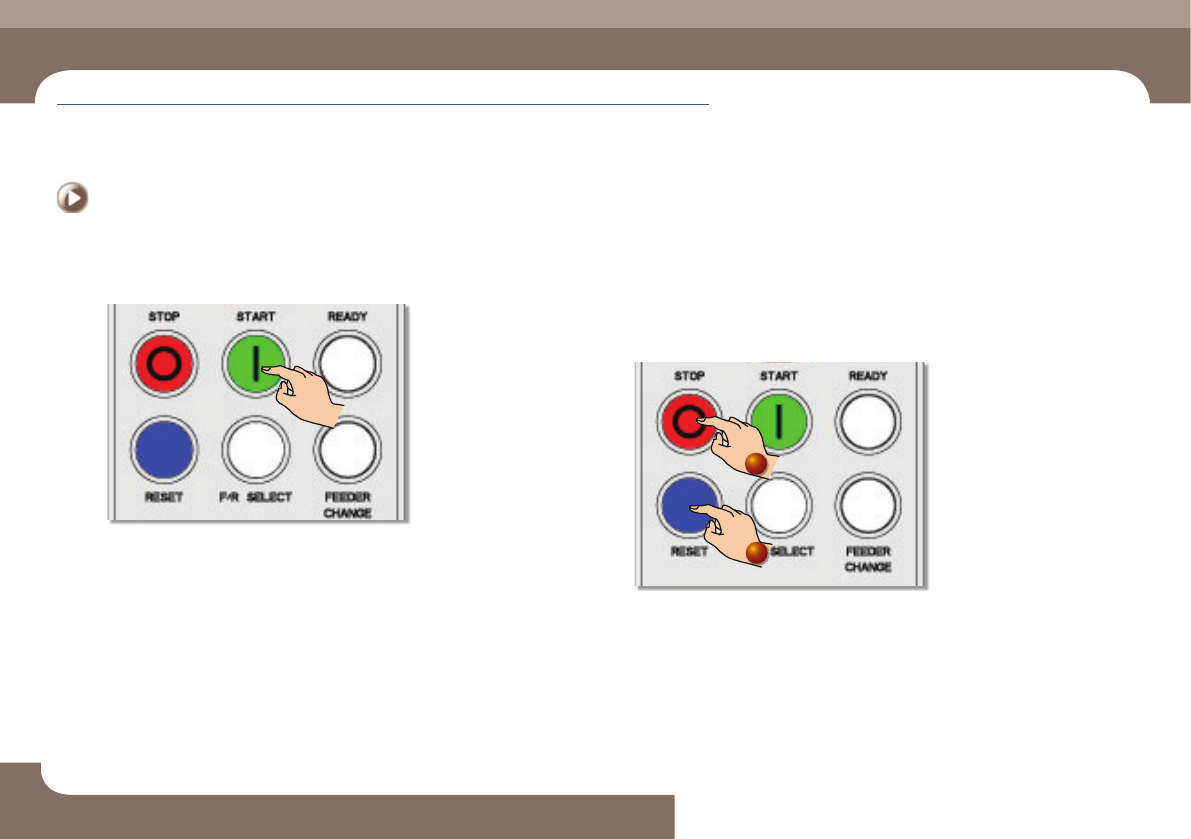
Step 3.
Press the 'START' button
ㆍ Resume the production by pressing the 'START' button.
2. Start mode: Restarts the production after the
occurrence of an error
1. Releasing the 'FREEZE' Mode.
Step 1.
Press the 'STOP' and 'RESET' buttons in order.
1
2