DECAN_S1_Operation_EN.pdf - 第83页
Ch e ck o th e r s and r e plac e e xhaus t e d part s Chap ter 6 Nex t Generation, Multi- Funct ional Placer DE CAN S 1 Ope ra tio n Han db oo k 6-1 0 This Chapter describes the items for which care must be exercised wh…
Check others and replace exhausted parts
Chapter 6
Next Generation, Multi-Functional Placer
DECAN S1 Operation Handbook
6-9
This Chapter describes the items for which care must be exercised while
using thetape feeder as well as the method to take measures when
parts are exhausted.
Checking Feeder > Setting the pickup height of the parts
Checking Feeder
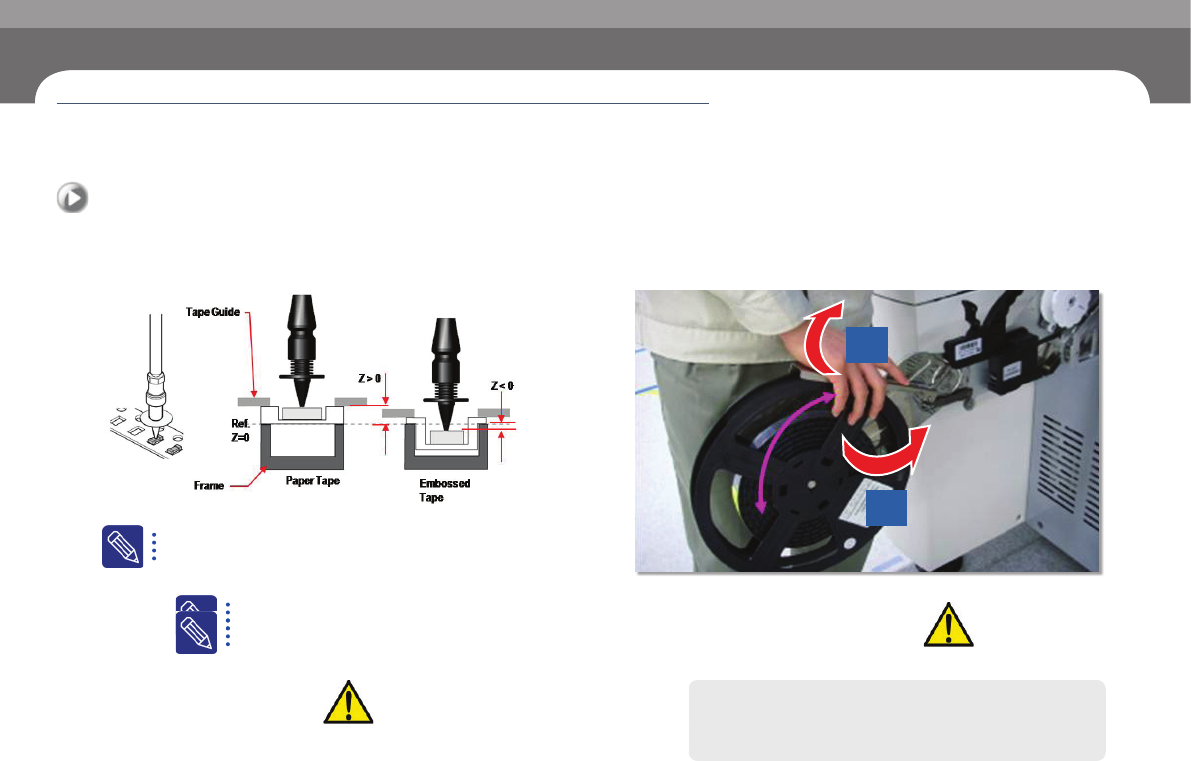
9. Setting the pickup height of the parts
- To set the pickup height of the parts, select 'PCB Edit' > 'Feeder Z Pickup' in MMI.
Check Points
ㆍ You should set the pickup height differently depending on whether
theart is fed by the paper tape reel or by the emboss tape reel.
ㆍ Please refer to the figure on the left when you set the pickup height of
the parts.
or detailed information, please refer to “1.3 Reference plan
for the z-axis height of SM tape feeder (p. 1-8)” in the SM
feeder manual.
Example
ㆍ Paper Type: 1608R -> Z
0.5
ㆍ Emboss Type: Z = -0.1
10. Operating the machine after changing the reel
When you close the reel arm after reel change, you should lift it slightly.
Slow Swing
1
2
ㆍ 12mm ~ 88mm
Check Points
The machine will operate only if you l
ft the reel arm
upwards when you close the reel hanger.
Caution
If you try to close the arm too hard, you may damage the reel
stopper.
Check others and replace exhausted parts
Chapter 6
Next Generation, Multi-Functional Placer
DECAN S1 Operation Handbook
6-10
This Chapter describes the items for which care must be exercised while
using thetape feeder as well as the method to take measures when
parts are exhausted.
Checking Feeder > Precautions that need to be taken when you check the reel information
Checking Feeder
Check others and replace exhausted parts
11. Precautions that need to be taken when you check
the reel information
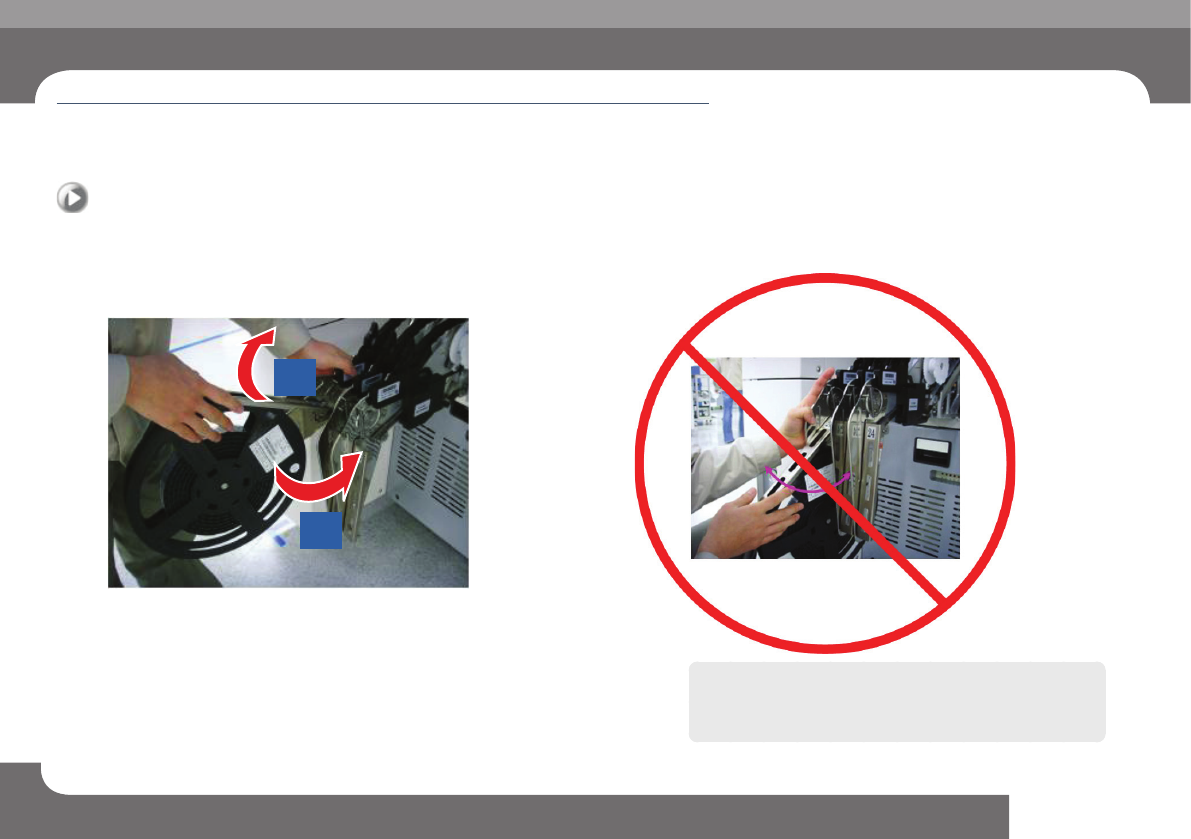
You should open the reel arm before you can check the reel information.
1
2
ㆍ When you check the reel information, you should open (lift) the reel arm plate
first.
Caution
If you try to move the reel arm plate sideways as shown in the
figure below, the reel arm plate may bend.
Check others and replace exhausted parts
Chapter 6
Next Generation, Multi-Functional Placer
DECAN S1 Operation Handbook
6-11
This Chapter describes the items for which care must be exercised while
using thetape feeder as well as the method to take measures when
parts are exhausted.
Arranging Backup Pins > Determining the positions of the backup pins
Arranging Backup Pins
1. Determining the positions of the backup pins
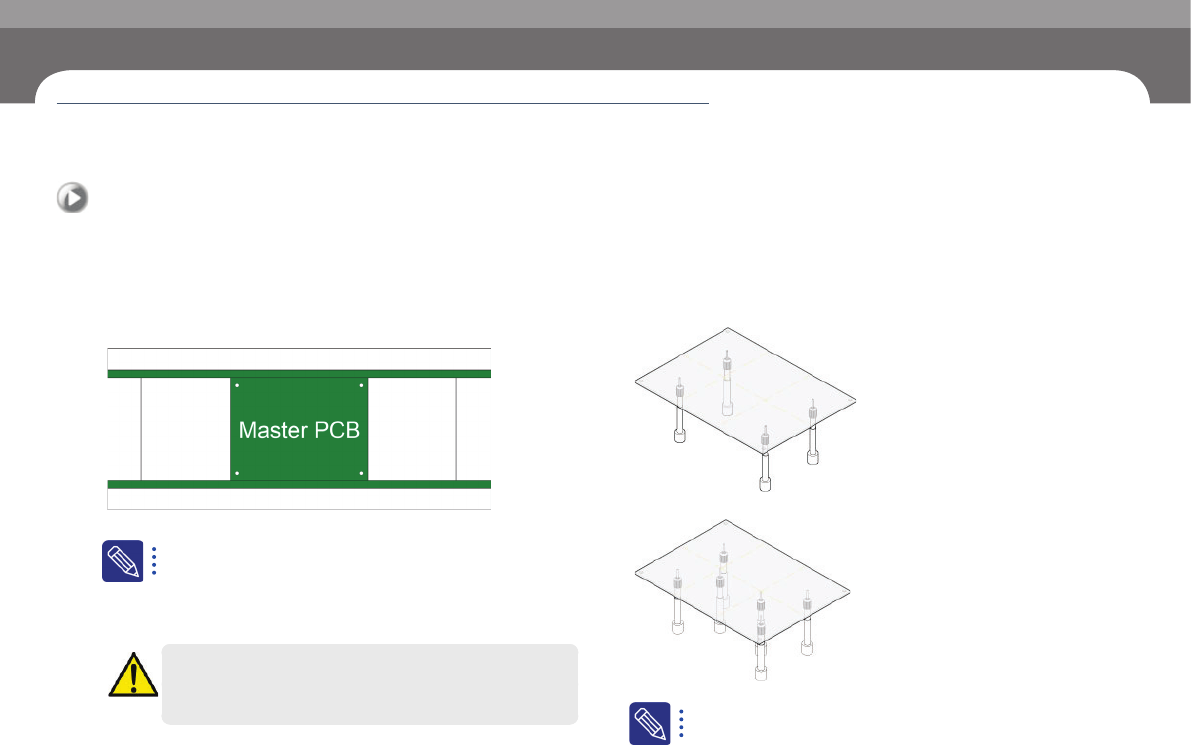
When you place the backup pins, you should avoid the hole
in the PCB.
Step 1.
Place the master PCB in the conveyer.
Manufacturing master PCB
ㆍ Master PCB prevents interference between backup pins and parts.
ㆍ For a double-faced PCB, a master PCB is manufactured which has
a hole in the bottom area where the parts are mounted.
Warning
Before removing the backup-pin, power off the motor.
Step 2.
Arrange backup pins.
① Place the backup pins on both sides where the PCB is bent the least.
② Place the backup pins where the parts are mounted in the central area .
The number of backup pins
ㆍ For a 200 mm-wide PCB, usually 6 backup pins are used.
Arranging Backup Pins