WPC4 services manual.pdf - 第44页
Replacing Spare Parts Limit Switches, Sensors and Light Barriers Repl acing the WPTC Avail able Sensor [03047283-xx] 44 Service Manual SIPLACE WPC4 3.6.2 Replacing the WPTC A vailable Sensor [03047283-xx] Removal/install…
Replacing Spare Parts
Introduction Limit Switches, Sensors and Light Barriers
Service Manual SIPLACE WPC4
43
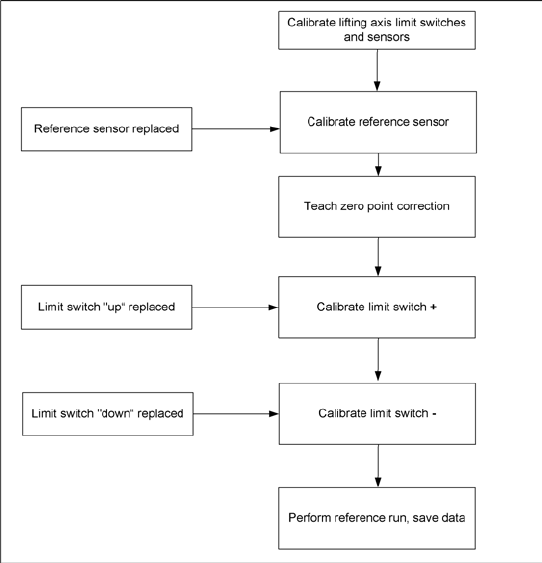
Lifting axis – order of settings
If the limit switches or sensors are replaced, you
will need to recalibrate or reset these. Make sure
that you adhere to the correct order. For example,
if the reference sensor is replaced, the subsequent
calibrations, such as "transfer position“ limit switch
+“ etc., must be performed.
Replacing Spare Parts
Limit Switches, Sensors and Light Barriers Replacing the WPTC Available Sensor [03047283-xx]
44 Service Manual SIPLACE WPC4
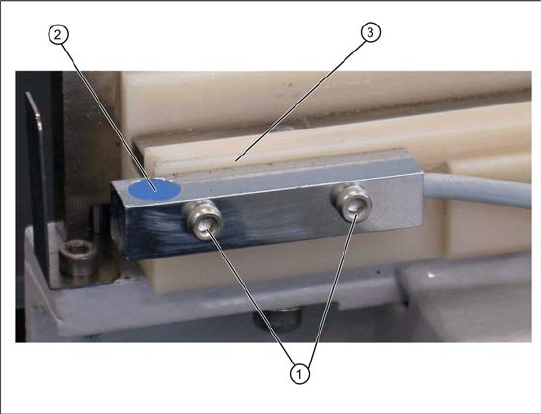
3.6.2 Replacing the WPTC Available Sensor [03047283-xx]
Removal/installation
X Loosen the two fastening screws (1) on the sensor.
X Loosen the cable clamps and remove the cable ties.
X Unthread the connection cable as far as the control unit back plane and unplug it from the terminal
strip.
X Fit the sensor so that the sensor surface (2) points upwards.
X Align the sensor parallel to the white guidance rail (3).
X Restore the electrical connection and fix the connection cable into place.
Settings
X Check the sensor function.
X To do this, push a waffle pack tray carrier (WPTC) by hand over the sensor. The LED on the sensor
will show the status:
LED shines = switched
LED does not shine = not switched.
X Use SITEST to check whether the correct output was switched.
X To do this, open the SITEST main view and select the function=>
SITEST inputs/outputs 1
.
The display
WPTC available sensor
must be active for this sensor.
X Remove the waffle pack tray carrier.
The relevant display must be off.
1. Fastening screws
2. WPTC available sensor
3. Guidance rail
Spare part
Proximity switch for WPC available sensor
[03047283-01]
Replacing Spare Parts
Replacing the WPTC Lock Sensor Closed [03047285-xx] Limit Switches, Sensors and Light Barriers
Service Manual SIPLACE WPC4
45
3.6.3 Replacing the WPTC Lock Sensor Closed [03047285-xx]
Settings
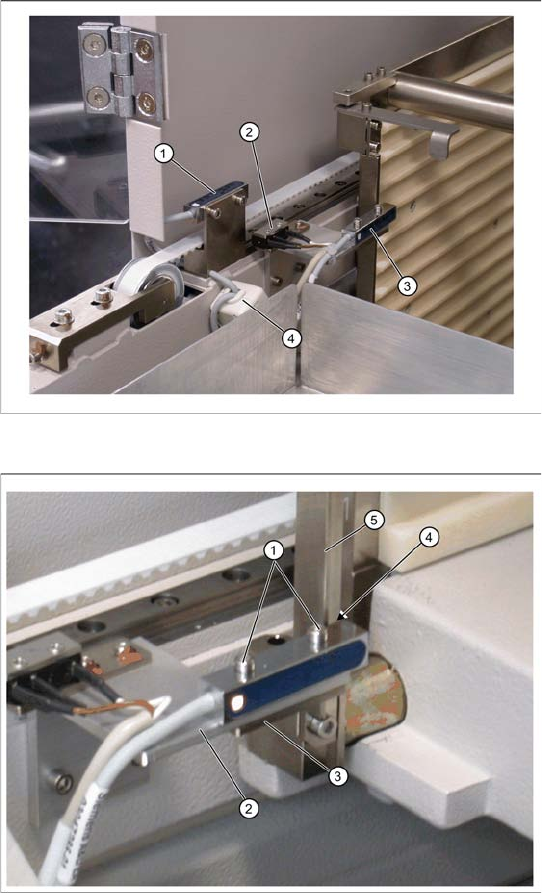
X The sensor must be fitted so that it switches reliably when the locking strip (5) is closed.
X Close and open the locking strip (5) manually. The sensor must switch when the lock is closed.
X The LED on the sensor will show the status:
LED shines = switched
LED does not shine = not switched.
X Use SITEST to check whether the correct output was switched.
X To do this, open the SITEST main view and select the function=>
SITEST inputs/outputs 1
.
The display
WPTC lock sensor closed
must be active.
X Open the lock.
The relevant display must be off.
Spare part
Anti-twist lock proximity switch for magazine
carrier [03047285-01]
Overview
1. Reference sensor, feed axis
2. Feed axis limit switch on tower side
3. WPTC lock sensor closed
4. Ferrite core for EMC interference suppression
at feed axis reference sensor
Removal/installation
X Loosen the two fastening screws (1) on the
sensor.
X Watch the plate beneath (3). Make sure that it
does not fall out and get lost.
X Loosen the cable clamps and remove the
cable ties.
X Unthread the connection cable as far as the
control unit back plane and unplug it from the
terminal strip.
X Fit the sensor so that the sensor surface (4)
points to the locking strip (5).
X Align the sensor parallel to the mounting
bracket (2). Do not dismantle the mounting
bracket.
X Restore the electrical connection and fix the
connection cable into place.