WPC4 services manual.pdf - 第64页
Calibration and Settings Feed Axis Procedure - Calibrating the Feed Axis 64 Service Manual SIPLACE WPC4 4.2 Feed Axis 4.2.1 Procedure - Calibrating the Feed Axis 4.2.2 Calibrating the Reference Sensor , Feed Axis See the…
Calibration and Settings
Teaching the Zero Point Correction Lifting Axis
Service Manual SIPLACE WPC4
63
4.1.3 Teaching the Zero Point Correction
X Place a waffle pack tray (WPTC) on the sliding rail of the feed axis.
X Push the WPTC into tray position 1 of the tower. The waffle pack tray must move evenly into the
tower on the sliding rails and must not jam anywhere.
X Make sure that the WPTC can be moved over the slanted ends of the sliding rails, without jamming.
X Correct the position of the tower with the help of the SITEST function
Teach zero point
.
X To do this, open the SITEST main view and select the function=>
SITEST Settings
.
X In the input area Axis, select the radio button
Lifting axis
.
X In the input area
Travel range
select the button
Teach zero point
.
X Follow the instructions as you are guided through this menu and teach the position of the tower with
the help of the arrow keys.
4.1.4 Calibrating the Top Lifting Axis Limit Switch
See the service manual 3.6.10 Replacing the Top Lifting Axis Limit Switch [03047279-xx] [J57].
4.1.5 Calibrating the Bottom Lifting Axis Limit Switch
See the service manual 3.6.11 Replacing the Bottom Lifting Axis Limit Switch [03047280-01-xx] [J58].
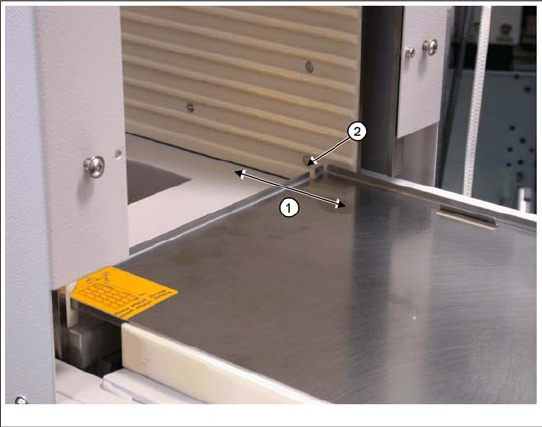
1. Waffle pack tray carrier
2. Tray position 1 in tower
It must be possible to move the waffle pack tray
into the tower magazine (tray position 1) via the
feed axis, without the waffle pack tray jamming or
getting caught anywhere.
Calibration and Settings
Feed Axis Procedure - Calibrating the Feed Axis
64 Service Manual SIPLACE WPC4
4.2 Feed Axis
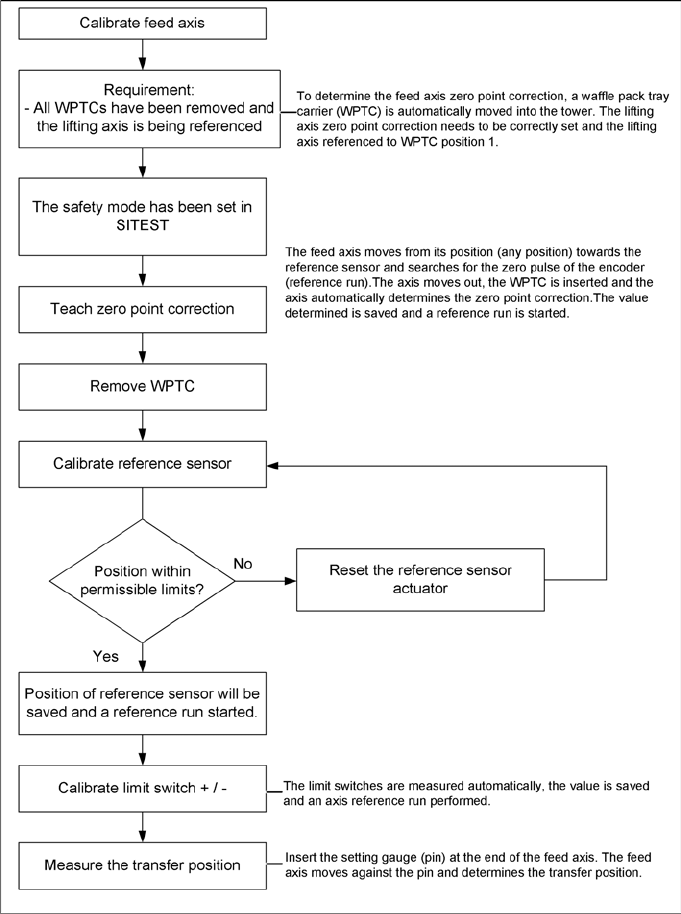
4.2.1 Procedure - Calibrating the Feed Axis
4.2.2 Calibrating the Reference Sensor, Feed Axis
See the service manual 3.6.5 Replacing the Reference Sensor, Feed Axis [03047273-xx] [J47].
4.2.3 Calibrating the Feed Axis Limit Switch on Tower Side
See the service manual 3.6.7 Replacing the Feed Axis Limit Switch on Tower Side [03047276-xx]
[J51].
4.2.4 Calibrating the Feed Axis Limit Switch on Transfer Side
See the service manual 3.6.6 Replacing the Feed Axis Limit Switch on Transfer Side [03047277-xx]
[J50].
Calibration and Settings
Measuring the Transfer Position Machine Data
Service Manual SIPLACE WPC4
65
4.2.5 Measuring the Transfer Position
4.2.6 Calibrating the Zero Point Correction
X Open the SITEST main view and select the function=>
SITEST Settings
.
X In the input area Axis, select the radio button
Feed axis
.
X In the input area Functions, select the button
Zero point correction...
.
X Follow the instructions as you are guided through this menu. The zero point correction will be
automatically determined.
See also:
J 3.6 Limit Switches, Sensors and Light Barriers [J40]
J 3.6.1.3 Requirements for Settings [J42]
4.3 Machine Data
4.3.1 Initialization
Each WPC4 has a serial number. This is stamped onto the type plate.
Initialization is necessary, for example, when the controller board is replaced.
Follow the instructions below to perform initialization:
X Open the SITEST submenu
Machine data
and select the button
Initialize….
The dialog
box
Initialization
will open.
X Enter the WPC4 serial number in the input field.
Number from 0 to 9 are permitted.The serial number can have a maximum length of eight numbers.
X Select the button
Accept.
Overview
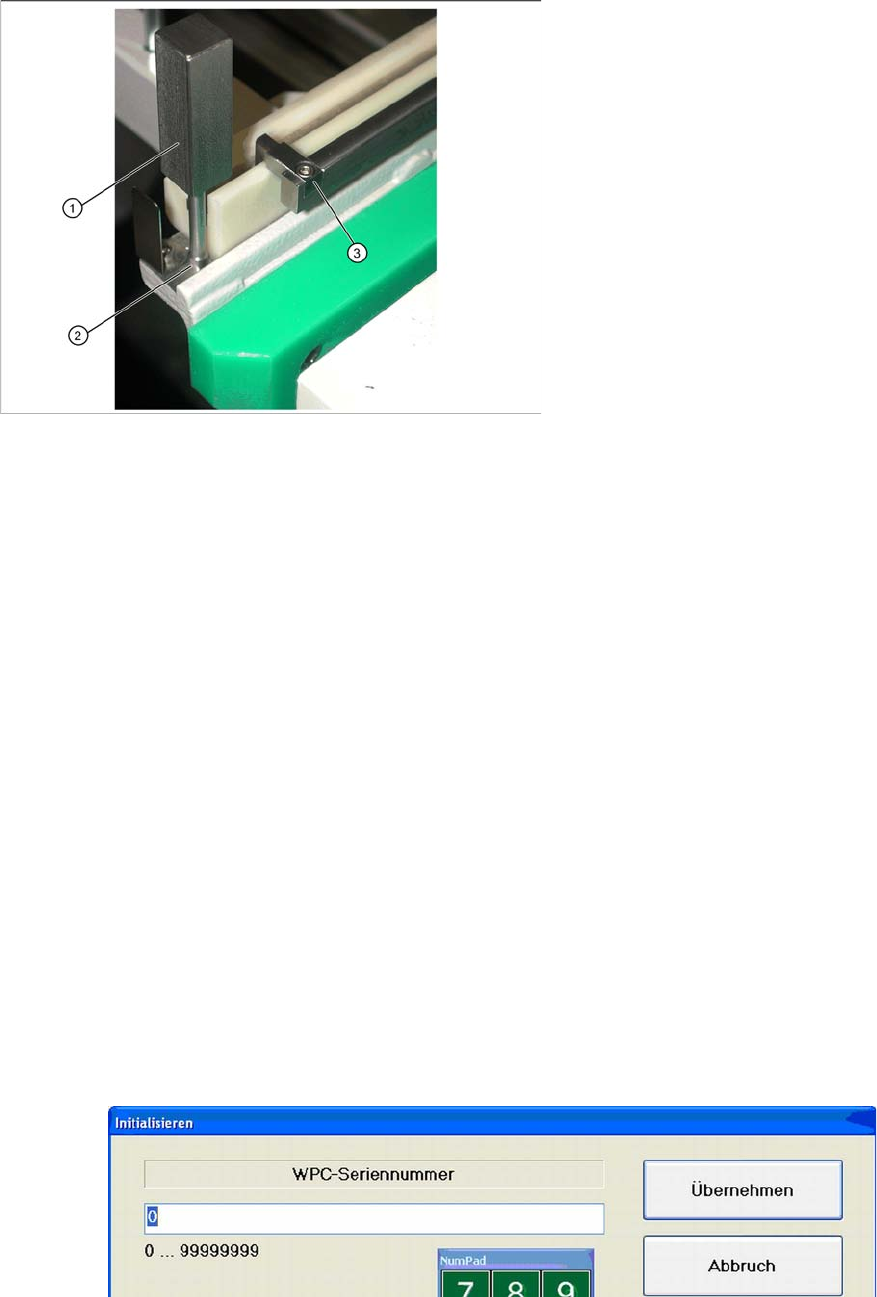
1. Catch
2. Drilling for setting gauge
3. Setting gauge [03052363-02]
X Insert the small setting gauge (3) into the
drilling (2) at the front, on the feed axis.
X Hold the waffle pack tray ready.
X Open the SITEST main view and select the
function=>
SITEST Settings
.
X In the input area Axis, select the radio button
Feed axis
.
X In the input area Functions, select the button
Measure transfer position...
.
X Follow the instructions as you are guided
through this menu. The transfer position will be
automatically determined.