SYS-CP842-1.1E.pdf - 第229页
6.System Installation and Upgrade SYS-CP842-1.1E 220 CP-842E / CP-842ME System Reference MEMO:
SYS-CP842-1.1E 6.System Installation
and Upgrade
CP-842E / CP-842ME System Reference 219
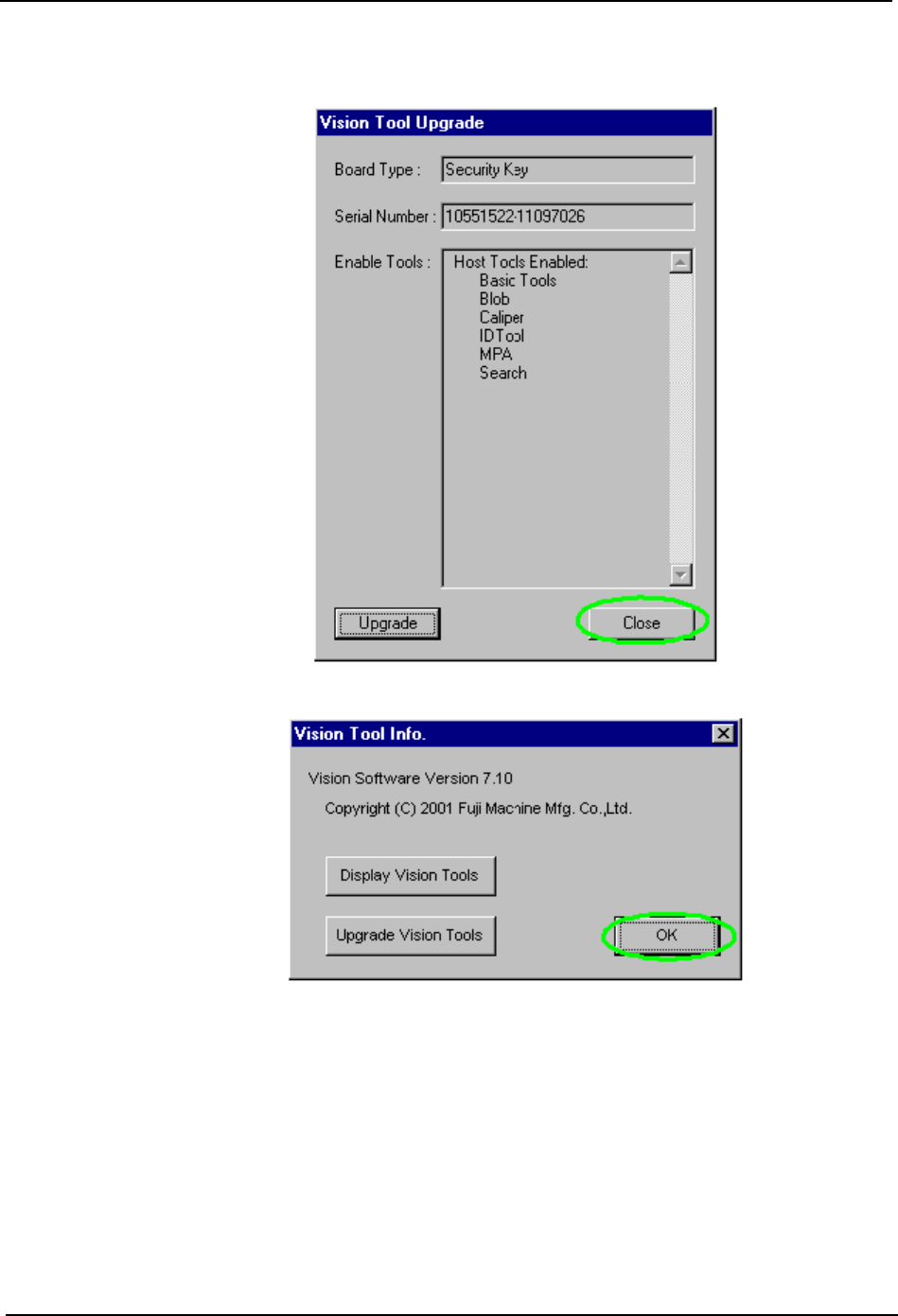
6. Close the dialog box.
7. Remove the CD.

6.System Installation
and Upgrade SYS-CP842-1.1E
220 CP-842E / CP-842ME System Reference
MEMO:

SYS-CP842-1.1E
Index
CP-842E / CP-842ME System Reference 221
Index
A
advance pick-up........................................ 28
Automatic Conveyor Width Change Function 62
Automatic Panel Conveyance................... 60
Automatic Skipping of Boards................... 68
B
Barcode Reader Adjustment................... 124
BIOS Settings ......................................... 209
board......................................................... 28
C
Camera Monitor Settings .......................... 71
Changeover .............................................. 51
Changing the Axis Group and the Rapid Inching
Speed ....................................................... 66
Changing the Conveyor Width .................. 62
Changing the Recovery Limit.................... 43
Changing the Recovery Limit Reference .. 42
Changing the Starting Sequence .............. 67
Changing User Settings ...........................113
Clearing All Panels from the Machine....... 61
Clearing an Error....................................... 33
Commands.............................................. 127
CYCLE STOP button ................................ 25
D
Delayed Continuous.................................. 42
Delayed Stop ............................................ 41
device (feeder) pallet (CP-842ME Option) 28
Device Change ......................................... 51
Display During Production ........................ 58
Displaying the Software Versions ........... 112
E
Editing Production Programs .................... 76
Editing Production Programs On the Machine 75
EMERGENCY STOP button ..................... 25
F
Flush Out .................................................. 61
Forcing the Machine to Skip a Board (Manual
Skip) ......................................................... 68
Fujitrax-Profiler Settings......................... 124
G
global skip mark ....................................... 28
Global Skip Marks .................................... 68
I
I/O Map .................................................. 185
Idle ........................................................... 37
Idle operation with loading ....................... 37
Idle operation without pickup.................... 37
Immediate Continuous ............................. 41
Immediate Stop ........................................ 40
in/out lifter................................................. 28
in-/out-carrier............................................ 28
Inching...................................................... 65
inching...................................................... 28
Installing the ID Tool License Upgrade CD 217
J
Joint.......................................................... 51
Joint Resupply.......................................... 51
L
Loading and Unloading Device Pallets (CP-
842ME Option) ......................................... 50
Loading and Unloading Panels ................ 60
Loading and Unloading Panels Manually. 60
M
machine configuration data ...................... 28
Maintenance Mode................................. 116
multiboard panel....................................... 28
N
Next-Stage Follow-Up Control ................. 64
nozzle holder............................................ 29
P
Pallet Change Unit (PCU) ........................ 29
Panel ID Read Function (Option)............ 119
Parts Error Handling................................. 39