E4000-90023+N67xx+dut+ps+installation.pdf.pdf - 第19页
N67xx DUT Power Supply Installation 1-15 Figure 1-9 N6752 output connections – Cha nnels 7 and 8 (Utility Car d) Channel 8 Channel 7 P/S Label on cable Cable color P/S Label on cable Cable color +S CH8 S+ GRN +S CH7 S+ V…
1-14 N67xx DUT Power Supply Installation
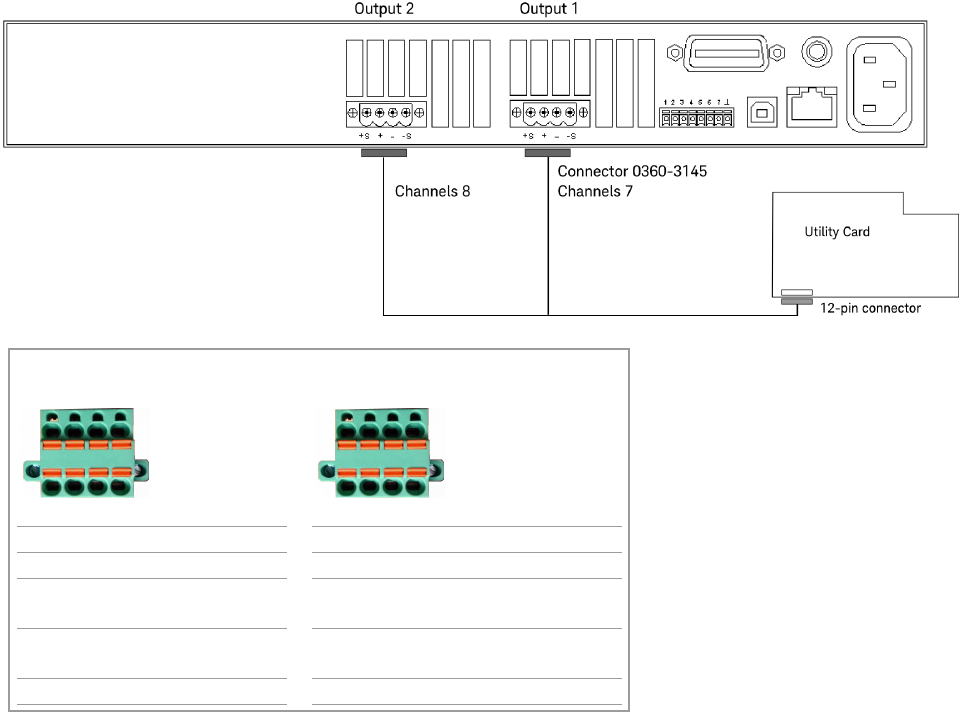
Connecting to the Utility Card
The Utility Card provides an additional two channels of high current output
(channels 7–8). The power supply connector on the card is J601.
Table 1-4 Connector A to J601 on Utility Card
Pin Wire Color Wire Size Con/Terminal
1 VIO 24 CH7 S+
2 WHT 24 CH7 S–
3RED/BRN12
4BRN 12
5RED/ORN12
6ORN 12
7 BLK/BRN 12
8BLK 12
9 RED/BLK 12
10 RED 12
11 WHT 24 CH8 S–
12 GRN 24 CH8 S+
CH7 –
CH7 +
CH8 +
CH8 –
N67xx DUT Power Supply Installation 1-15
Figure 1-9 N6752 output connections – Channels 7 and 8 (Utility Card)
Channel 8 Channel 7
P/S Label on cable Cable color P/S Label on cable Cable color
+S CH8 S+ GRN +S CH7 S+ VIO
+ CH8 + BLK/BRN
BLK
+ CH7 + RED/ORN
ORN
– CH8 - RED/BLK
RED
– CH7 - RED/BRN
BRN
–S CH8 S- WHT –S CH7 S- WHT
+–
S
+
+–
S
–
CH8
CH8
+–
S
+
+–
S
–
CH7
CH7
1-16 N67xx DUT Power Supply Installation
Connecting Output Cables for N6773
Connecting to the ASRU Card
Connecting to the Utility Card
Connecting to the ASRU Card
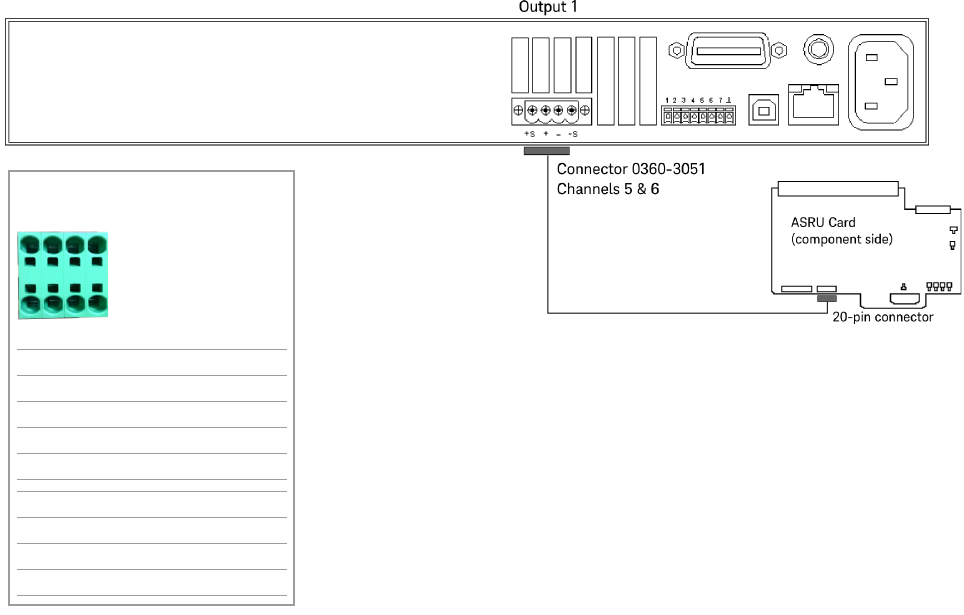
The N6773 DUT Power Supply is a one-output, high-current supply. It can only be
connected to channels 5 and 6 on the ASRU Card. Two ASRU channels are required
to handle the high current. Connect the supply to the highest numbered module
with channels 5 and 6 available. Use cable N1807-61621 for a 4-module system or
N1807-61616 for a 2-module system.
Connect the cables as shown in Figure 1-10.
Figure 1-10 N6773 output connections
Channels 5 & 6
P/S Label on cable Cable color
+S K1 GRN
+ K2 BLK/WHT
– K3 BRN/WHT
–S K4 WHT
+S L1 BLU
+ L2 RED/WHT
– L3 ORN/WHT
–S L4 WHT
L1 L2 L3 L4
K1 K2 K3 K4