TS560R-USER-GUIDE.pdf - 第4页
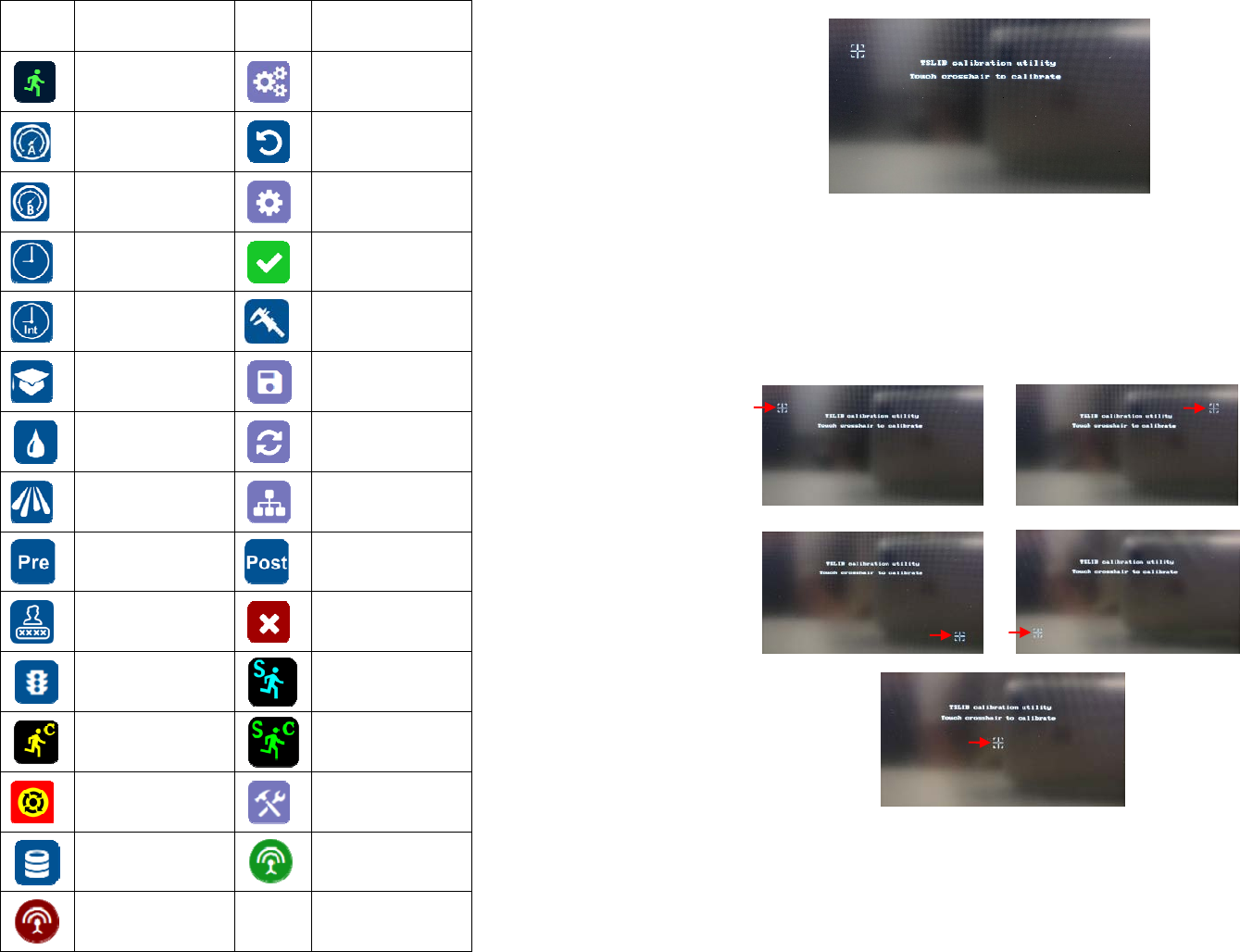
4 2. SYMBOL DEFINITIONS Symbol Description Symbol Description Run (Activate) Setup Valve Pressure Counter reset Atomized Air Pressure Mac address Timed mode Accept change Interrupt mode Pressure calibrat ion Teach mode S…

30
8. TROUBLESHOOTING
PROBLEM POSSIBLE CAUSE CORRECTION
Display does
not light up
No power inputs
Check power cord
connections
Turn on power
System will not
actuate
Supplied pressure
dropped below “Low
Pressure” setting
Foot switch not plugged
in or improperly
plugged in
Defective foot switch
Broken wire or loose
connection inside unit
Defective solenoid
Defective PC board
Increase supplied
pressure
Check foot switch
connection
Foot switch needs to be
repaired or replaced
Unplug power cord and
disconnect air supply.
Remove cover and check
for broken wires or loose
connections
Replace solenoid
Replace PC board
System will not
pressurize
Insufficient air pressure
Air hoses not plugged
in
Re
g
ulator defective
Increase air supply
pressure
Check connection
Re
p
lace re
g
ulato
r
Inconsistent
spray coverage
Air bubbles in material
Activation time is too
low
De-air material
Increase activation time
3
1. SAFETY
1.1 Intended Use:
WARNING: Use of this equipment in ways other than those described in this User
Guide may result in injury to persons or damage to property. Use this equipment
only as described in this User Guide.
OK International cannot be responsible for injuries or damages resulting from
unintended applications of its equipment. Unintended uses may result form taking
the following actions:
Making changes to equipment that has not been recommended in the User
Guide
Using incompatible or damaged replacement parts
Using unapproved accessories or auxiliary equipment
1.2 Safety Precautions:
Do not operate this unit in excess of maximum ratings/settings
Always wear appropriate personal protective clothing or apparel
The fluid may be toxic and/or hazardous. Refer to Material Safety Data Sheet
for proper handling and safety precautions
Do not smoke or use open flame when flammable materials are being sprayed
This equipment is for indoor use only
4
2. SYMBOL DEFINITIONS
Symbol Description Symbol Description
Run (Activate)
Setup
Valve Pressure
Counter reset
Atomized Air
Pressure
Mac address
Timed mode
Accept change
Interrupt mode
Pressure calibration
Teach mode
Save
Purge mode
Reset time in Teach
mode
Spray
IP address
Pre-Spray
Post-Spray
Login/Logout
Cancel
Run Method
Sequence Mode
Continous Mode
Sequence Continous
Mode
E-Stop
Change Password
Remote Server
On line
Off Line
29
6. Wait until the system completes the software update from the USB drive
and the first touch-screen calibration is displayed
7. Remove the USB drive from the USB port before proceeding to the next
step
8. Follow the instructions on the display to calibrate the touch screen by
touching the crosshair at five different points. Note: In order to
accurately calibrate the touch screen, it’s recommended that the stylus
pen is used
9. Wait until the system completes the rebooting sequence and the home
screen is displayed
10. Repeat sections 5.1.1 and 5.1.2 to re-calibrate the air pressure
28
Proceed to make changes
Click OK button to save
The new parameters will be displayed on the controller
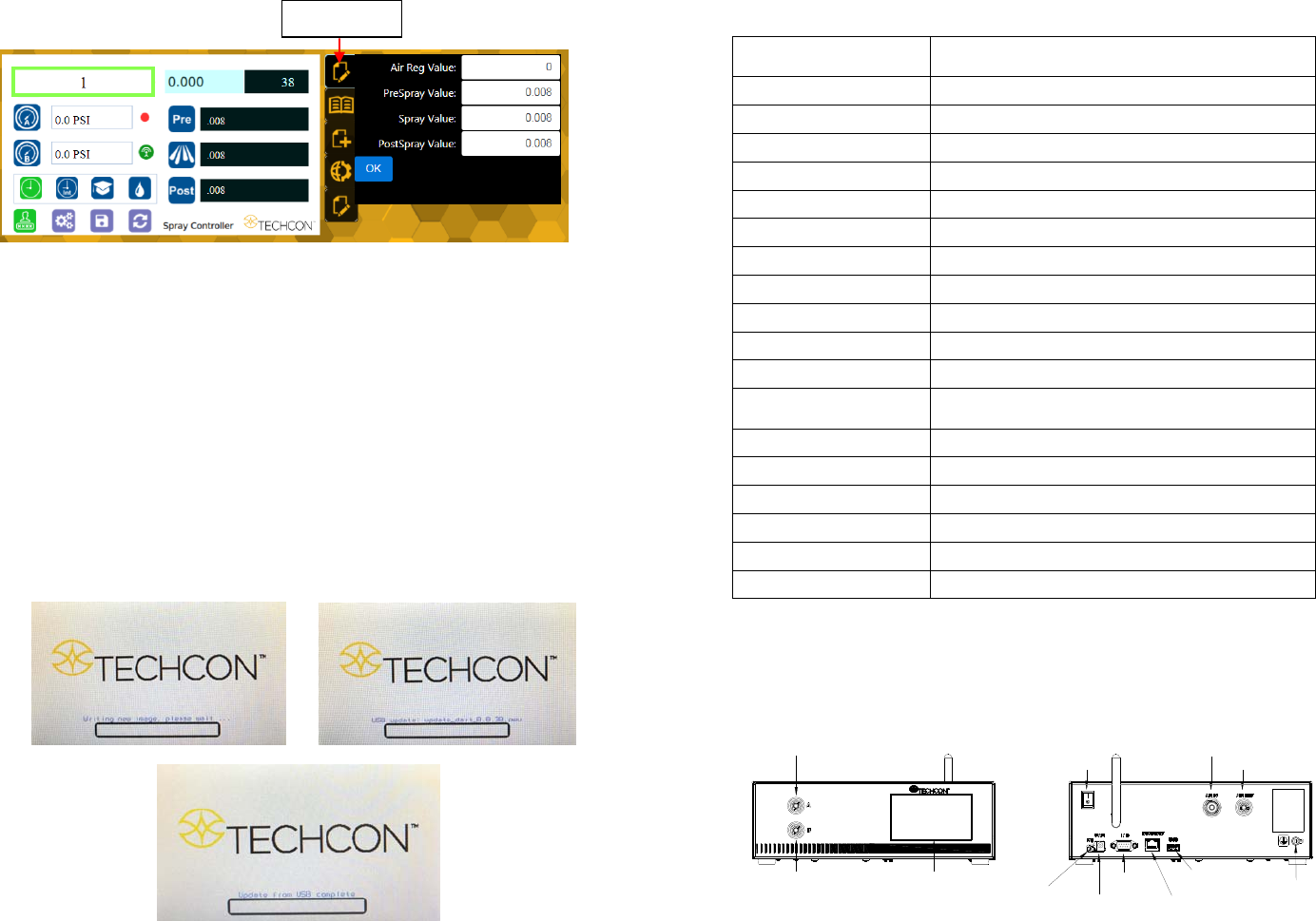
7. SOFTWARE UPGRADE
Note: For future software upgrade, follow the instructions below.
1. Download the latest software version from Techcon website and copy it to
a blank USB thumb drive. Note: Do not put the software file inside a
folder
2. Make sure that the unit is turned off
3. Insert the USB drive to the USB port located in the back of the unit
4. Turn on the unit
5. Wait while the system is loading the new software. This process can take
a few minutes
“Edit” icon
5
TOUCH
SCREEN
ATOMIZED AIR
PORT
VALVE
ACTIVATION
PORT
WIFI ANTENNA
POWER
SWITCH
AIR INLET
AIR OUTLET
UNREGULATED
FOOT
SWITCH
PORT
POWER
INLET
IO PORT
INTERNET
PORT
USB PORT
GROUNDING
TS560R
3. SPECIFICATIONS
4. FEATURES
Figure 1.0
Size
290mm x 212mm x 98mm
(
11.4” X 8.3” X 3.9”
)
Weight 3.1 kg (6.8lbs)
Input Voltage 24VDC
Output Voltage Range 0-24 VDC
Rated Power 15W
Air Input 100 psi (6.9 bars) Max.
Air Output 0-99.9 Psi (6.9 bar)
Pollution Degree II
Installation Category I
Indoor Use Altitude up to 2,000m (6,562ft)
Operating Temperature 0˚C to 50˚C (32˚F to 122˚F)
Storage Temperature -10˚C to 60˚C (14˚F to 140˚F)
Max. Relative Humidity
80% for temperature up to 31˚C (87.8˚F) Decreasing
linearl
y
to 50% relative humidit
y
at 40˚C
(
104˚F
)
Timer 0.008-99.99 seconds
Cycle Mode Timed, Interrupt, Teach, Purge
Timing Repeat Tolerance +/- 0.001%
Cycle Rate 900 cycles/min
Display Touch Screen, Resitive
Meets or exceed CE, TUV and NRTL