TS560R-USER-GUIDE.pdf - 第6页
6 TS560R 1 5 2 3 6 4 VALVE AIR HOSE ATOMIZED AIR HOSE TO AIR SOURCE 5. TO CONTROL SPRAY VALVE CAUTION: A 5-micron filter (TSD800-6) must be inst alled with the unit to ensure proper air filtration. Figure 2.0 5.1 Connect…
28
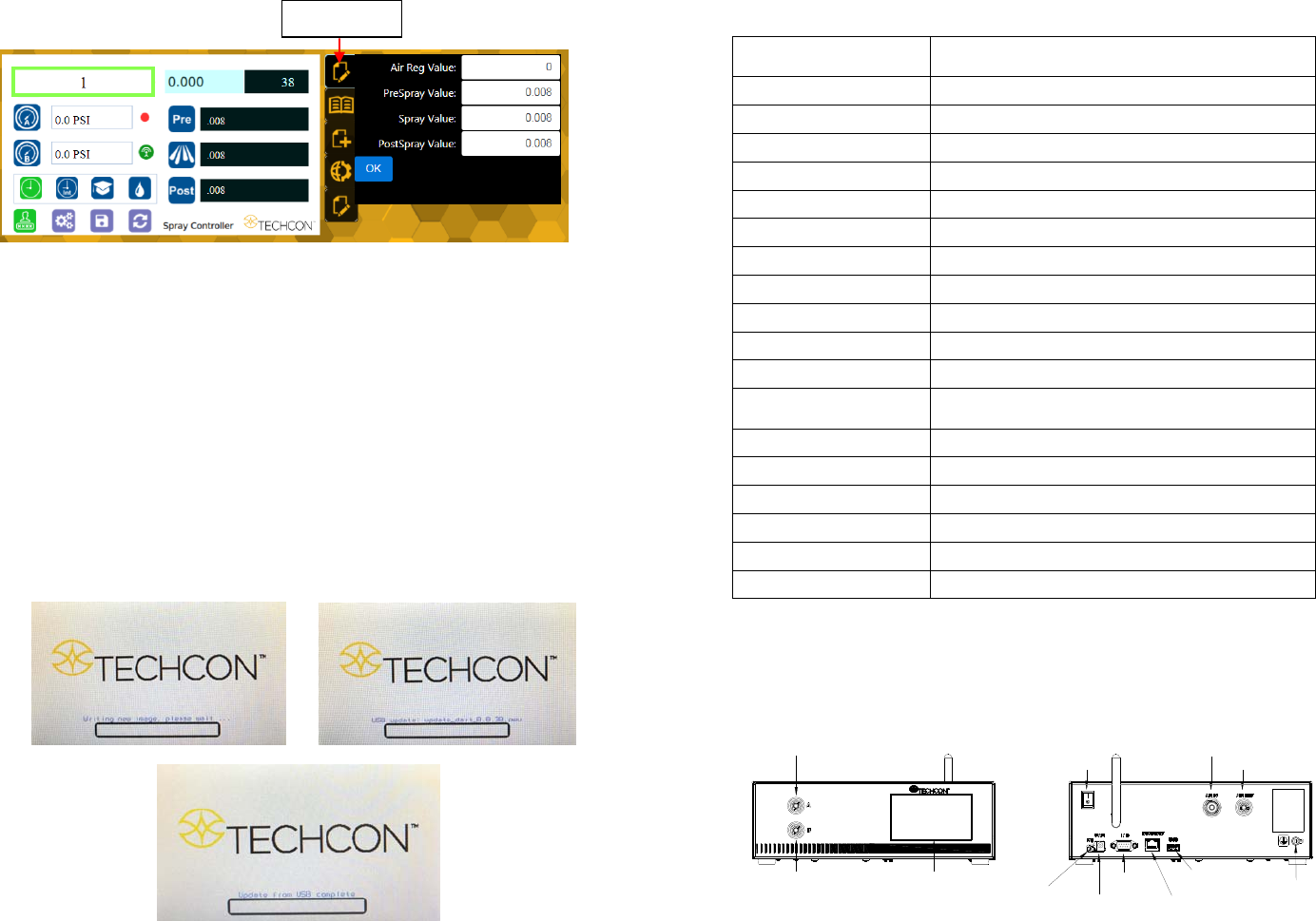
Proceed to make changes
Click OK button to save
The new parameters will be displayed on the controller
7. SOFTWARE UPGRADE
Note: For future software upgrade, follow the instructions below.
1. Download the latest software version from Techcon website and copy it to
a blank USB thumb drive. Note: Do not put the software file inside a
folder
2. Make sure that the unit is turned off
3. Insert the USB drive to the USB port located in the back of the unit
4. Turn on the unit
5. Wait while the system is loading the new software. This process can take
a few minutes
“Edit” icon
5
TOUCH
SCREEN
ATOMIZED AIR
PORT
VALVE
ACTIVATION
PORT
WIFI ANTENNA
POWER
SWITCH
AIR INLET
AIR OUTLET
UNREGULATED
FOOT
SWITCH
PORT
POWER
INLET
IO PORT
INTERNET
PORT
USB PORT
GROUNDING
TS560R
3. SPECIFICATIONS
4. FEATURES
Figure 1.0
Size
290mm x 212mm x 98mm
(
11.4” X 8.3” X 3.9”
)
Weight 3.1 kg (6.8lbs)
Input Voltage 24VDC
Output Voltage Range 0-24 VDC
Rated Power 15W
Air Input 100 psi (6.9 bars) Max.
Air Output 0-99.9 Psi (6.9 bar)
Pollution Degree II
Installation Category I
Indoor Use Altitude up to 2,000m (6,562ft)
Operating Temperature 0˚C to 50˚C (32˚F to 122˚F)
Storage Temperature -10˚C to 60˚C (14˚F to 140˚F)
Max. Relative Humidity
80% for temperature up to 31˚C (87.8˚F) Decreasing
linearl
y
to 50% relative humidit
y
at 40˚C
(
104˚F
)
Timer 0.008-99.99 seconds
Cycle Mode Timed, Interrupt, Teach, Purge
Timing Repeat Tolerance +/- 0.001%
Cycle Rate 900 cycles/min
Display Touch Screen, Resitive
Meets or exceed CE, TUV and NRTL
6
TS560R
1
5
2
3
6
4
VALVE AIR HOSE
ATOMIZED AIR HOSE
TO AIR SOURCE
5. TO CONTROL SPRAY VALVE
CAUTION: A 5-micron filter (TSD800-6) must be installed with the unit to ensure proper
air filtration.
Figure 2.0
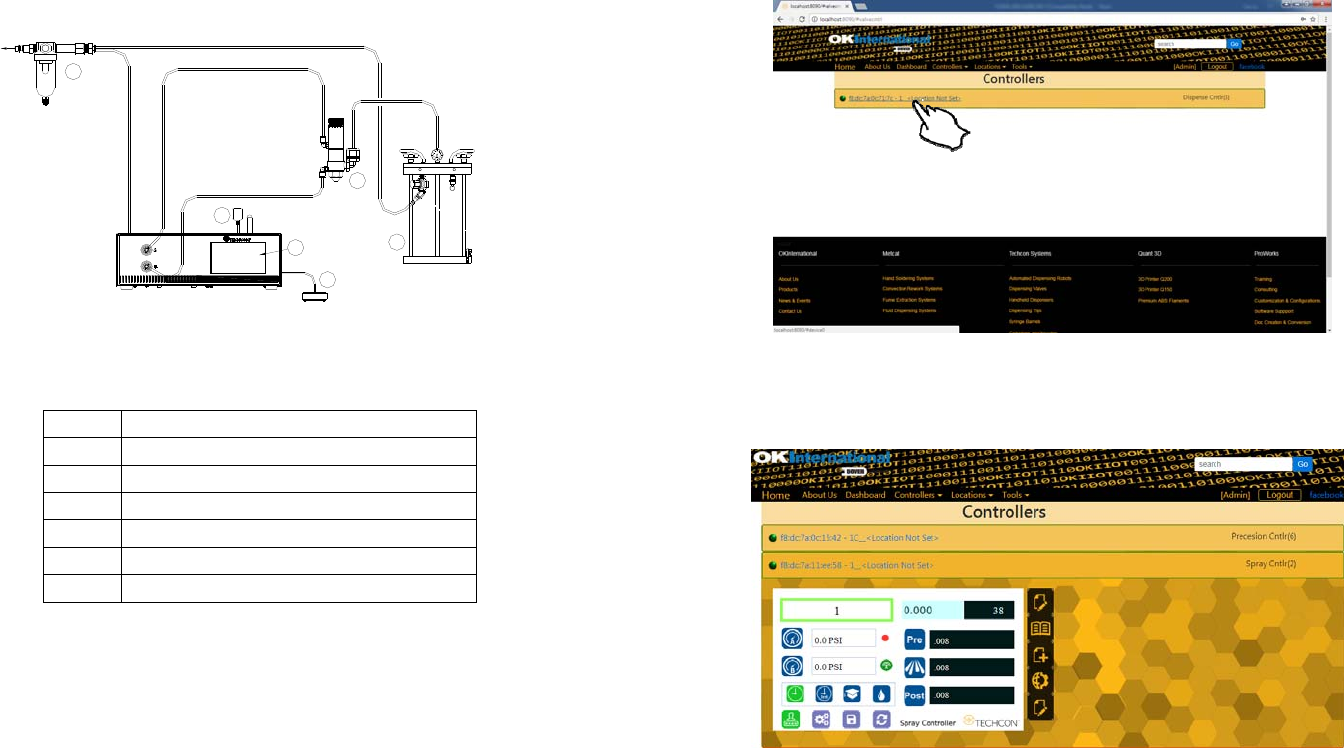
5.1 Connecting the Unit: (Refer to Figure 1.0 and 2.0)
1. Connect the power cord, foot switch to the back of the unit.
2. Connect Valve air hose to Port A (Not Regulated)
3. Connect Atomized air hose to Port B (Regulated)
4. Press the Power switch to turn on the unit.
Items Description
1 Air Filter
2 Valve (not included)
3 Pressure Pot (not included)
4 Display
5 Power Adapter
6 Foot Switch
27
6.2 Making Parameters Adjustment from the webserver
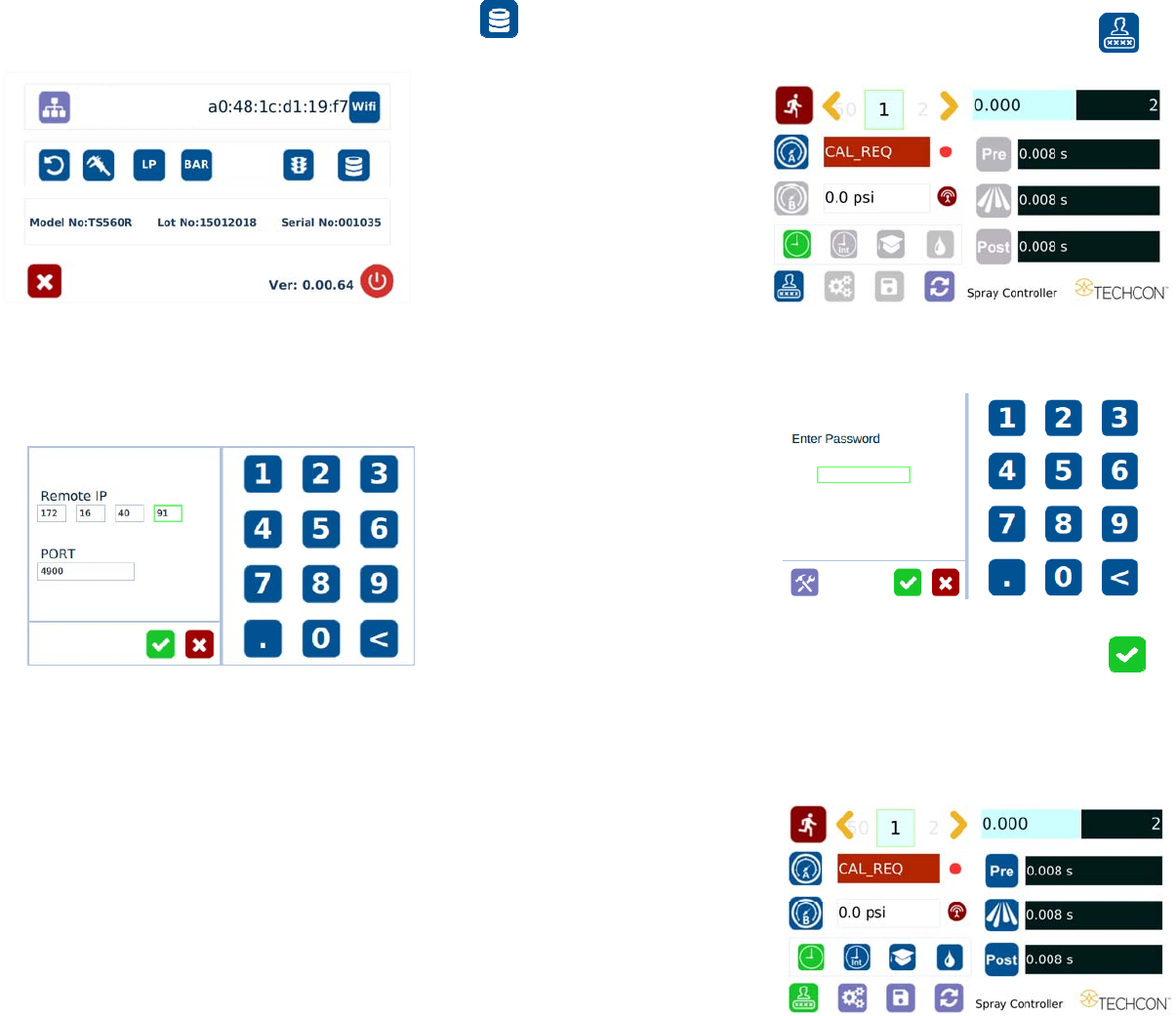
Go back to the webserver site and click on the “Controllers” menu
Click on the active controller link
The controller screen will be displayed in the webserver as shown below.
The controller parameters such as pressure and dispense time can be adjusted
from the webserver.
Click on the “Edit” icon
The parameter screen will appear as shown below:
26
18. Go to the setup screen of the controller and touch the “Remote Server”
icon
19. Enter the Server IPv4 address recorded in step #11 into Remote IP address box
20. Touch the green check mark icon to save
21. The controller is now connected to the webserver site.
7
5.1.1 Login
1. Touch the Login Icon to enter login screen
2. Enter “0000” in Password window
3. Touch the Check Mark icon to save and exit
5.1.2 Pressure Calibration
Note: Pressure calibration must be performed when the unit is activated for
the first time.