Gemini Semi Appendix Manual.pdf - 第15页
OPERATOR APPENDIX POWER UP Chapter Issue 1 Feb 15 Appendix to Micron Technical Manuals 1.5 POWER UP Switch the Mains Isolator On . Press the Star t button.. When the System Initialisation p age is displayed, press the Sy…
OPERATOR APPENDIX
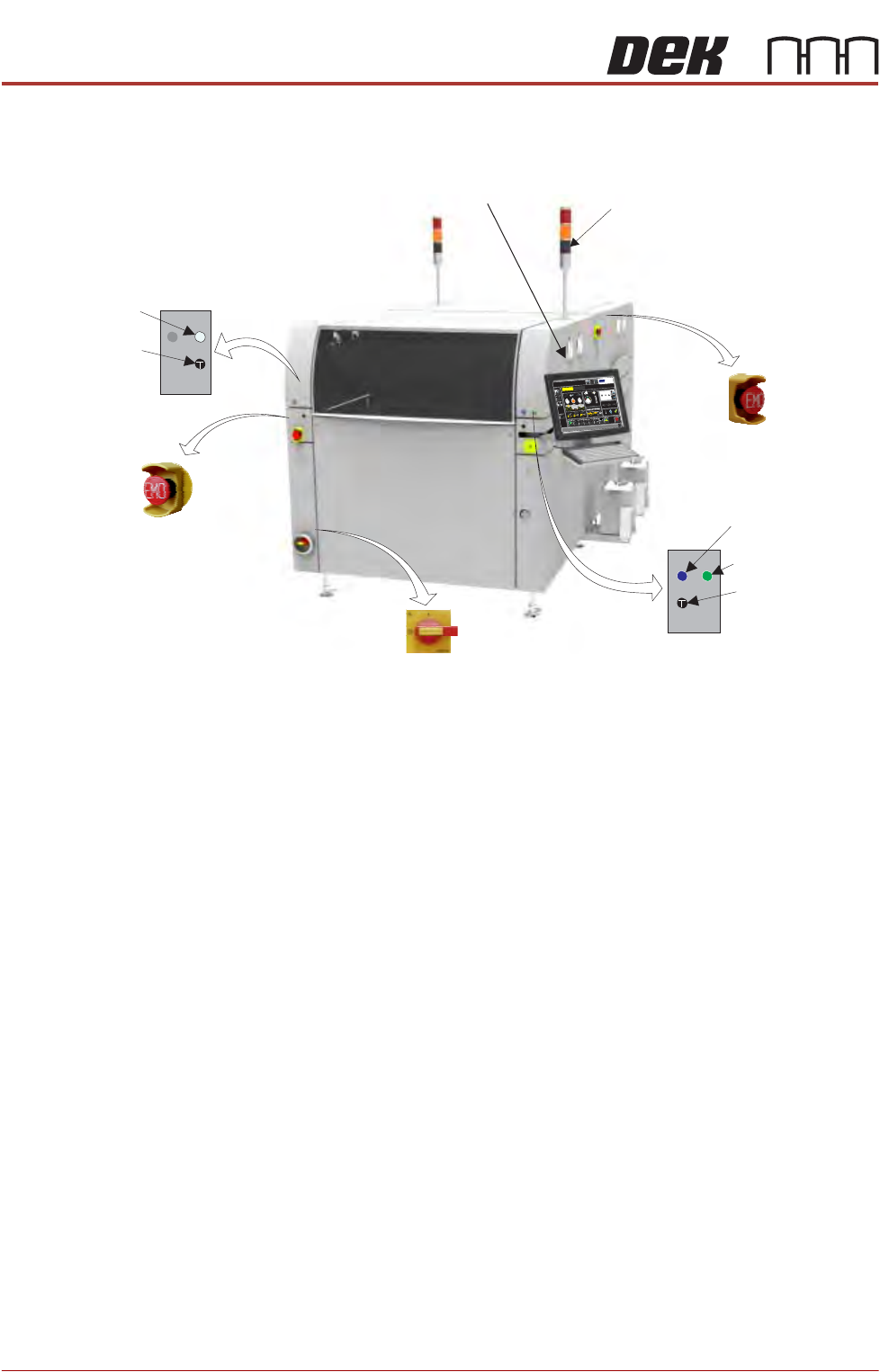
MACHINE OVERVIEW
1.4 Appendix to Micron Technical Manuals Chapter Issue 1 Feb 15
MACHINE OVERVIEW
NOTE
The monitor could be sited on either side of the machine front panel, dependant
on customer confguration. The front panel EMO button is always sited on the
opposite front panel to the monitor (i.e. monitor sited left-hand front panel - EMO
button sited right-hand front panel).
Tricolour Beacon
Monitor
Mains Isolator
Emergency Machine Off Button
Emergency Machine Off Button
(at rear of machine)
60min
60min+
30min+
Current Product: DEK04
-
+
C
yc
le
Tim
e
9.6
se
c
0
%
2
5
%
5
0%
7
5
%
1
00
%
Batch Limit
200
23
23
Status
Process
Ready
S
et up
P
rod
u
ct
Ma
in
ten
an
c
e
P
a
ste
Dispen
s
eP
ape
r
S
o
lve
nt
30
S
h
ut D
o
w
n
23°C
Te
m
p
e
ra
ture
6
8
%
Hu
m
idity
N
e
t F
ile
s
La
n
g
ua
g
e
H
elp
Adjus
t
90
20
60
L
arg
e
View
B
o
ard
Vie
w
P
rin
t
Lo
a
d
S
c
re
e
n
C
h
a
n
g
e
O
p
er
ato
r
Q
C
C
a
lc
P
rodu
c
t
C
ha
ngeo
ve
r
Open Cover
Commands
Dispenser
Clean 1
Clean 2
Clea
r
Boa
rd
C
ou
nt
DEKDEK
Interactiv
Host Comms
Board Count
Batch Count
C
h
a
n
g
e
P
rin
t D
ire
c
tion
C
le
a
n 1
0
0
Two Button Control
Two Button Control
Internal Light
System Button
Start Button
View on Front of Machine
OPERATOR APPENDIX
POWER UP
Chapter Issue 1 Feb 15 Appendix to Micron Technical Manuals 1.5
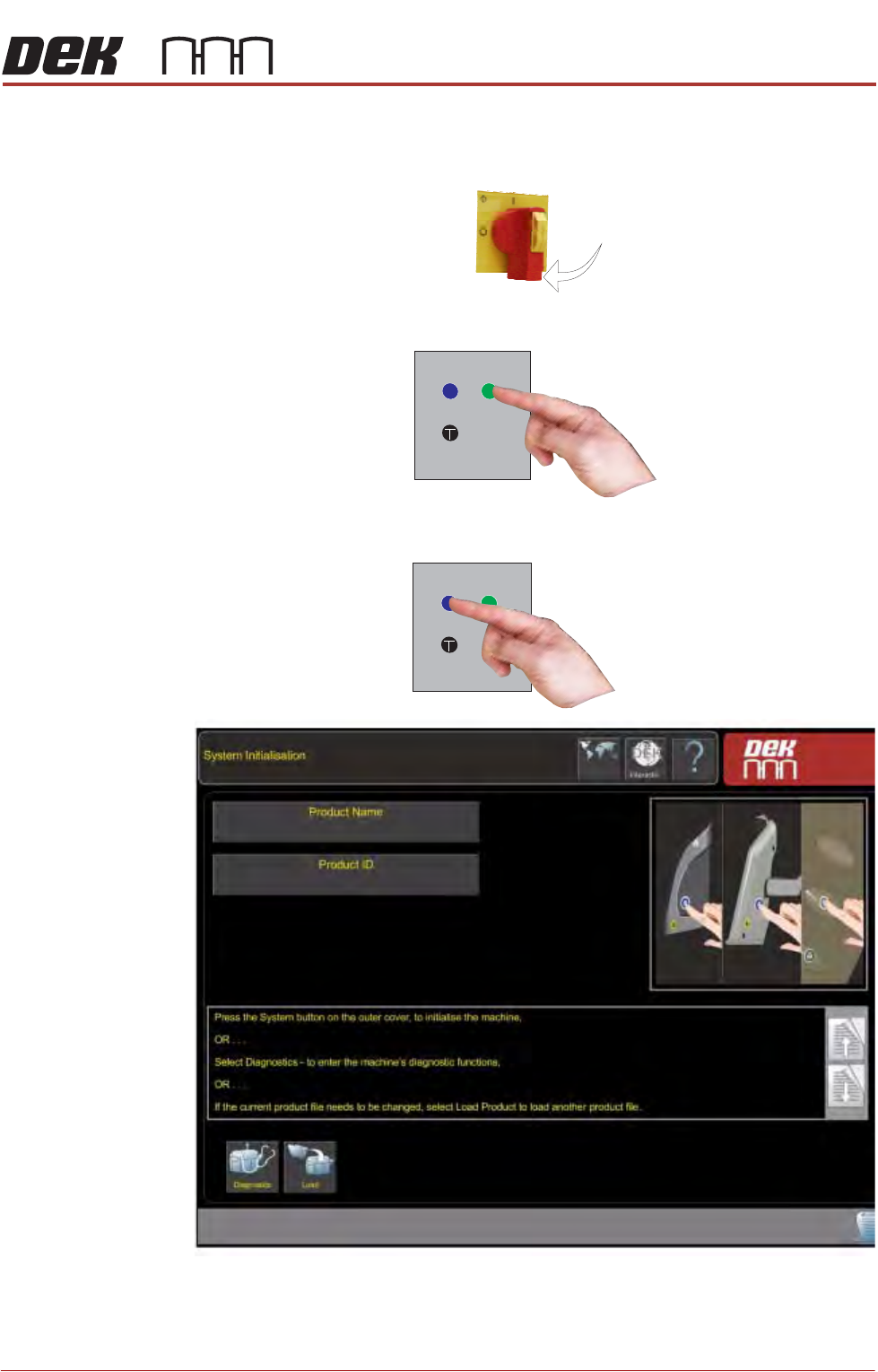
POWER UP
Switch the Mains Isolator On.
Press the Start button..
When the System Initialisation page is displayed, press the System button.

OPERATOR APPENDIX
POWER UP
1.6 Appendix to Micron Technical Manuals Chapter Issue 1 Feb 15