00197382-03_IM_SetupCenter6.3SP2_EN.pdf - 第94页
Docking Station Installation Firmware download for docking station 7.3.3 Installing the CAN B us driver and API 94 Installation Manual SIPLACE Setup Center 6.3 SP2
Docking Station Installation
7.3.3 Installing the CAN Bus driver and API Firmware download for docking station
Installation Manual SIPLACE Setup Center 6.3 SP2 93
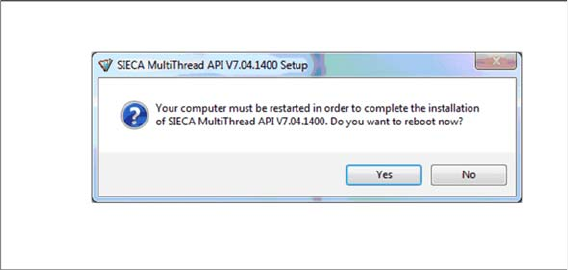
Step 10
If a restart of the PC is required, the following window appears.
► Click Yes.
7.4
7.4 Firmware download for docking station
Firmware download for docking station
► Setup Center can update the firmware of your docking station.
To learn how to update the firmware of your docking station, please refer to the chapter "Docking
Station Firmware Download" in the Online Help Setup Center.
Docking Station Installation
Firmware download for docking station 7.3.3 Installing the CAN Bus driver and API
94 Installation Manual SIPLACE Setup Center 6.3 SP2
Settings
Installation Manual SIPLACE Setup Center 6.3 SP2 95
8
8 Settings
Settings
Settings in the Station Software
In order to use Setup Center you should make settings in the station software. For detailed information,
please refer to SIPLACE Setup Center User Guide.
SIPLACE Setup Center Configuration
Setup Center GUI requires to be configured before it can be used. The configuration can be found via
the main menu Extras → Settings. For detailed information, please refer to SIPLACE Setup Center User
Guide.
Settings on the SIPLACE Pro
In order to use Setup Center you should make settings on the programming system SIPLACE Pro. For
detailed information, please refer to SIPLACE Setup Center User Guide.
Barcode Label Wizard
The Barcode Label Wizard enables you to print out barcodes needed for the operation of the SIPLACE
Setup Center. For detailed information, please refer to SIPLACE Setup Center User Guide.