Infinity EX Rail System Module.pdf - 第22页
INFINITY EX RAIL S YSTEM M ODULE ADJUS TMENTS AN D SETTIN GS 15.2 2 Technical Reference Manual Chapter Issue 2 Jan 04 Mid R ail Sett ing 1. Usi ng the setting plate , ensure that the mid rails are in li ne to the board/ …
INFINITY
EX
RAIL SYSTEM MODULE
ADJUSTMENTS AND SETTINGS
Chapter Issue 2 Jan 04 Technical Reference Manual 15.21
Snugger Clamp
Setting (Height)
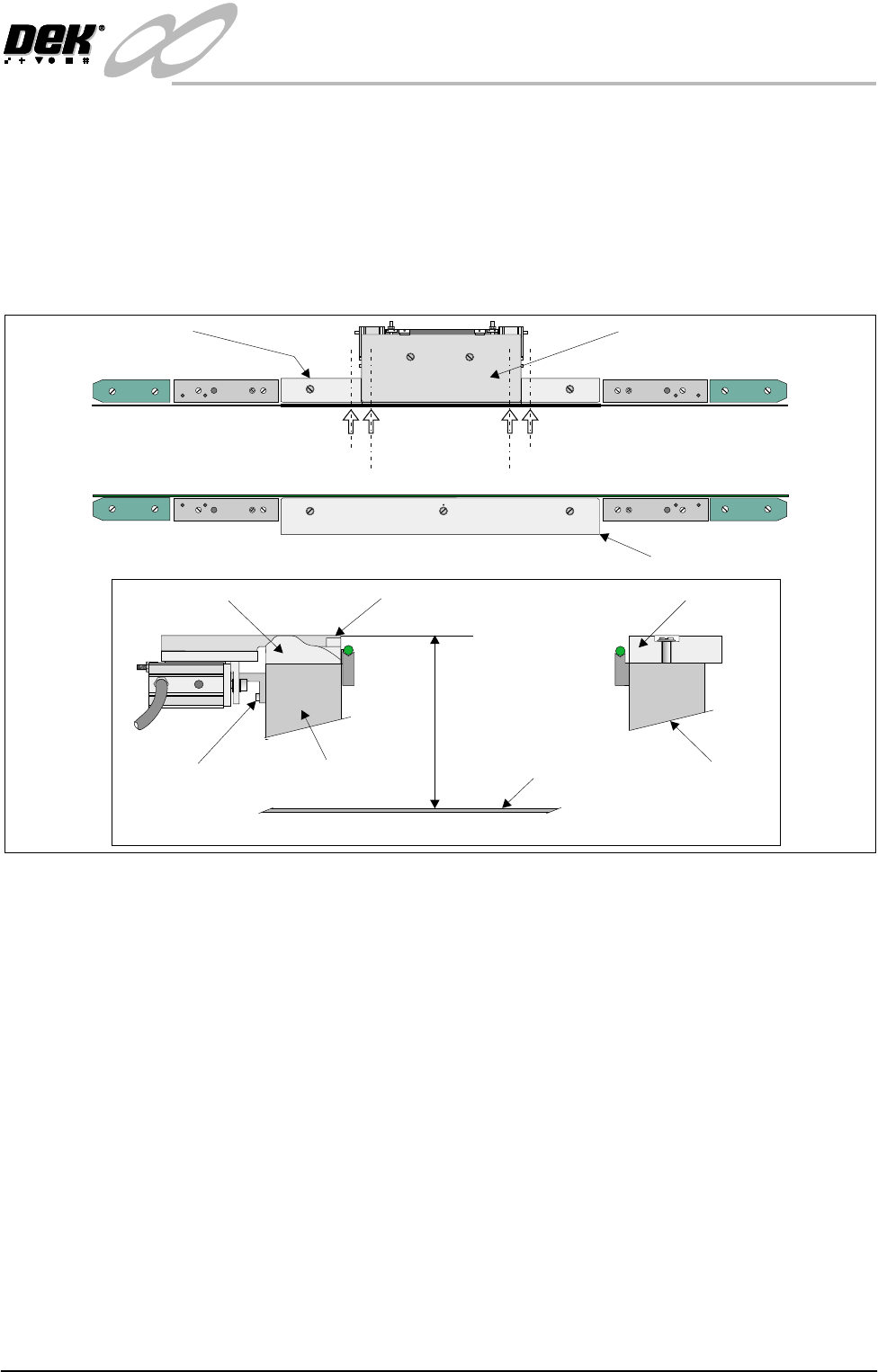
The procedure for setting up the snugger height is as follows:
1. Before setting snugger height, check the rail to table height (Rising Table
Chapter).
2. Place a straight edge on the top surface of the rear rail guide (Position A1 on
figure below refers). Using a depth gauge indicator measure the distance
from the top of the rising table to the top of the rear rail guide.
3. Carry out same operation at Position A2.
4. Check that the dimensions in Steps 2 and 3 are the same (to within 0.2mm).
If necessary adjust by slackening snugger support bracket securing screws.
Do not fully re-tighten screws at this point.
5. Carry out identical checks at other end of adjustable snugger plate (Position
B1 and B2). On completion of check/adjustments fully re-tighten bracket
securing screws.
NOTE
If adjustments are made ensure that a gap of 250mm is maintained as laid
out in Parallelism setting up.
6. On completion of setting up ensure that the board is free to move along the
transport rail without jamming.
7. Pneumatically operate the snugger clamp with a board fitted. Ensure that the
board is gripped evenly along its entire length.
Adjustable Snugger Plate
Fixed Snugger Plate
Plan View Rail System
Rear Rail Guide
I.O
Position A1
Position A2
Position B2
Position B1
Snugger Height Adjustment
Fixed Snugger PlateRear Rail Guide (Cutaway)
Fixed RailRear Rail (Moving)
Adjustable Snugger Plate
Rising Table
Dimension at Positions
andA1/A2 B1/B2
Snugger Support
Bracket Screws
(3 in Number)
INFINITY
EX
RAIL SYSTEM MODULE
ADJUSTMENTS AND SETTINGS
15.22 Technical Reference Manual Chapter Issue 2 Jan 04
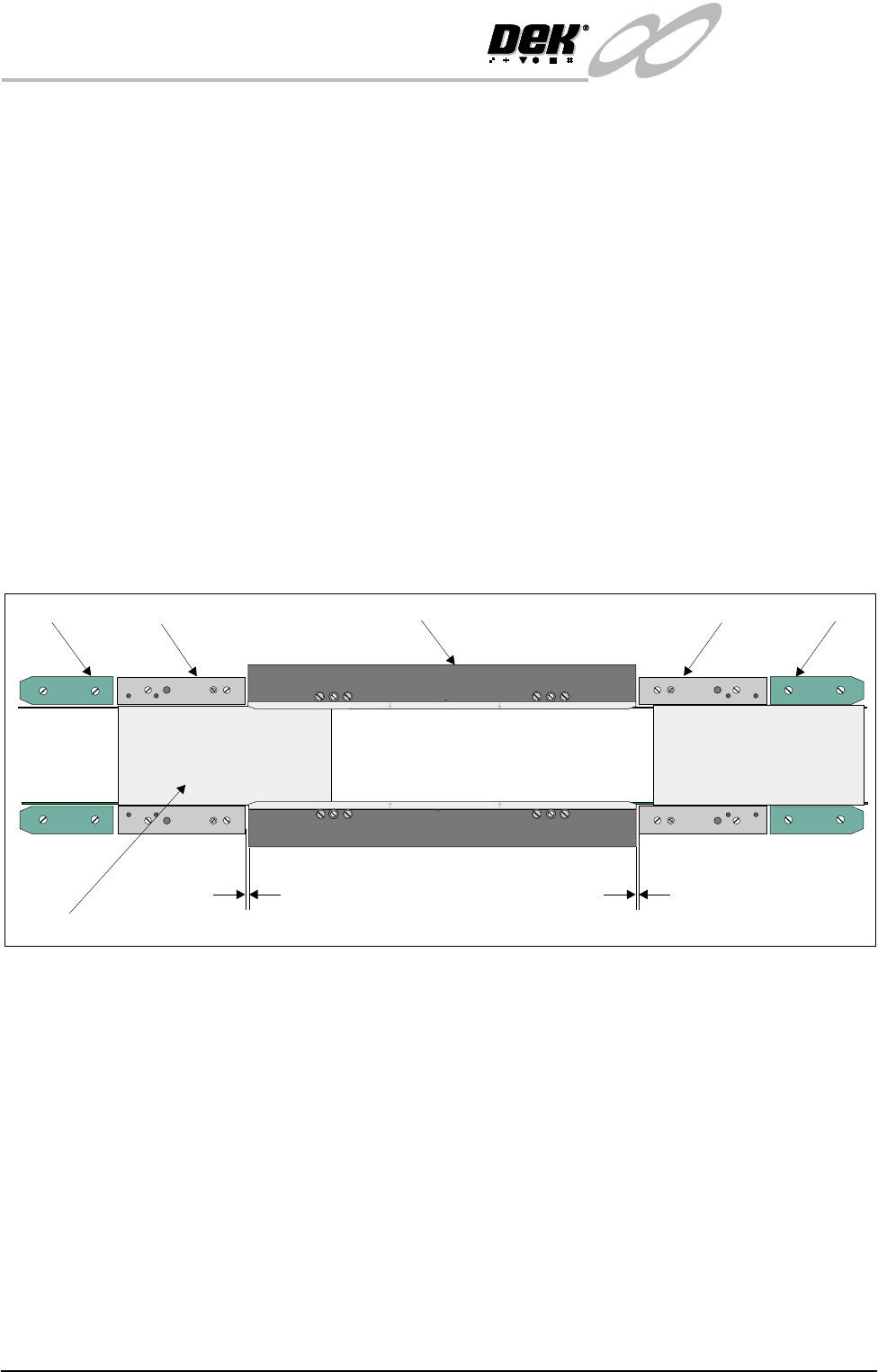
Mid Rail Setting 1. Using the setting plate, ensure that the mid rails are in line to the board/
snugger clamps (see position 1 on figure below).
2. Check that a nominal gap of 1mm exists between the end of the mid rail and
the board/snugger clamps.
3. Check using a 0.05mm feeler gauge for any gaps along the entire length of
the mid rail, adjust if the feeler enters any gaps.
4. Check that the mid rails are parallel to within 0.2mm.
NOTE
Mid rail width the same as or greater than the board clamp width.
Rail End Green
Insert Setting
1. Using the setting plate, ensure that the green inserts at each rail end are in
line to the mid rails (see position 2 on figure below).
2. Check that the green inserts are parallel to within 0.2mm.
NOTE
Green insert width the same as or greater than the mid rail width.
Figure 15-11 Mid Rail and Rail End Green Insert Setting
Home Position Rail
Width Check
1. In Diagnostics, select Rail System and Select Module.
2. Select Home Rail Width and Run Diagnost.
3. Select Adjust and set board width to 250mm (Carrier Handling Option -
300mm).
4. Select Drive Rail to Board Width.
5. Select Run Diagnost.
6. Check that the board clamp width is between 250.35mm - 250.55mm
(Carrier Handling Option - 300.35mm - 300.45mm).
7. Check that the mid rail width is between 250.35mm - 250.65mm (Carrier
Handling Option - 300.35mm - 300.55mm).
8. Check that the rail end green insert width is between 250.35mm - 250.85mm
(Carrier Handling Option - 300.35mm - 300.55mm).
Position 2
Position 1
WARNING-SHARP EDGE
WARNING-SHARP EDGE
PATENT No.5157438
PATENT No.5157438
End Rail
End Rail
Mid Rail
Mid Rail
Board Clamp
1mm
Setting Plate
1mm
INFINITY
EX
RAIL SYSTEM MODULE
ADJUSTMENTS AND SETTINGS
Chapter Issue 2 Jan 04 Technical Reference Manual 15.23
NOTE
If any of the rail widths are out of tolerance do not adjust the rails, adjust the
position of the rail home position sensor and recheck.
9. Using a suitable test board, with the rail width programmed to the board size,
select Cycle Board on Belts.
10.Select Run and ensure the board runs through the entire length of the rail
system for 10 complete cycles, without jamming or excessive clicking of the
board edges.
NOTE
If any jamming occurs investigate the position of the board/snugger clamps, mid
rails and the green inserts at the rail ends before repeating the check.
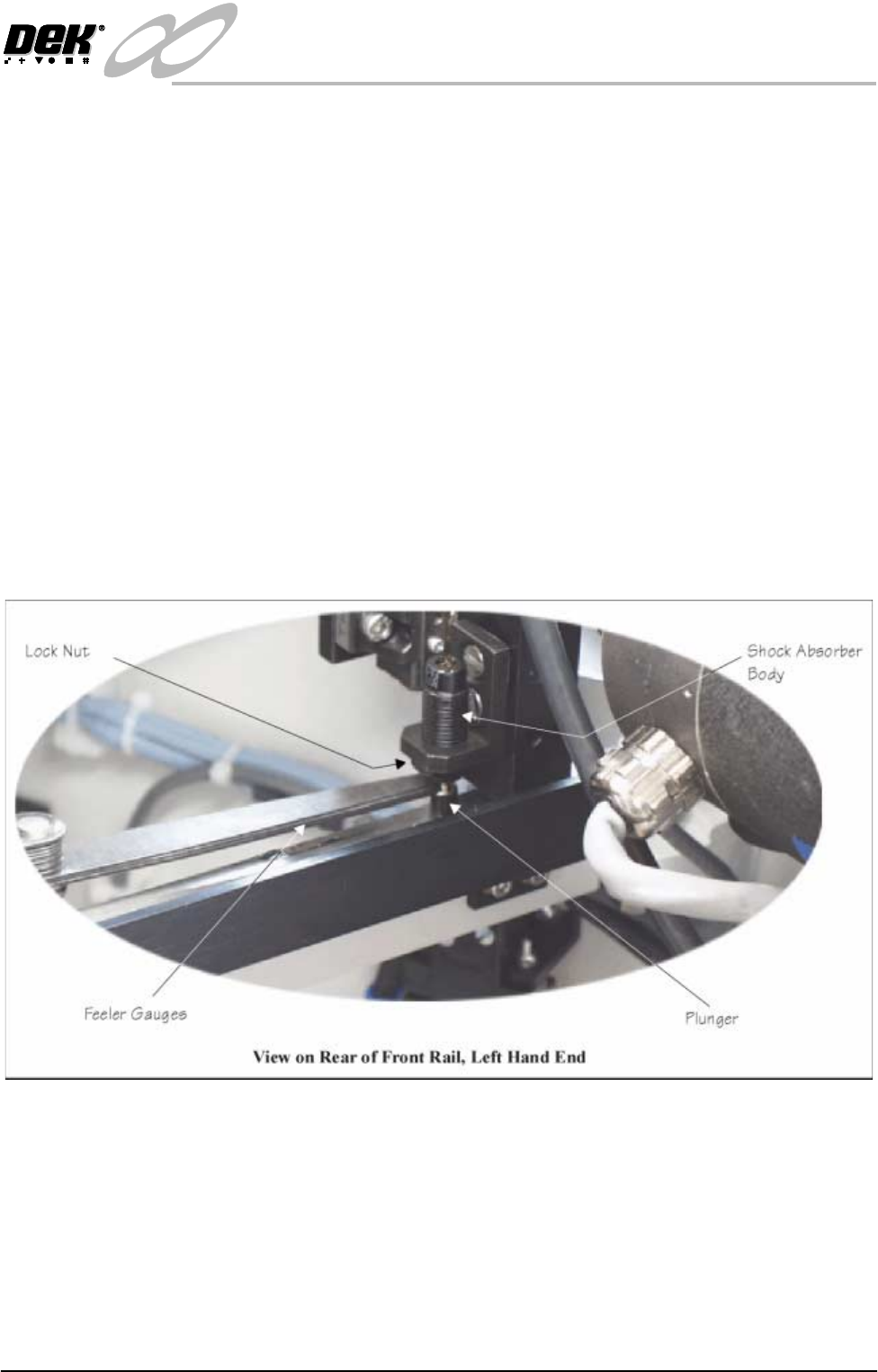
Rail Shock
Absorber Setting
1. Ensure the machine is powered down.
2. Using feeler gauges, check that a gap of 2.5mm - 3mm exists between the
top of the plunger and the shock absorber body. Alternatively use a 2.5mm
and 3mm allen key as a Go, No Go Gauge.
3. Repeat Step 2 for the three other rail shock absorbers.
4. If adjustment is necessary, slacken the lock nut.
5. Rotate the shock absorber body as required, clockwise to reduce the gap,
anti-clockwise to increase the gap.
6. Check the gap is between 2.5mm - 3mm.
7. Repeat Steps 5 and 6 until the correct dimension is achieved
8. Tighten the lock nut.
9. Recheck the gap is still within limits.