Infinity EX Rail System Module.pdf - 第8页
INFINITY EX RAIL S YSTEM M ODULE DRIVE S AND SEN SORS 15.8 Technical Reference Manu al Chapter Is sue 2 Jan 04 Rail Lif ted Sensors The left and right rail lifted sensors are through beam opto type sensors. These sensors…
INFINITY
EX
RAIL SYSTEM MODULE
DRIVES AND SENSORS
Chapter Issue 2 Jan 04 Technical Reference Manual 15.7
DRIVES AND SENSORS
Sensors
Motors
NOTE
Location of rail system sensors and drives are detailed on the Rail System
Overview Figure at the beginning of this chapter.
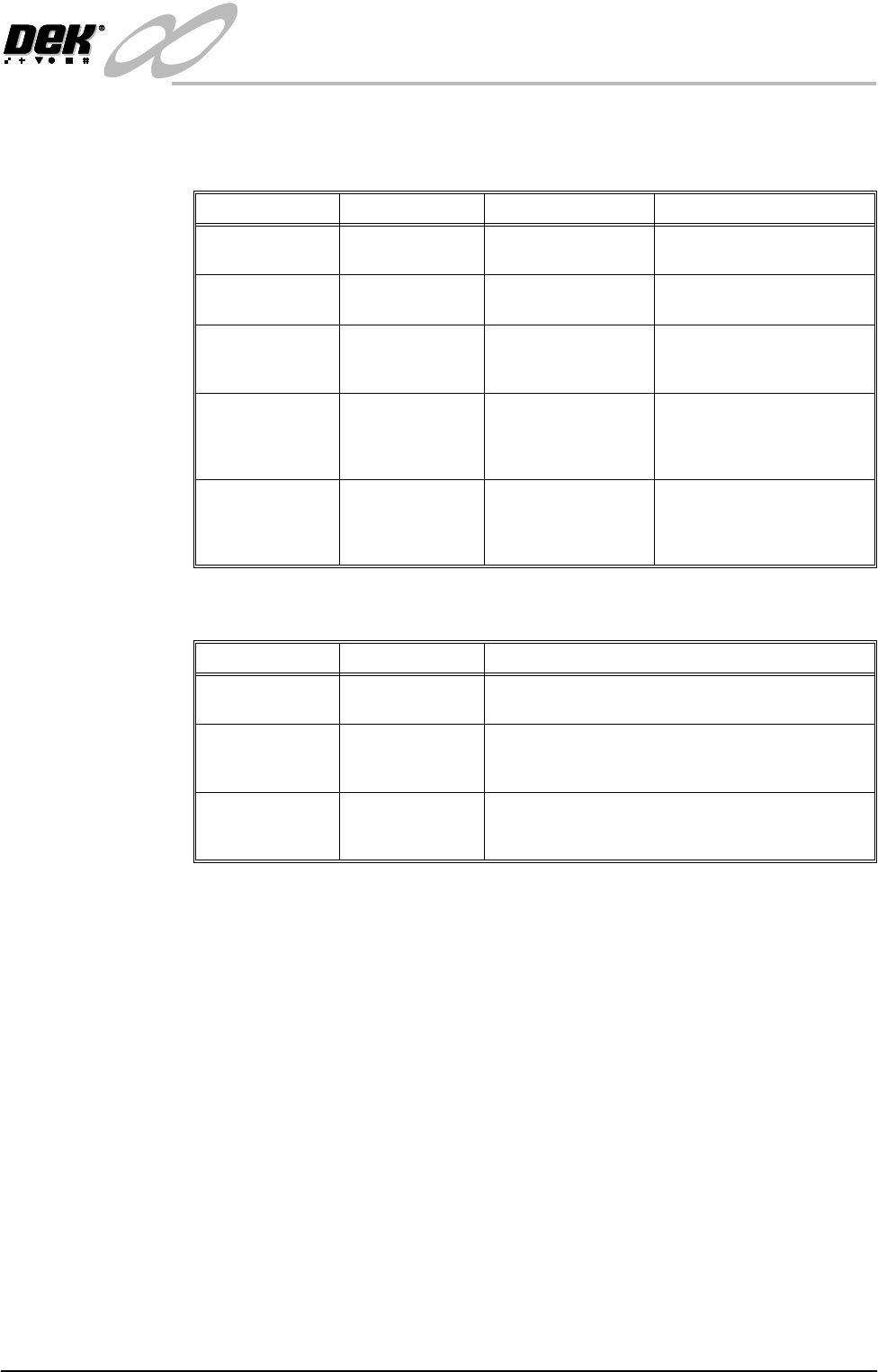
Name Type Test Point Functional Description
Rail Lifted Left Through Beam
Opto
NextMove Dig IN 3 Detects premature lifting of
rail
Rail Lifted Right Through Beam
Opto
NextMove Dig IN 4 Detects premature lifting of
rail
Moving Rail
Home
Through Beam
Opto
Stepper Multiplexer
MUX2
Provides home position of
moving rail thus providing
accurate board width settings
Board at Left Diffuse Opto NextMove Dig IN 16 Detects left side incoming/
outgoing board dependent
upon machine pass through
configuration
Board at Right Diffuse Opto NextMove Dig IN 17 Detects right side incoming/
outgoing board dependent
upon machine pass through
configuration
Name Type Functional Description
Moving Rail
Drive
Stepper Motor Moves the rear moving rail in the Y direction
Front Board
Transport Belt
Drive
DC Moving Coil
Motor
Turns the front transport belt in the clockwise or anti
clockwise direction (dependent upon upline/down-
line feed direction)
Rear Board
Transport Belt
Drive
DC Moving Coil
Motor
Turns the rear transport belt in the clockwise or anti
clockwise direction (dependent upon upline/down-
line feed direction)
INFINITY
EX
RAIL SYSTEM MODULE
DRIVES AND SENSORS
15.8 Technical Reference Manual Chapter Issue 2 Jan 04
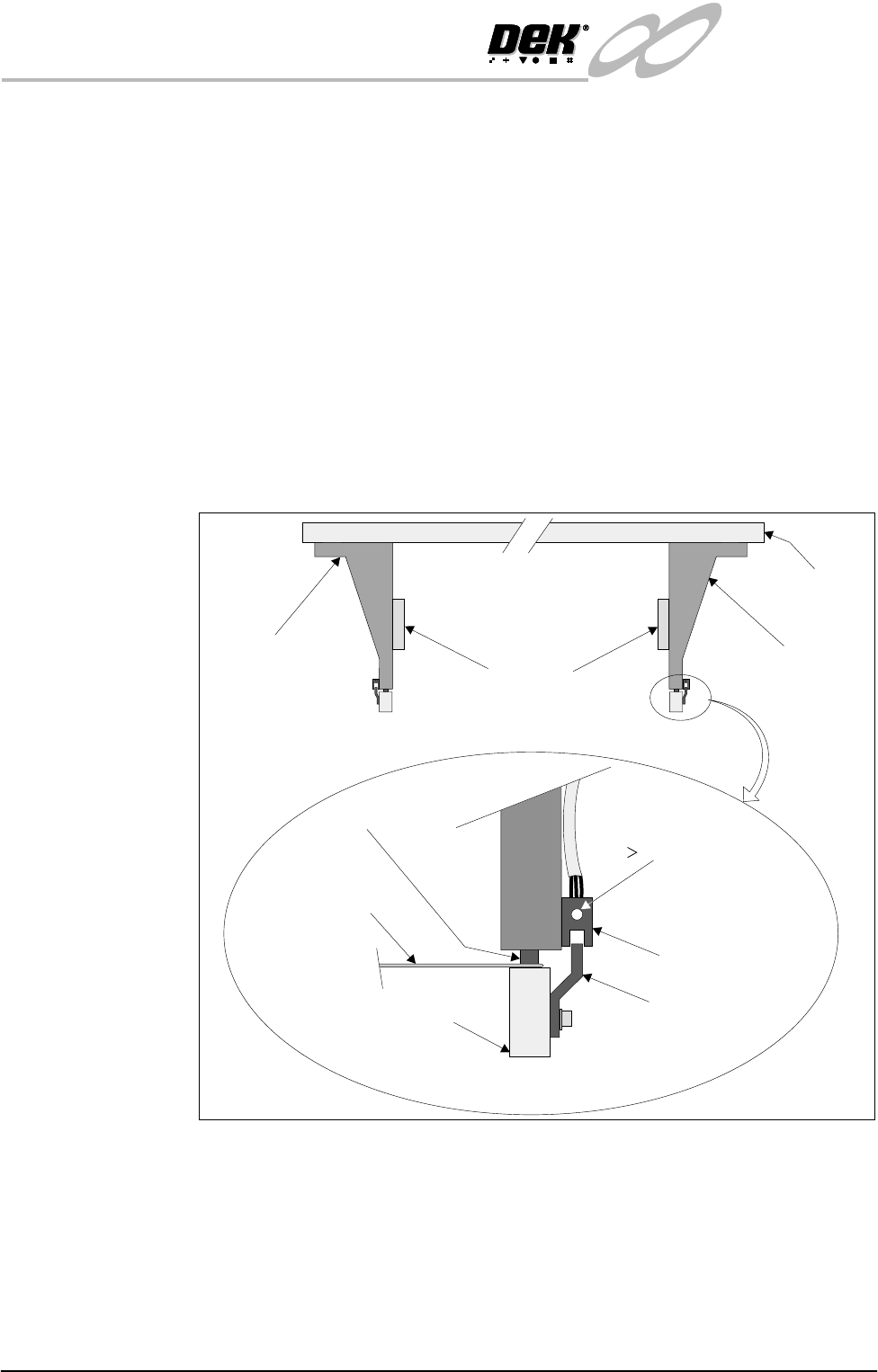
Rail Lifted Sensors The left and right rail lifted sensors are through beam opto type sensors.
These sensors are fitted to the bottom of the left and right moving rail support
arms. The sensor vanes are fitted to the entire length of the rail stop bars. These
sensors feed directly into NextMove card of the machine PC.
The purpose of the rail lifted sensors is to detect premature lifting of the rail as
the rising table rises. This may occur if tooling or any other object was placed
under the rear rail. They are checked:
1. Immediately after the rail has moved to its new board width following
product file change.
2. When Run is pressed, before the camera moves to board stop position.
3. After printing to check that the rail is fully down before the next print cycle
can commence.
4. When the table moves to rail lift check height before moving to vision height.
Figure 15-5 Rail Lift Setting
Right Rail
Support Bracket
Main Rear
Rail
Front View of Rail System
Left Rail
Support Bracket
Feeler Gauge -
0.5mm
Rail Stop Bar
Opto Vane
Bracket
Opto
Shock Absorber
Light Extinguishes
when Sensor lifted
0.5mm
Linear Rail
Enlarged View of Right Rail Opto
INFINITY
EX
RAIL SYSTEM MODULE
DRIVES AND SENSORS
Chapter Issue 2 Jan 04 Technical Reference Manual 15.9
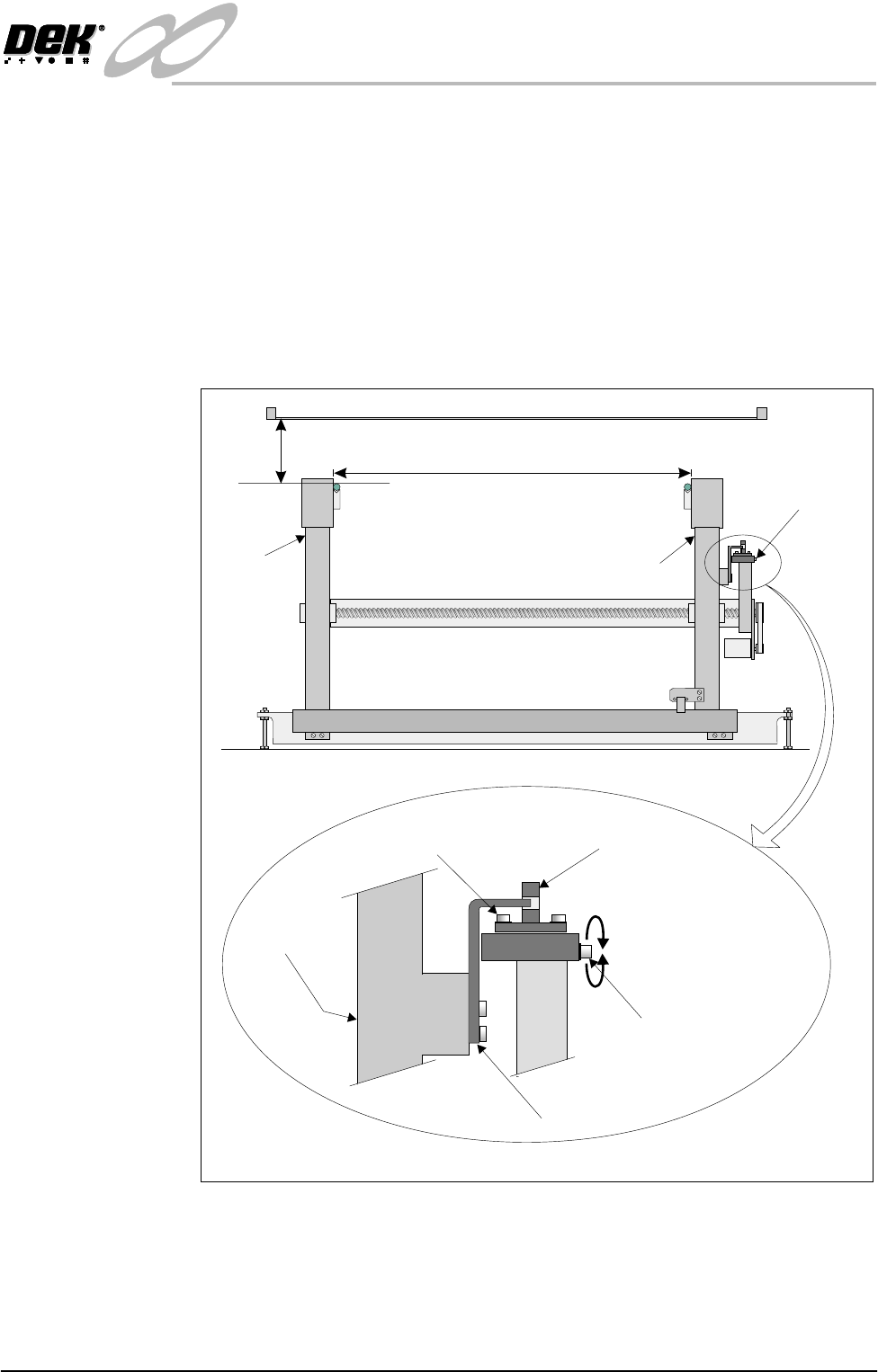
Rail Home Sensor The rail home sensor is a through beam opto type sensor.
The sensor is used for accurately determining the front and rear rail widths.
During machine initialization, (power-up or upon exiting diagnostics), the rear
rail moves to the rear of the machine where upon the rail opto vane enters the
rail home sensor, the rear rail is now at the home position.
NOTE
Homing Sequence of this chapter refers.
The rail home sensor feeds directly to the Multiplexer controller and is used to
set the datum value for the rail width (508.5mm - 508.7mm).
Figure 15-6 Rail Home Setting
Home Position
Adjustment
508.5 - 508.7mm
85mm Rail Transport Height
Front Rail
(Fixed)
Rear Rail
(Moving)
Adjustable Through
Beam Opto Sensor
Home Sensor Adjustment
Screw (0.5mm Pitched
Thread)
Rear Rail
Opto Flag
Sensor Forward Securing Screw
View on Right Hand Side of Machine
Enlarged View of Rail Home Position Sensor