Infinity EX Rail System Module.pdf - 第23页
INFINITY EX RAIL SY STEM MOD ULE ADJUS TMENTS AN D SETTING S Chapter Issue 2 J an 04 Technical Reference Manual 15.23 NO TE If any of the rail widths ar e out of tolerance do not adjust the rails, adjust the position of …
INFINITY
EX
RAIL SYSTEM MODULE
ADJUSTMENTS AND SETTINGS
15.22 Technical Reference Manual Chapter Issue 2 Jan 04
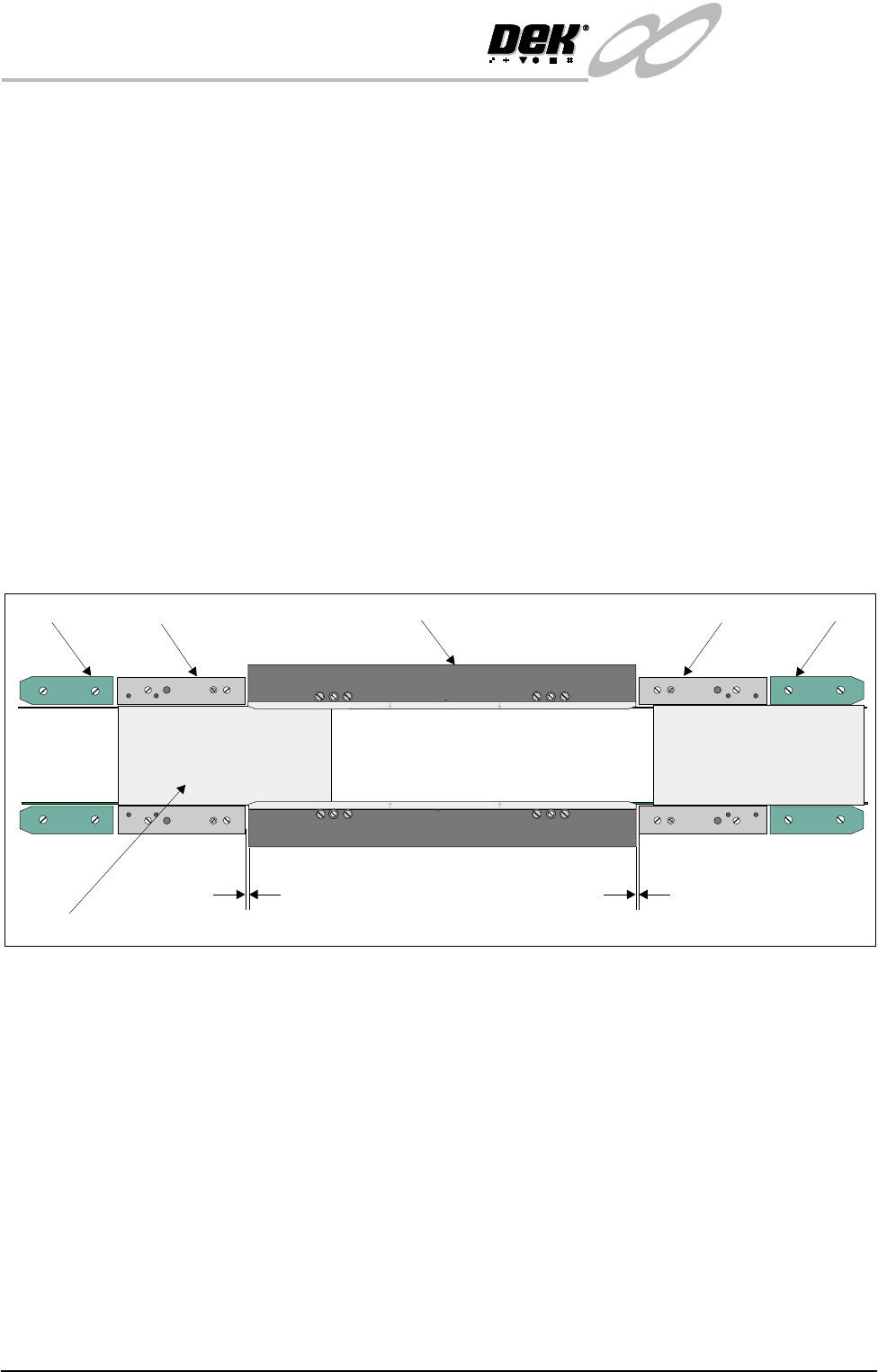
Mid Rail Setting 1. Using the setting plate, ensure that the mid rails are in line to the board/
snugger clamps (see position 1 on figure below).
2. Check that a nominal gap of 1mm exists between the end of the mid rail and
the board/snugger clamps.
3. Check using a 0.05mm feeler gauge for any gaps along the entire length of
the mid rail, adjust if the feeler enters any gaps.
4. Check that the mid rails are parallel to within 0.2mm.
NOTE
Mid rail width the same as or greater than the board clamp width.
Rail End Green
Insert Setting
1. Using the setting plate, ensure that the green inserts at each rail end are in
line to the mid rails (see position 2 on figure below).
2. Check that the green inserts are parallel to within 0.2mm.
NOTE
Green insert width the same as or greater than the mid rail width.
Figure 15-11 Mid Rail and Rail End Green Insert Setting
Home Position Rail
Width Check
1. In Diagnostics, select Rail System and Select Module.
2. Select Home Rail Width and Run Diagnost.
3. Select Adjust and set board width to 250mm (Carrier Handling Option -
300mm).
4. Select Drive Rail to Board Width.
5. Select Run Diagnost.
6. Check that the board clamp width is between 250.35mm - 250.55mm
(Carrier Handling Option - 300.35mm - 300.45mm).
7. Check that the mid rail width is between 250.35mm - 250.65mm (Carrier
Handling Option - 300.35mm - 300.55mm).
8. Check that the rail end green insert width is between 250.35mm - 250.85mm
(Carrier Handling Option - 300.35mm - 300.55mm).
Position 2
Position 1
WARNING-SHARP EDGE
WARNING-SHARP EDGE
PATENT No.5157438
PATENT No.5157438
End Rail
End Rail
Mid Rail
Mid Rail
Board Clamp
1mm
Setting Plate
1mm
INFINITY
EX
RAIL SYSTEM MODULE
ADJUSTMENTS AND SETTINGS
Chapter Issue 2 Jan 04 Technical Reference Manual 15.23
NOTE
If any of the rail widths are out of tolerance do not adjust the rails, adjust the
position of the rail home position sensor and recheck.
9. Using a suitable test board, with the rail width programmed to the board size,
select Cycle Board on Belts.
10.Select Run and ensure the board runs through the entire length of the rail
system for 10 complete cycles, without jamming or excessive clicking of the
board edges.
NOTE
If any jamming occurs investigate the position of the board/snugger clamps, mid
rails and the green inserts at the rail ends before repeating the check.
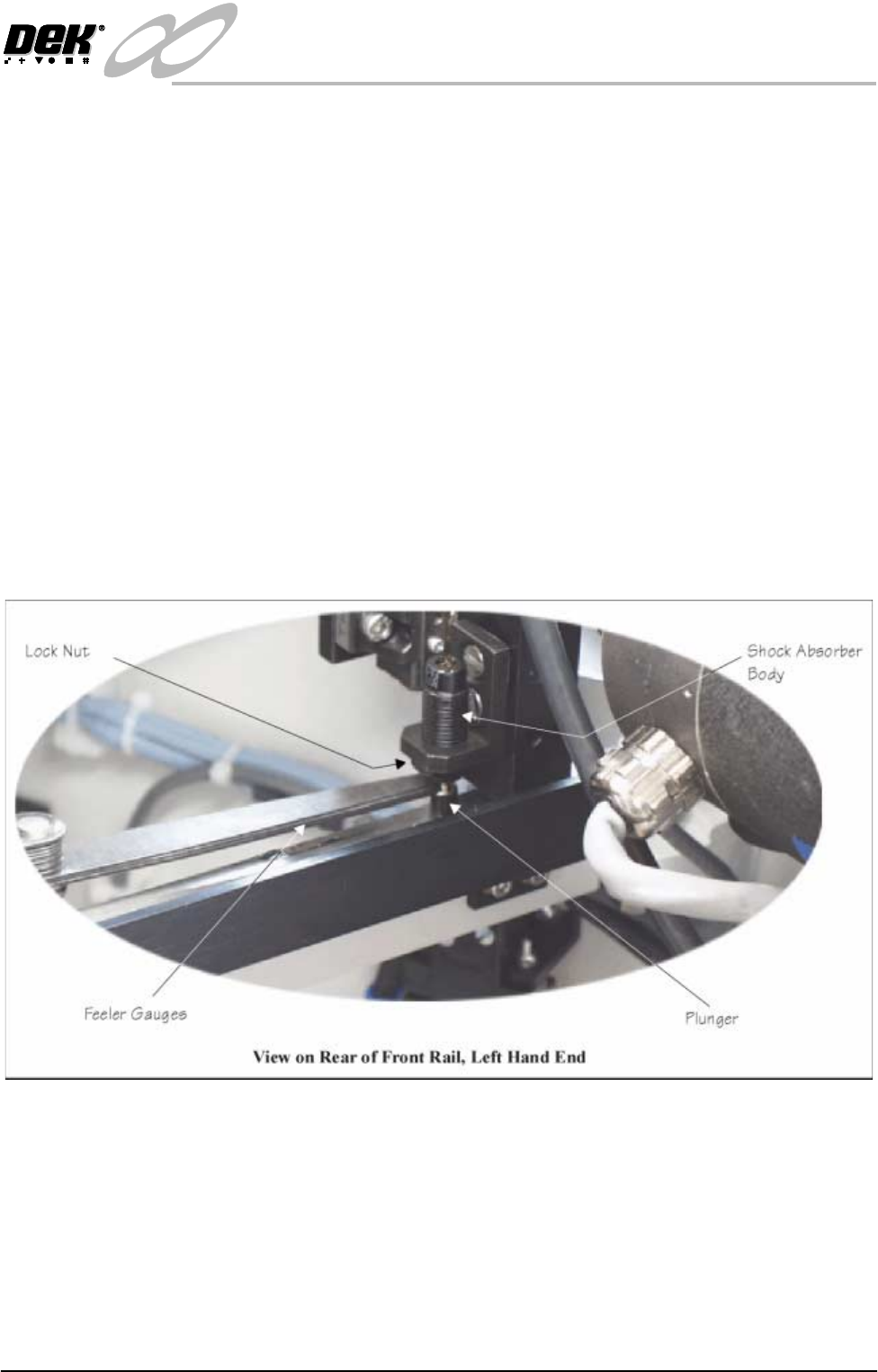
Rail Shock
Absorber Setting
1. Ensure the machine is powered down.
2. Using feeler gauges, check that a gap of 2.5mm - 3mm exists between the
top of the plunger and the shock absorber body. Alternatively use a 2.5mm
and 3mm allen key as a Go, No Go Gauge.
3. Repeat Step 2 for the three other rail shock absorbers.
4. If adjustment is necessary, slacken the lock nut.
5. Rotate the shock absorber body as required, clockwise to reduce the gap,
anti-clockwise to increase the gap.
6. Check the gap is between 2.5mm - 3mm.
7. Repeat Steps 5 and 6 until the correct dimension is achieved
8. Tighten the lock nut.
9. Recheck the gap is still within limits.
INFINITY
EX
RAIL SYSTEM MODULE
CALIBRATIONS
15.24 Technical Reference Manual Chapter Issue 2 Jan 04
CALIBRATIONS
Board Transport
Belt Speed
The front and rear board transport belts (feeder belts) are driven independently
by two variable speed motors. Inevitably one motor drives faster than the other
motor. It is necessary to calibrate these motors so that they drive at the same
speed in either direction. Non-compliance of this calibration could cause boards
to jam in the machine or uneven wear in the rails or transport belts.
WARNING
LETHAL VOLTAGE. DANGEROUS VOLTAGES EXIST IN THIS
EQUIPMENT. ENSURE ALL ELECTRONIC COVERS AND MAIN
MACHINE COVERS ARE FITTED BEFORE OPERATING THIS
EQUIPMENT.
The speed of both feeder belt motors is controlled by a MultiMove card situated
in the machine control enclosure and utilizes Pulse Width Modulation (PWM).
This is achieved by controlling the period of the 'ON' control pulse provided by
the MultiMove control card. The pulse repetition rate is fixed at 125Hz.
Feeder motor speed is measured using a tachometer on the input or output pulley
and adjusted by using the Belt Speed Calibration Page in the machine diagnos-
tics.
NOTE
For belt speed calibration set up see Calibration Procedure of this section. For
detailed information on access and use of the diagnostics module refer to the
Diagnostics chapter of the User manual.
Motor speed software parameters is listed in the following table:
Calibration
Procedure
1. In Diagnostics, select Rail System.
2. Select Belt Speed Calibration, the following window is displayed:
Name Maximum Minimum Default Increment
Front L to R Speed 64000 0 32000 1
Rear L to R Speed 64000 0 32000 1
Front R to L Speed 64000 0 32000 1
Rear R to L Speed 64000 0 32000 1
SEMI 2
Belt Speed Calibration
FRONT L TO R SPEED
FRONT R TO L SPEED
REAR L TO R SPEED
REAR R TO L SPEED
50000
50000
63999
63999