MR-Conveyor-Maintenance-Guide.pdf - 第14页
EN - 0034 Rev. F MR Conveyor Maintenance G uide 14 3/12/2024 Driv e Belt T ensioning 1) Check t he tension on the Belt. There should be about 1/8” of flex. See diagram. If the tension is not properly set, proceed. 2) Unp…

EN-0034 Rev. F MR Conveyor Maintenance Guide 13
3/12/2024
Drive Belt Removal
Procedure:
1) Unplug Power to the Conveyor
2) Remove the Collar Clamp, Drive Side Cover, and Drive Side Product Guide.
3) Remove the Motor Cover.
4) Loosen the four upper Motor mounting screws.
5) Slide the Motor up and remove the Drive Belt from the Motor Pulley.
6) Pull the Drive Side Pulley away from the Rail and off of the Drive Post.
7) Lift the Drive Belt off of the Drive Side Pulley.
Drive Belt Attachment
Procedure:
1) Place the Drive Belt on the Drive Side Pulley.
2) Put the Timing Belt onto the teeth of the Drive Side Pulley.
3) Slide the Drive Side Pulley onto the Drive Post. Turn the Drive Side Pulley with
your fingers to ensure that the Timing Belt is properly seated.
4) Slide the Motor up and put the Drive Belt around the Motor Pulley. Spin the
Pulley until the Belt is properly seated.
5) Gauge the Motor Pulley (See Page 12).
6) To set the Drive Belt tension, see Page 14.
7) Tighten securely using a 9/64”hex wrench and an 11/32” combination wrench.
8) Visually check the Drive Belt alignment.
9) Reassemble the Collar Clamp (See Page 11).
10) Replace the Product Guide.
11) Hand power the Conveyor (See Page 8).
12) Reattach the Cover.
13) Hand power the Conveyor.
14) Reattach the Motor Cover.
15) Turn on the Conveyor.
EN-0034 Rev. F MR Conveyor Maintenance Guide 14
3/12/2024
Drive Belt Tensioning
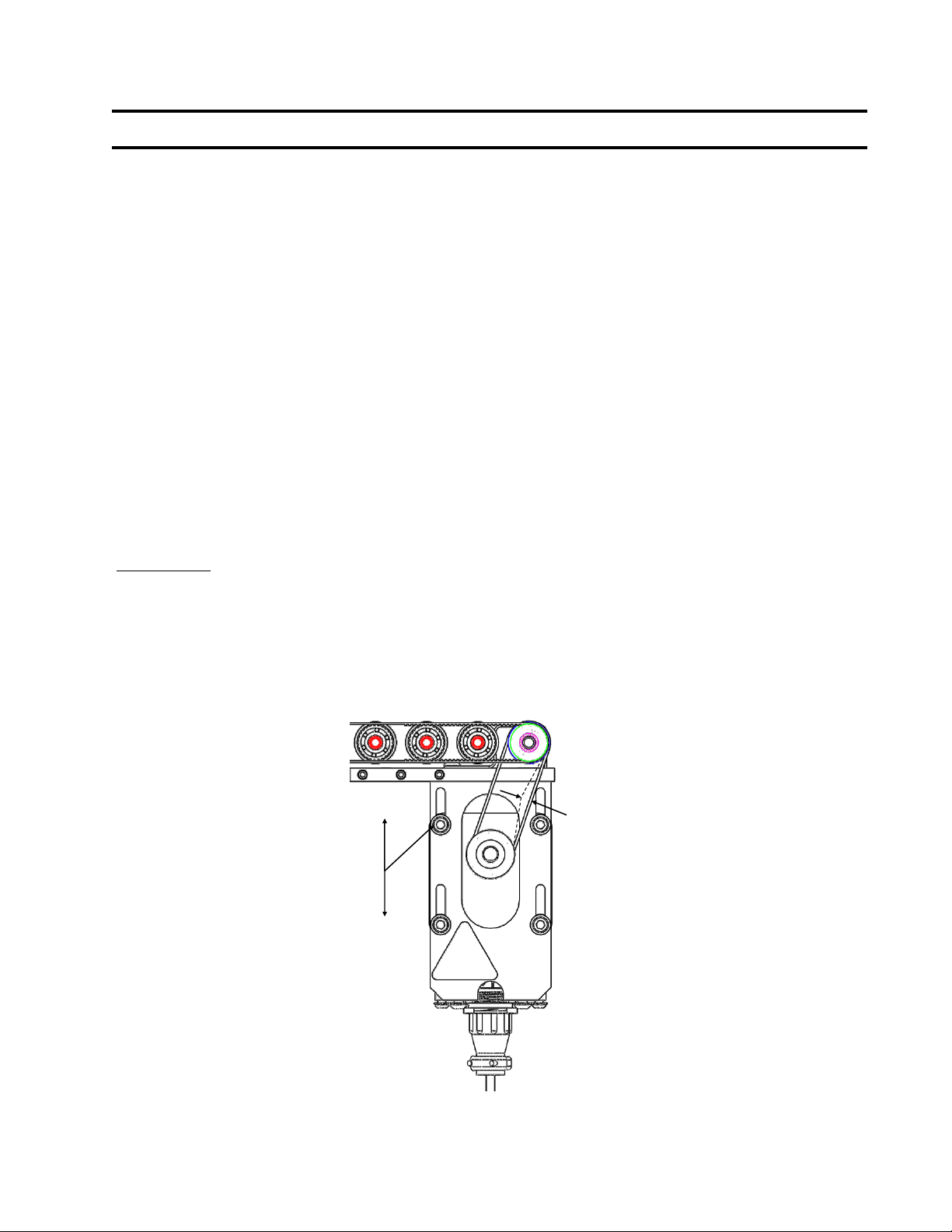
1) Check the tension on the Belt. There should be about 1/8” of flex. See
diagram. If the tension is not properly set, proceed.
2) Unplug power to the Conveyor.
3) Loosen the four motor mounting screws.
4) Let the Motor settle to the bottom.
5) Hold the Motor square to the Motor Mount with one hand; tighten the screws
until snug with the other hand.
6) Check the tension on the Belt. There should be about 1/8” of flex.
7) Repeat procedure, if necessary, until proper tension is achieved.
8) Fully tighten the screws using an 11/32” wrench to hold the nuts while
tightening the screws.
9) Hand power the Conveyor.
10) Turn on the Conveyor.
Important: Operating a conveyor that has a Drive belt that is too tight will greatly reduce the
life of the Drive Belt. Operating a conveyor that has a Drive Belt that is too loose will cause
the Drive Belt to skip which will also greatly reduce the life of the Drive Belt and generate
noise.
1/8” FLEX
LOOSEN 4 SCREWS
TO MOVE MOTOR
WHICH ADJUSTS
BELT TENSION.
EN-0034 Rev. F MR Conveyor Maintenance Guide 15
3/12/2024
Belt Drive Motor Replacement
Procedure For Belt Drive Models:
1) Unplug power to the Conveyor.
2) Remove the Motor Cover.
3) Unplug the Motor Cable from the Motor.
4) Remove the four screws that secure the Motor to the Motor Bracket.
5) Lift the Motor up and remove the Drive Belt from the Motor Pulley.
6) Remove the Pulley from the old Motor and inspect it for wear.
7) Attach the new Motor to the Motor Bracket with the two upper screws.
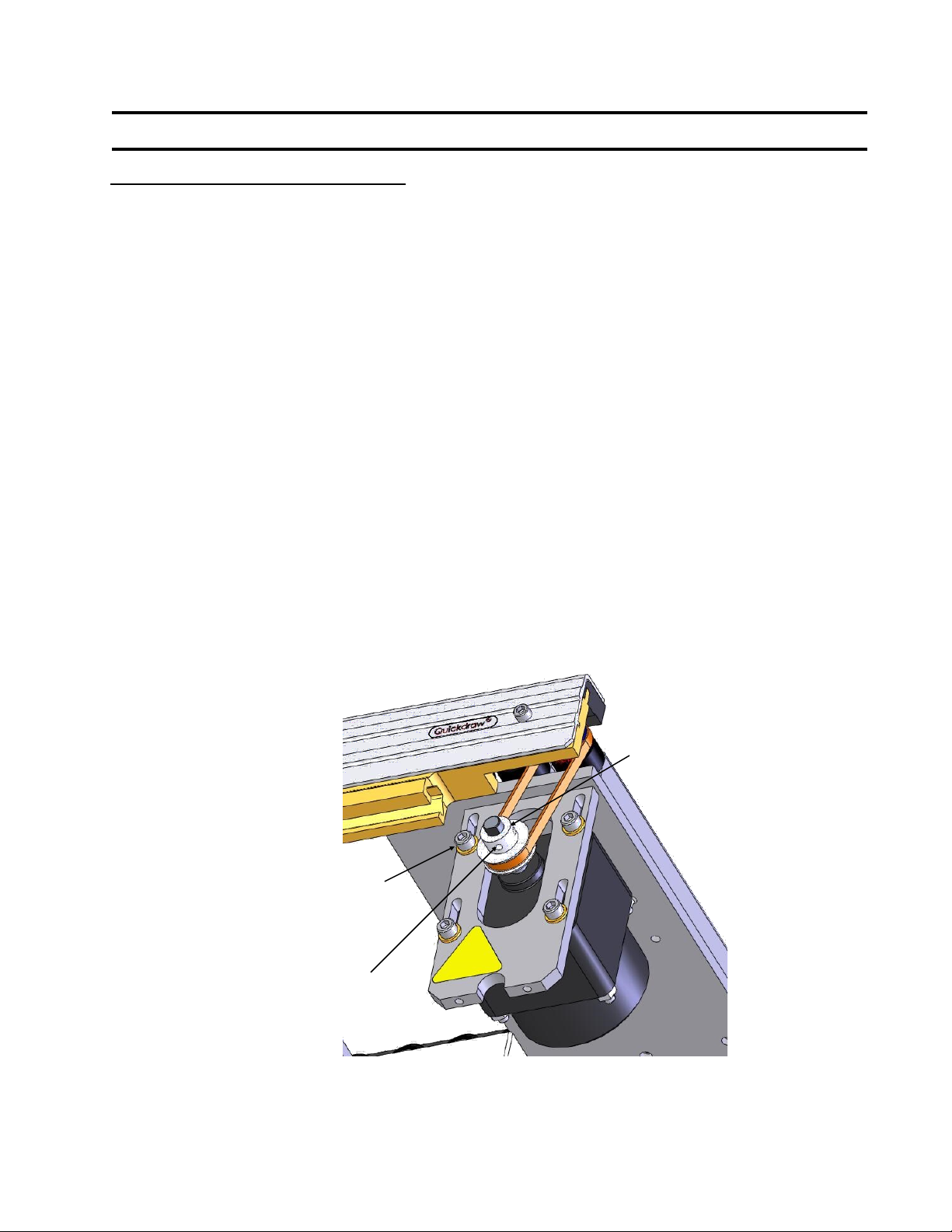
8) Put the Motor Pulley on the Motor Shaft. Align Set Screw to Motor shaft flat.
9) Gauge the Motor Pulley (See Page 12).
10) Loosen the upper screws and install the remaining screws.
11) Reattach the Drive Belt and set the Drive Belt Tension (See Page 14)
12) Plug the Motor Cable into the Motor.
13) Reattach the Motor Cover. Be sure that there is clearance between the end of
the Motor Shaft and the inside of the Motor Cover.
14) Hand power the Conveyor (See Page 8).
15) Turn on the Conveyor.
MOUNTING SCREWS
SET SCREW
DRIVE PULLEY