MR-Conveyor-Maintenance-Guide.pdf - 第24页
EN - 0034 Rev. F MR Conveyor Maintenance G uide 24 3/12/2024 • Motor External Direction mode uses the control signal on P1 - 11. This pin is brought to common P1 - 12 through a jumper wire, switch, relay, or an open coll…

EN-0034 Rev. F MR Conveyor Maintenance Guide 23
3/12/2024
• Motor direction is specified by the Customer.
• Motor Boost mode uses directional control signals from another controller and
amplifies those signals for use on higher wattage motors. These connections are
made through P1.
Boost External Enable
Enable
(Default Setting)
Motor Controller Enabling Options.
J2 J2 J2
Motor Enabling Control:
Quickdraw’s BLDC controller has three modes for controlling the motor: boost, external
enable, and always on.
Motor Boost mode uses control signals from another controller and amplifies those signals
for use on higher wattage motors. These connections are made through P1.
Motor External Enable mode uses the control signal on P1-9. This pin is brought to
common P1-10 through a jumper wire, switch, relay, or an open collector NPN transistor.
Motor Enable mode; the motor is always on.
Unless specified otherwise by the customer, the default setting for this jumper is “External
Enable”.
Motor Directional Control:
Quickdraw’s BLDC controller has four modes for controlling the motor direction: boost,
external direction, always forward, or always reverse. This controller is not designed for
plug reversing. Damage to the controller could happen by not stopping it first.
It may be necessary to reverse the motor without changing the directional controls. This
can be accomplished by changing P2-1 with P2-3 and P2-6 with P2-5.
Boost External Rev. For.
Direction
Motor Controller Directional options.
J1 J1 J1 J1
EN-0034 Rev. F MR Conveyor Maintenance Guide 24
3/12/2024
• Motor External Direction mode uses the control signal on P1-11. This pin is brought to
common P1-12 through a jumper wire, switch, relay, or an open collector NPN
transistor.
• Motor Forward mode, the motor will always rotate clockwise (view facing shaft end).
• Motor Reverse mode, the motor will always run counterclockwise.
SPECIFICATIONS:
BOARD OUTSIDE DIMENSION………………………………………………….. 2.3” x 3”
MOUNTING HOLE DIMENSION………………………………………………..... 1.9” x 2.6”
INPUT VOLTAGE …………………………………………………………………. 24Vdc
OUTPUT VOLTAGE ………………………………………………………………. 0 to 24Vdc
MOTOR HALL SPACING (jumper selectable) …………………………………. 60° or 120°
LOAD CURRENT (continuous) …………………………………………………... 2.5 Amps continuous
SPEED RANGE ……………………………………………………………………. 0-100%, full range
INPUT CONNECTIONS …………………………………………………………... 14-pin JST
OUTPUT CONNECTIONS ……………………………………………………….. 9-pin JST
SPEED COMMAND SIGNAL …………………………………………………….. 2-5Vdc
DIRECTIONAL COMMAND SIGNAL ……………………………………………. Switched to common
MOTOR CONTROL SIGNAL …………………………………………………….. Switched to common
OPERATING TEMPERTURE ……………………………………………………. 32° - 95° F
INTERNAL VOLTAGE SUPPLY (for hall sensors) …………………………….. 6.25 Volts
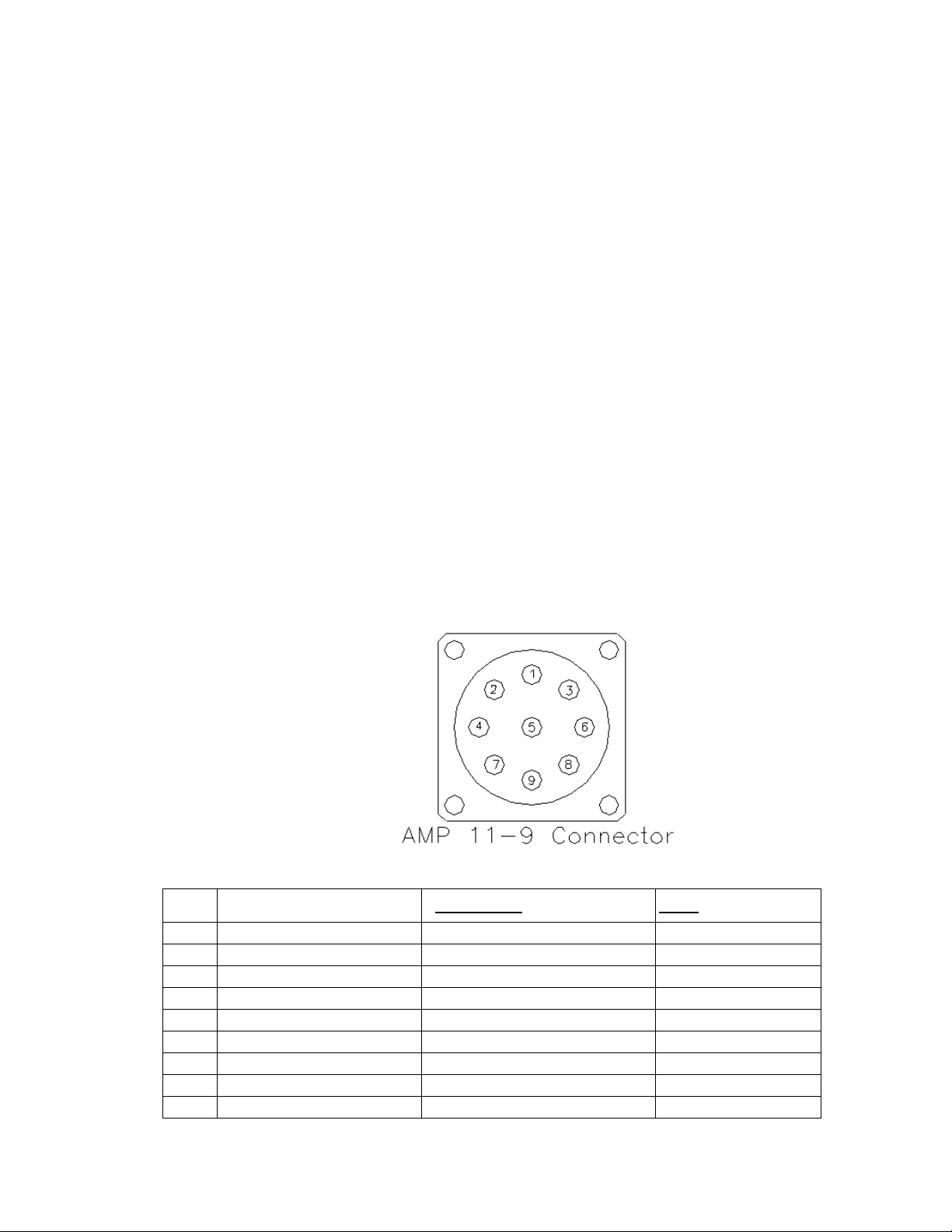
Conveyor Interface Connector:
PIN # DESCRIPTION STANDARD CABLE COLOR FLEX CABLE COLOR
1 +24V Source Orange Pink
2 Motor ON/OFF Brown Brown
3 Motor ON/OFF Common Red Red
4 Motor Direction Black Gray
5 Motor Direction Common White White
6 Speed Reference (0-5VDC) Blue Blue
7 Source Common Green Green
8 N/C X X
9 N/C X X
Quickdraw PN—980413

EN-0034 Rev. F MR Conveyor Maintenance Guide 25
3/12/2024
Setting Conveyor Speeds
Unless otherwise requested, Quickdraw sets all MR Conveyor Speeds at 50 ft./min.
for all MR Conveyor Systems that include Conveyor Control Boxes. Quickdraw does
this to standardize its conveyor performance data. The Motor Cards used on most
applications come with Speed Potentiometers (Speed Pots) that can either be used
or discarded. Most customers choose not to use the Speed Potentiometers, but
rather set speed with Min/Max Speed Pots directly attached to the board.
How To Determine Conveyor Speed
Procedure:
1) Place a piece of non-reflective tape around the Collar Clamp. * This is done to
ensure that the Tachometer is reading only the reflection of the special
reflective tape.
2) Place a small piece of reflective tape onto the other tape.
3) Turn on the conveyor.
4) Measure the rpm with a Handheld Optical Digital Tachometer, such as the
“AMETEK Model 1726 Optical Digital Tachometer”.
How To Convert Linear Distance/Minute to Target RPM
Procedure:
1) Establish the needed conveyor flow rate. * For example: 50 ft/min.
2) Determine the diameter of a Roller. * The diameter of a standard Roller is
0.827”.
3) Use the following formula to determine the target rpm:
Target RPM = Linear Speed (ft/min) / {π*roller diameter (in feet)}
→ Target RPM = 50 ft/min. / π* (0.827”/12”/ft)
→ Target RPM = 50 ft/min. / π* 0.069 ft.
→ Target RPM = 50 ft/min. / 0.217 ft.
→ Target RPM = 231 rpm
Procedure For Conveyors Equipped With Dart 730 BDC Control Cards:
With Speed Pot:
1) Turn the dial on Speed Pot until the tachometer reads target rpm.
2) If unable to achieve target rpm, adjust the white Min and Max dials found on
the Motor Control Card until the target rpm can be achieved within the range of
the Speed Pot.
Without Speed Pot:
1) Adjust the white Min and Max dials found on the Motor Control Card until the
target rpm can be achieved.