WPC4 services manual.pdf - 第60页
Replacing Spare Parts Limit Switches, Sensors and Light Barriers Replacing the Safety Switch [03048181-xx] 60 Service Manual SIPLACE WPC4
Replacing Spare Parts
Replacing the Safety Switch [03048181-xx] Limit Switches, Sensors and Light Barriers
Service Manual SIPLACE WPC4
59
3.6.12 Replacing the Safety Switch [03048181-xx]
The connection cable has two separate connections:
Unplug the connection cable at terminal strip x12a on the control unit back plane.
Unplug the connection cable from the safety loop.
X Fit the new safety switch at the marked installation position.
X Restore the electrical connection and fix the connection cable into place.
Settings
X Make sure that the door contact engages properly. If necessary, correct the installation position at
the slots.
X Check that the safety switch switches reliably at the docked WPC4.
Spare part
X Safety switch, closed (safety switch with
cable) 03048181-xx]
Removal/installation
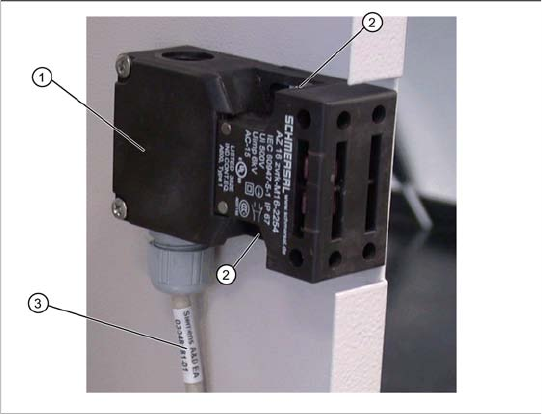
X Mark the installation position of the safety
switch (1) at the two fastening screws (2) with
slots.
X Loosen the two fastening screws (2) and
remove thesafety switch (1).
X Unthread the connection cable (3) as far as the
control unit back plane.
Replacing Spare Parts
Limit Switches, Sensors and Light Barriers Replacing the Safety Switch [03048181-xx]
60 Service Manual SIPLACE WPC4
Calibration and Settings
Procedure - Calibrating the Lifting Axis Lifting Axis
Service Manual SIPLACE WPC4
61
4 Calibration and Settings
4.1 Lifting Axis
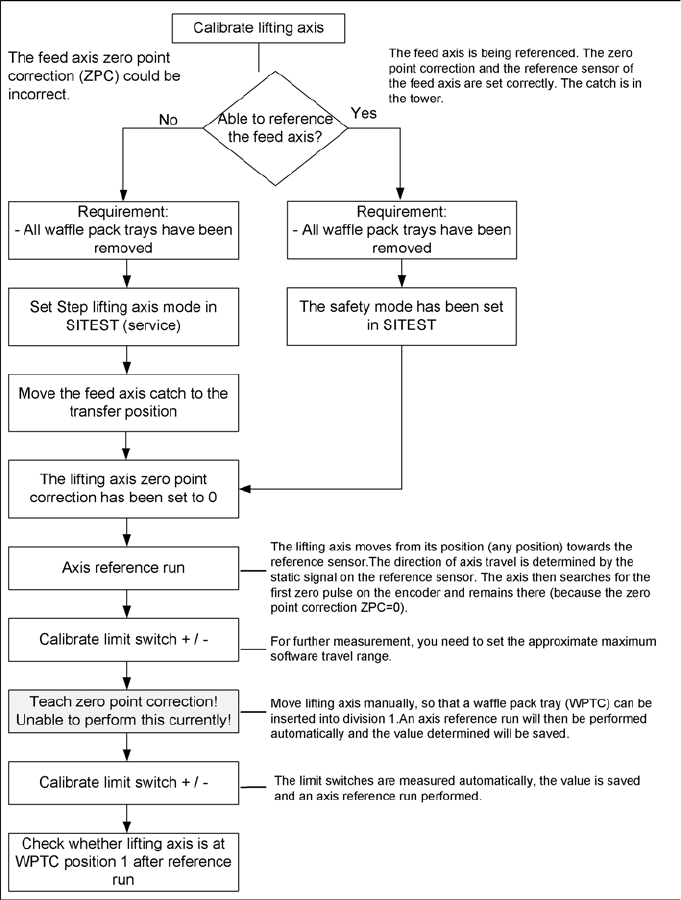
4.1.1 Procedure - Calibrating the Lifting Axis