WPC4 services manual.pdf - 第87页
SITEST for WPC4 Positioning Data SITEST Axes Service Manual SIPLACE WPC4 87 Cancel: Closes the dialog box and rejects any chan ges made. Edit...: Open s a dialog box in which you ca n enter the required sp eed and ac…
SITEST for WPC4
SITEST Axes Standard Values
86 Service Manual SIPLACE WPC4
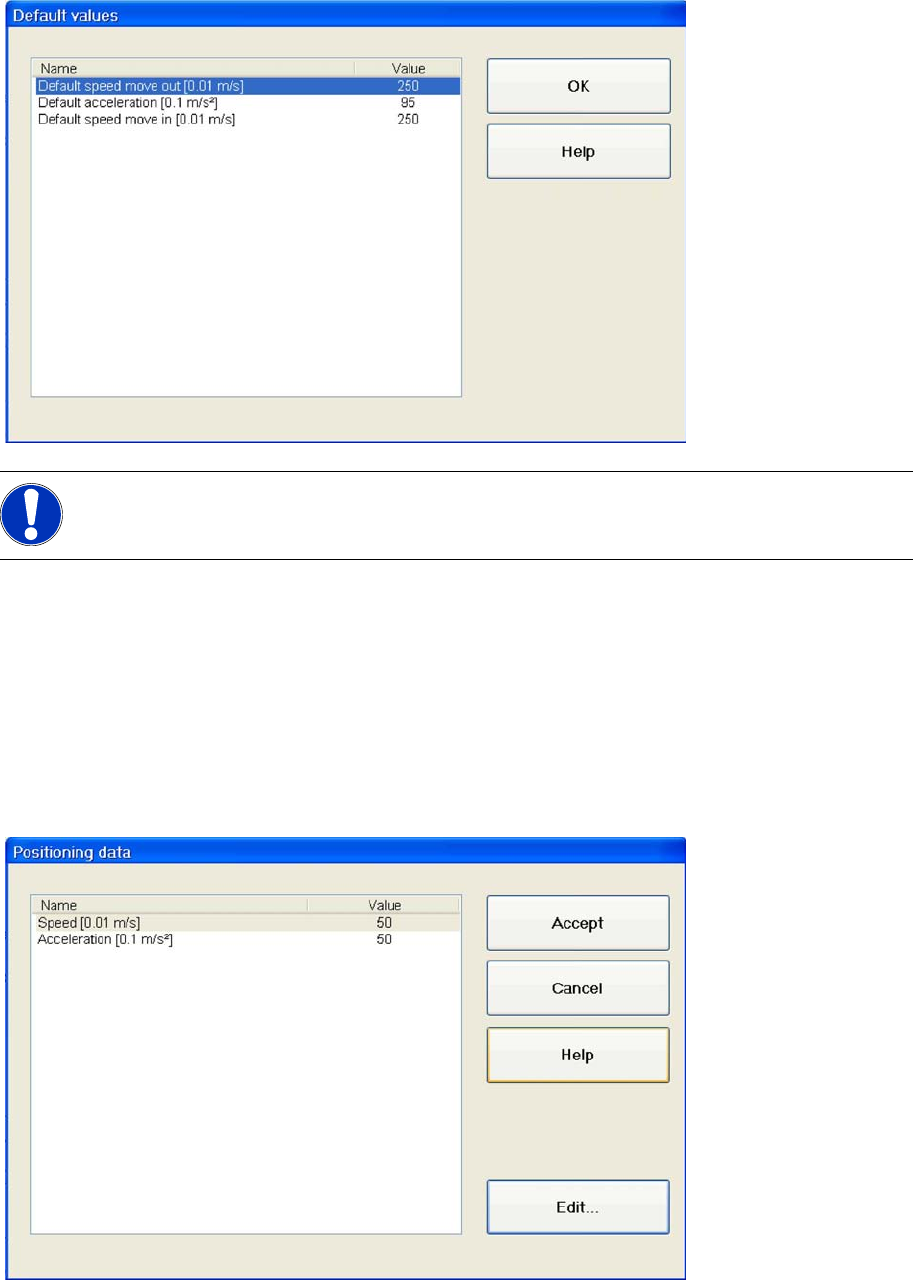
5.7.5 Standard Values
Default speed [0.01 m/s]: Shows the maximum speed of the selected axis.
Default acceleration [0.1 m/s²]: Shows the maximum acceleration with which the feed axis moves
out of the tower.
Default removal speed [0.01 m/s]:Shows the maximum acceleration with which the feed axis
moves into the tower.
OK : Closes the dialog box.
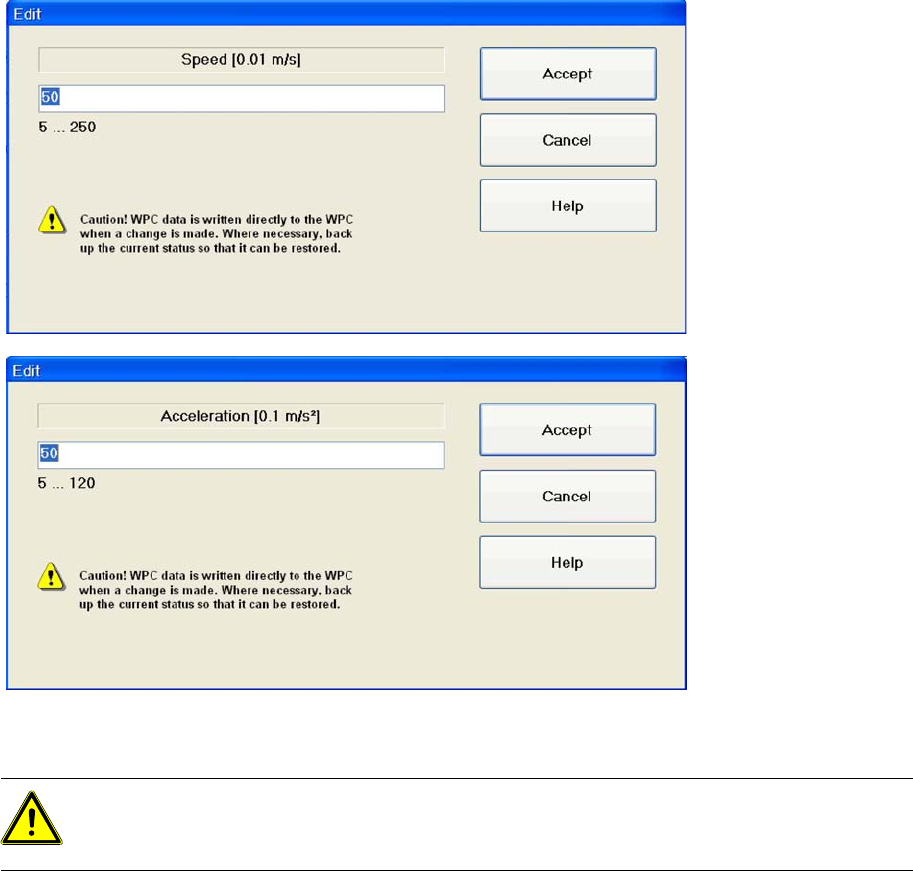
5.7.6 Positioning Data
Speed [0.01 m/s]: Shows the current speed of the selected axis.
Acceleration [0.1 m/s²]: Shows the current acceleration of the selected axis.
Accept: Confirms the entry and closes the dialog box.
NOTE:
The following parameters are for information purposes only and can not be edited.
SITEST for WPC4
Positioning Data SITEST Axes
Service Manual SIPLACE WPC4
87
Cancel: Closes the dialog box and rejects any changes made.
Edit...: Opens a dialog box in which you can enter the required speed and acceleration.
Setting values
X Mark the parameter which you want to change.
X Select
Edit..
.
X Enter the required value in the input field. Make sure the value entered is within the permissible limits.
X Select
Accept
to confirm your entry or
Cancel
to reject the entry.
ATTENTION:
WPC machine data is saved directly in the WPC when a change is made.
Back up the current status, so that is can be restored.
SITEST for WPC4
SITEST Feed Axis Settings Positioning Data
88 Service Manual SIPLACE WPC4
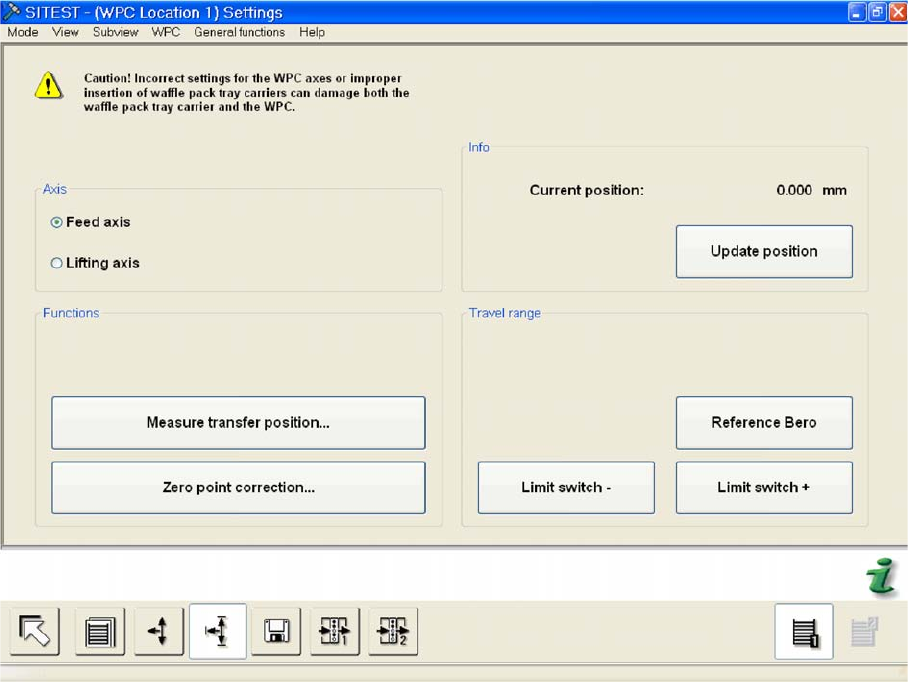
5.8 SITEST Feed Axis Settings
Menu field: Axis,
This where you can select the WPC axis to be checked or set.
Feed axis: Performs the selected functions for the feed axis.
Lifting axis: Performs the selected functions for the lifting axis.
Menu field: Functions
Measure transfer position...: Opens a dialog box with a warning.
Zero point correction ..: Opens a dialog box in which the feed axis zero point can be set.
Menu field: Info
Current position: Shows the current position of the activated axis in mm.
Update position: Updates the position shown for the activated axis.
Menu field: Travel range
Reference bero: Moves the selected axis to the reference proximity switch so that the position of
the proximity switch can be redetermined.The position determined is then shown in a dialog box.
Select
OK
to open another dialog box. Select
OK
to start a reference run of the axis.
Limit switch +: Moves the selected axis to the limit switch so that the maximum approach position
can be redetermined. The position determined is then shown in a dialog box. Select
OK
to open
another dialog box. Select
OK
to start a reference run of the axis.
Limit switch -: Moves the selected axis to the limit switch so that the minimum approach position
can be redetermined. The position determined is then shown in a dialog box. Select
OK
to open
another dialog box. Select
OK
to start a reference run of the axis.