TM4230.SmartRecognition.pdf - 第14页
S M T S o f t w a r e E n g i n e e r i n g G r o u p I M O p e r a t i o n s Y A M A H A M O T O R C O . , L T D . MDOC-SOFT50185 11) Save Model Press the [OK] button to s ave the created model data. ※ [C…
SMTSoftwareEngineeringGroup
IMOperationsYAMAHAMOTORCO.,LTD.
MDOC-SOFT50185
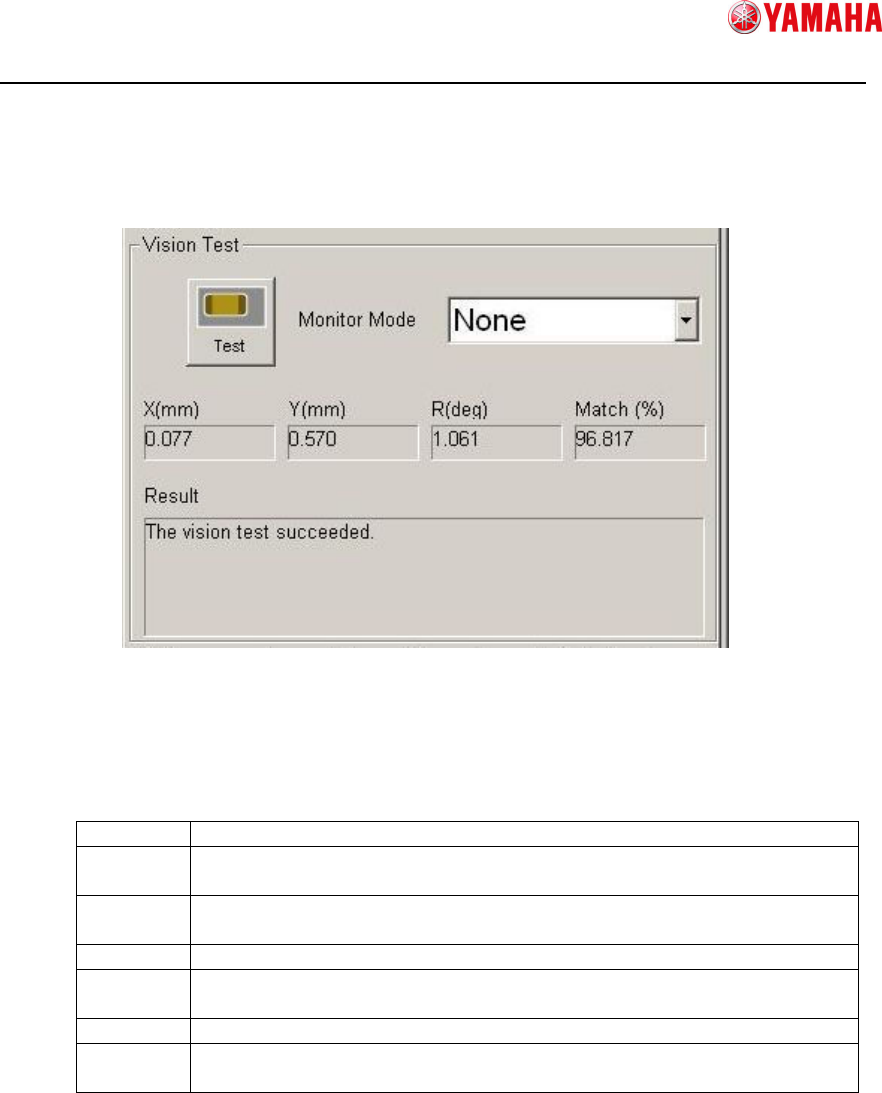
10) Vision test
Executes a vision test with the created model data and the recognition condition
setting. This checks whether or not the recognition result has any fault.
① Test
Executes a recognition test.
② Monitor Mode
Changes the monitor mode of recognition result displayed on the vision window.
None Displays only the parts image.
Vision
Result
Displays the recognition result values.
Detection
Range
Displays the edge detection range.
Model Displays the model data.
Edge
Pos.
Displays the detected edges.
Last Pos.
Displays the center of parts.
Detail
Setting
Use this to display with some results at once.
③ Recognition Result
Displays recognition result.
X, Y, R : Displays difference between recognition basis and result.
Match : Displays matching value of recognition result.
④ Recognition Result (Message)
Displays a recognition result message.
If recognition test is failed, error cause and error number are displayed.
①
①①
①
②
②②
②
③
③③
③
④
④④
④

SMTSoftwareEngineeringGroup
IMOperationsYAMAHAMOTORCO.,LTD.
MDOC-SOFT50185
11) Save Model
Press the [OK] button to save the created model data.
※[Caution] When you press the [OK] button, you go back to the [Parts Adjust] screen,
with the model data still kept in the parts adjust data.
However, please note that if you press the [Cancel] button on the [Parts Adjust]
screen, the model data will be deleted.

SMTSoftwareEngineeringGroup
IMOperationsYAMAHAMOTORCO.,LTD.
MDOC-SOFT50185
4.3. Error Message
Error Message
Number Title Cause and Countermeasure
Ea2755
SMART RECOGNITION
DATA READ ERROR
Failed to read Smart Recognition Data.
[Cause]
Model data is invalid.
No model doesn’t exist.
[Countermeasure]
Check if you have finished to create model data
for Smart Recognition.
Ea7712 INITIALIZATION ERROR
It failed to initialize vision system.
[Cause]
The machine doesn’t have valid system
board.(With 1GB or more size RAM)
[Countermeasure]
1. Change [Setting] - [Installation] -
[Smart Recognition] to [Not Use].
2. Change to valid system board.
Ea12815 Smart Recognition Error
Result from checking detected edges,
this parts is not applicable for Smart
Recognition.
Check the following items, and get image
again.
[Cause]
The number of detected edges is too small.
[Countermeasure]
1. Select detected area to enclose whole parts.
2. Change the light setting.
- Light type
- Light level