00195987-03_VB_SWS_Software_3.0_DE_EN.pdf - 第28页
SIPLACE SWS Software 3. 0 / Versionsbeschreibung / Ve rsion Description Ausgabe 12/2014 Edition 28 12.6 Mapped Wafer - Refere nce Points 12.6.1 Teaching 4 Reference Points The SWS software supports teac hing of four refe…
SIPLACE SWS Software 3.0 /
Versionsbeschreibung / Version Description Ausgabe 12/2014 Edition
27
12 SWS Software 2.0 Features
The SWS software 2.0 includes all the functions of the SWS software 1. 2. The key new features of
the SWS software 2.0 are listed below.
12.1 LAN Connection to Station Software 707
In addition to the connection via CAN with the station software 605 SP5, the SWS software
supports a connection to machines via LAN with station software 707.
12.2 Managing 2 Different Transfer Positions
In combination with the station software 707 and the SWS software 2.0, 2 different transfer
positions are managed for operation with 2 nozzles. This enables you to set the transfer position
per nozzle.
12.3 Operation with 2 Nozzles
The SWS software supports operation with 2 nozzles.
12.4 Frame-Offset Compensation for Start Dies
The SWS software supports the frame-offset compensation during teaching for start dies or
reference points with static starting position.
12.5 Wafer Edge Recognition for Square Wafers
The SWS software supports wafer edge recognition of square wafers and ellipses.
SIPLACE SWS Software 3.0 /
Versionsbeschreibung / Version Description Ausgabe 12/2014 Edition
28
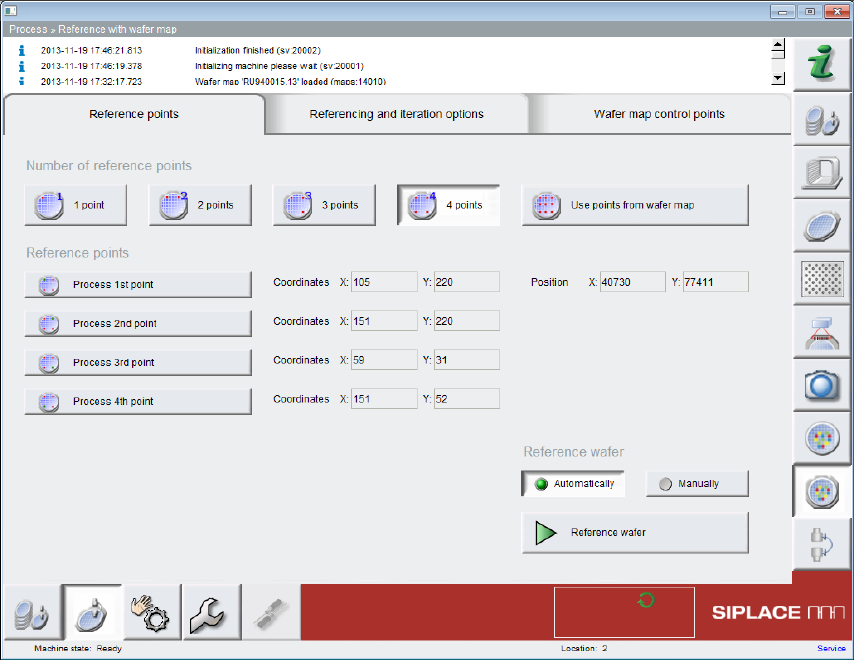
12.6 Mapped Wafer - Reference Points
12.6.1 Teaching 4 Reference Points
The SWS software supports teaching of four reference points instead of three reference points, as
in previous versions.
12.6.2 Applying Reference Points from the Wafer Map
The SWS software supports the application of reference points from the wafer map.
SIPLACE SWS Software 3.0 /
Versionsbeschreibung / Version Description Ausgabe 12/2014 Edition
29
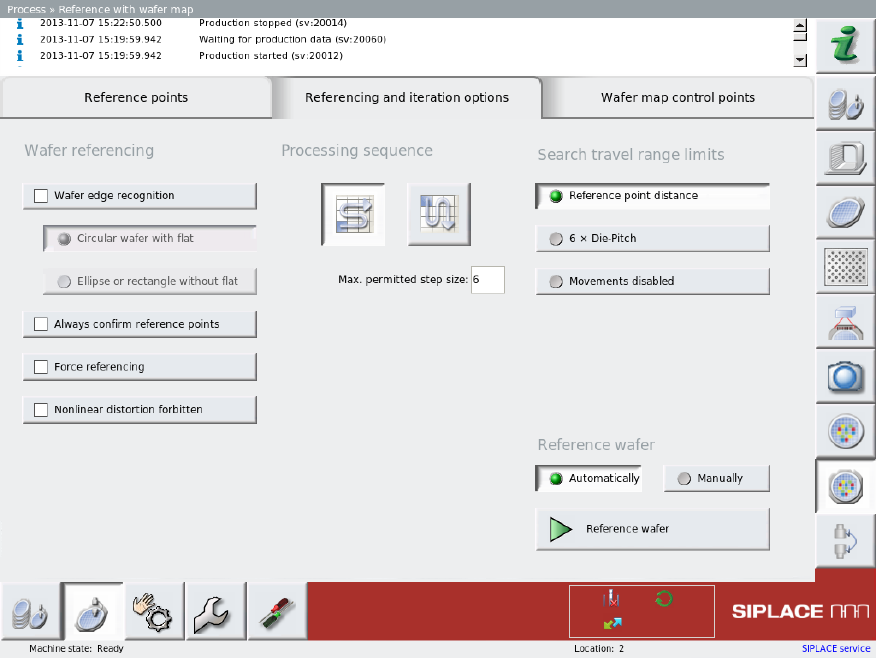
12.7 Mapped Wafer – Referencing and Iteration Options
12.7.1 Limiting the ROI for Wafer Referencing
If the reference point is not found at the theoretical position, a search will be triggered around the
theoretical position, during which the wafer table travels in a spiral pattern.
12.7.2 Forcing Referencing After Wafer Change
The Force referencing options ensures that the wafer is re-referenced at each wafer change. This
compensates any imprecision during wafer clamping.
12.7.3 Prohibiting Nonlinear Distortion
The Nonlinear distortion forbidden options checks the SWS software to see whether the pitch or
distortion between the individual reference points differs enough for there to be a different amount
of dies present in the rows and columns. If this option is enabled, referencing will be aborted in this
case.