00193871-06.pdf - 第12页
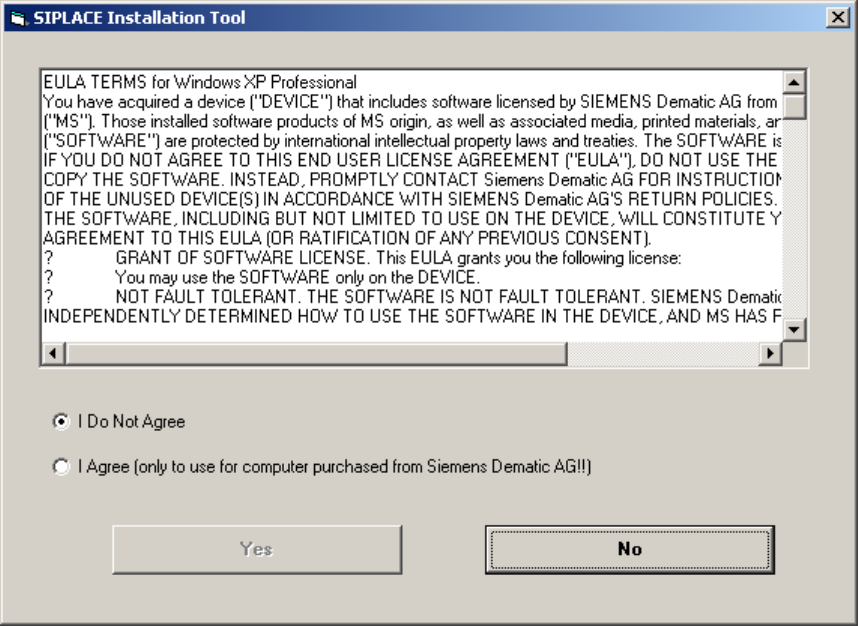
Installation Manual for Windows XP (unattended setup) for SIPLACE Computers 01/2005 US+DE 6.2 Preparation for the unattended setup Windows XP Fig. 6-1: License Agreement 12
Installation Manual for Windows XP (unattended setup) for SIPLACE Computers 01/2005 US+DE
6 Installation
Note:
In the general part of the setup, you have to answer with „Yes“ or „No“. In the second part you
can switch between the wizard dialogs with „Next“ or „Back“ buttons.
With the „Cancel“ button you can abort the whole installation procedure.
6.1 Installation procedure
→ Insert the BOOT CD-ROM (Boot CDROM for Windows XP Professional) to start the unattended
setup into the CD ROM drive.
→ Reboot the computer.
→ Please change the boot devices in your BIOS if the system doesn’t accept the CD ROM drive
as the boot medium.
→ Attention for Scenic C610 computers: If you connect your keyboard via USB interface, you
have to ensure the “legacy USB” option in the System BIOS to be enabled. To do this:
press the F2 key at boot time.
Navigate to the “Advanced” menue.
You will see a screen that looks like this:
Advanced
Peripheral Configuration
------------------------------------------------
Serial 1: [Enabled]
Serial 1 Address: [3F8h, IRQ 4]
Serial 2: [Enabled]
Serial 1 Address: [2F8h, IRQ 3]
Parallel: [Enabled]
Parallel Mode: [Printer]
Parallel Address: [378h, IRQ 7]
USB Host Controller: [Enabled]
USB 2.0 Host Controller: [Enabled]
USB Legacy Support: [Disabled]
Serial ATA Configuration
Diskette Controller: [Enabled]
Mouse Controller: [Enabled]
LAN Controller: [Enabled]
LAN Remote Boot: [Disabled]
Audio Controller: [Disabled]
Item Specific Help
-----------------------------------
F1 Info
To activate the option “USB Legacy Support”, navigate to it and press the space bar.
After that you have to exit the BIOS setup and save your changes.
11
Installation Manual for Windows XP (unattended setup) for SIPLACE Computers 01/2005 US+DE
6.2 Preparation for the unattended setup Windows XP
Fig. 6-1: License Agreement
12
Installation Manual for Windows XP (unattended setup) for SIPLACE Computers 01/2005 US+DE
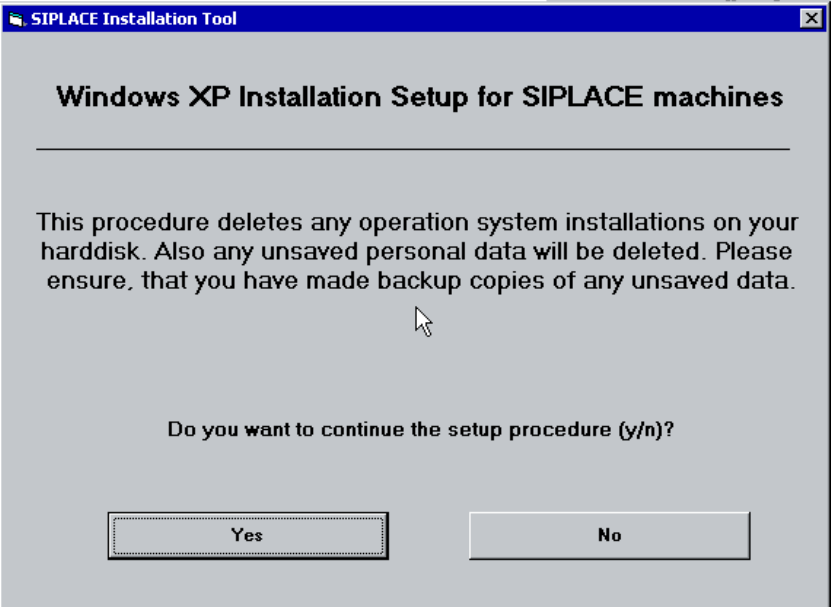
With the following dialog you can start the setup:
Fig. 6-2: Warning
13