00193871-06.pdf - 第22页
Installation Manual for Windows XP (unattended setup) for SIPLACE Computers 01/2005 US+DE 6.11 Display of the configured information Here you will find a display with all configured netwo rk parameters (check display ). …
Installation Manual for Windows XP (unattended setup) for SIPLACE Computers 01/2005 US+DE
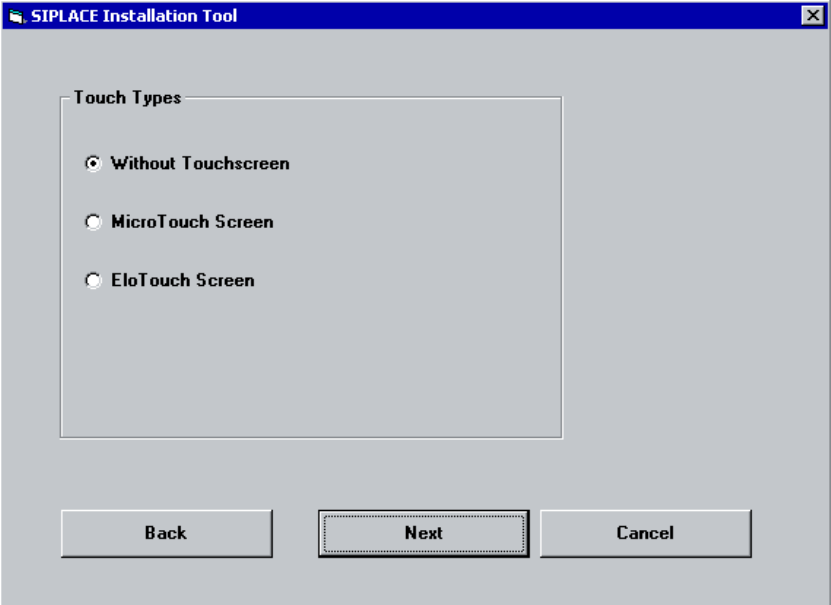
6.10 Touch screen type selection
If you selected the installation for the SIPLACE Product “station computer” you have to configure the
Touch Screen.
Fig. 6-10: Touch screen types
→ Select the correct Type.
→ Click the Next button.
21
Installation Manual for Windows XP (unattended setup) for SIPLACE Computers 01/2005 US+DE
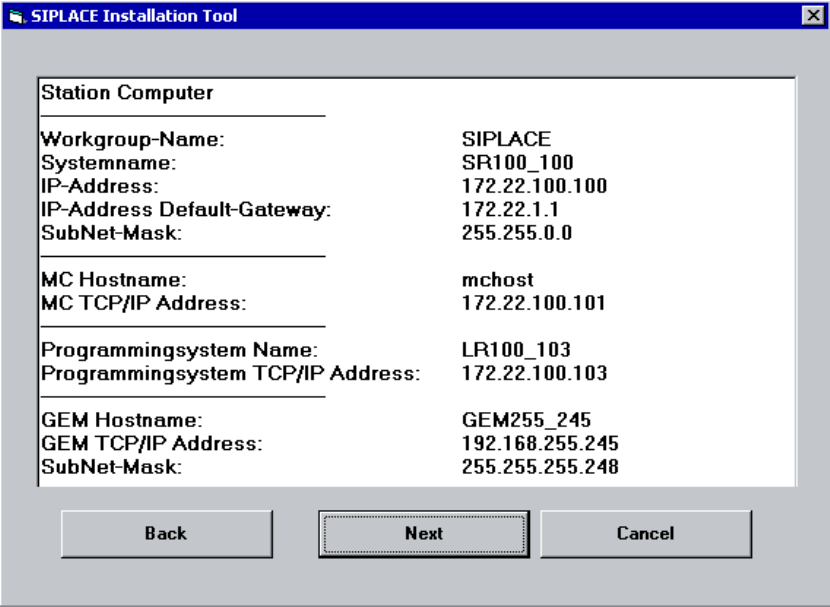
6.11 Display of the configured information
Here you will find a display with all configured network parameters (check display). You can change
the data if necessary.
Fig. 6-11: Configurations
→ Check the information.
→ Click the Next button.
22
Installation Manual for Windows XP (unattended setup) for SIPLACE Computers 01/2005 US+DE
6.12 Default settings and final administration tasks for
the station computer
6.12.1 Default-Settings
- Screen area: 1024 x 786, 16777216 Colors, 60 Hz Refresh Frequency
- Time Zone: GMT (London, Edinburgh, Lisbon)
- Keyboard-Layout: German (Germany)
- Network Protocol: TCP/IP
- In addition to the default user groups of Windows XP, the following users and user groups will be
configured:
→ User: Operator, Siemens-Techniker, Einrichter
→ User groups: _Operator, _Einrichter, _Siemens-Techniker
6.12.2 Passwords
6.12.2.1 Administrator
After the unattended setup, the default password for the local administrator is MS128. Please assign a
new password for your administrator!
6.12.2.2 Operator
The default user „Operator“ has the default password “operator”. Please do not change the password.
Otherwise the automatic logon is not possible.
6.12.2.3 Engineer
The user „Einrichter“ will be used for further options. The default password is “einrichter”. This user
doesn’t have further rights!
6.12.2.4 Administrator Group
The user „ Siemens-Techniker “ is in the local administrator group. Don’t remove this user from the
group. Otherwise the Siemens Personnel can’t perform any maintenance. The SIPLACE Service
Personnel knows the password. Don’t change the password!
6.12.2.5 Other settings
The passwords never expire!
6.12.3 Interrupting an automatic login at the Station
To install new software (e.g. station software or machine controller) or to execute maintenance on the
operating system, you have to interrupt the automatic login. Please press the Shift key during the
reboot (blue screen) or during the logout.
To activate the automatic logon again, please login as Operator with the password operator.
23