00193871-06.pdf - 第7页
Installation Manual for Windows XP (unattended setup) for SIPLACE Computers 01/2005 US+DE 1 General 1.1 License Agreement Warning: Please use this operating system only for SIPLACE machi nes and for computers with the pr…
Installation Manual for Windows XP (unattended setup) for SIPLACE Computers 01/2005 US+DE
6

Installation Manual for Windows XP (unattended setup) for SIPLACE Computers 01/2005 US+DE
1 General
1.1 License Agreement
Warning:
Please use this operating system only for SIPLACE machines and for computers with the
programming system SIPLACE Pro.
This CD contains pre-configured software with which to install a pre-set operating system on your
machine if it is a member of the SIPLACE family.
Siemens L&A AG has the sole responsibility for executing this software.
Siemens L&A AG provides support for this product.
1.2 Installation process
This manual describes the unattended Windows XP Setup for SIPLACE placement machine
computers and SIPLACE programming system computers.
The unattended setup was developed to execute a quick, and complete installation of Windows XP
Professional for all SIPLACE computers and to meet all requirements. The setup can be executed on
all computer systems described in chapter 4. The unattended setup is a quick and
reliable alternative
to the default Microsoft setup.
The setup provides the Windows XP operating system only in English (American).
Since the CD-ROM is bootable, you can start the installation simply by rebooting the system with the
CD in the CD-ROM drive. This requires that BIOS is set up to boot from a CD before the hard drive.
Note:
All data on the hard disk will be destroyed during the unattended setup. Therefore you have to
save necessary data before you start the setup.
The unattended setup will lead the user in English. Please refer to the following chapters.
During the installation you have to enter information about the system configuration (see chapter
„Required Parameters“).
7
Installation Manual for Windows XP (unattended setup) for SIPLACE Computers 01/2005 US+DE
2 Scope of delivery
- XP-Installation Package: (Order No 00374277-06)
- CD-ROM: (Order No. 00374734-06) “Boot CDROM for Windows XP Professional
Operating System”
- 1 Document: (Order No. 00193871-06) “Installation Manual Unattended Setup
Windows XP”
3 Interfaces
3.1 Network Cards for HFx
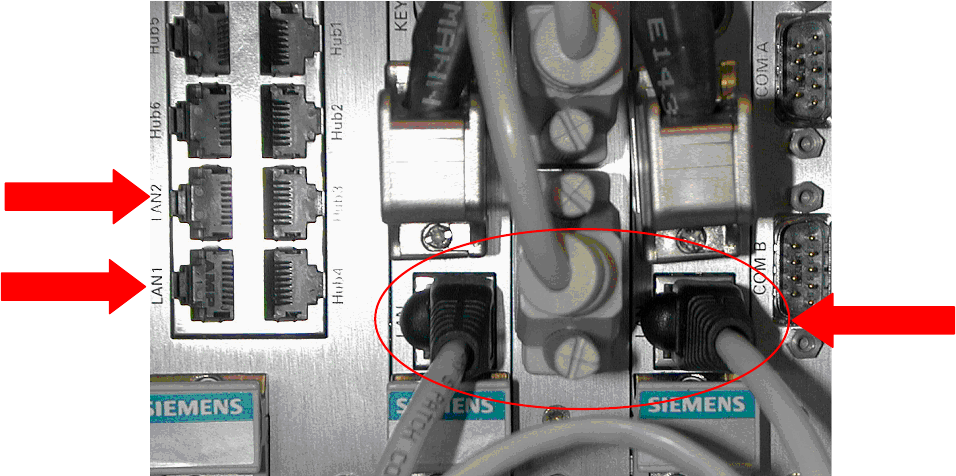
The new station computer PC 076 (1GHz) has an integrated network card and a network card with
two separate network connections. For the communication with the Machine controller, only the
integrated network card will be used (see Fig. 3-1:). The other network card will be used for the
connection to the programming system and for the GEM option.
1
3
2
Fig. 3-1: Connections
Legend:
• 1: Connection to the programming system
• 2: Connection to the GEM Host
• 3: Connection between station computer and machine controller a special cable is used)
8