TK26714.PickHeightTeaching.pdf - 第6页
SMT Software Engineering Group IM Operations Y AMAHA MOTOR CO., L TD MDOC-SOFT50389 6/18 - T eaching results are main tained until board data is read. < Note > - Pick height teaching is performed one b…
SMT Software Engineering Group
IM Operations YAMAHA MOTOR CO., LTD
MDOC-SOFT50389
5/18
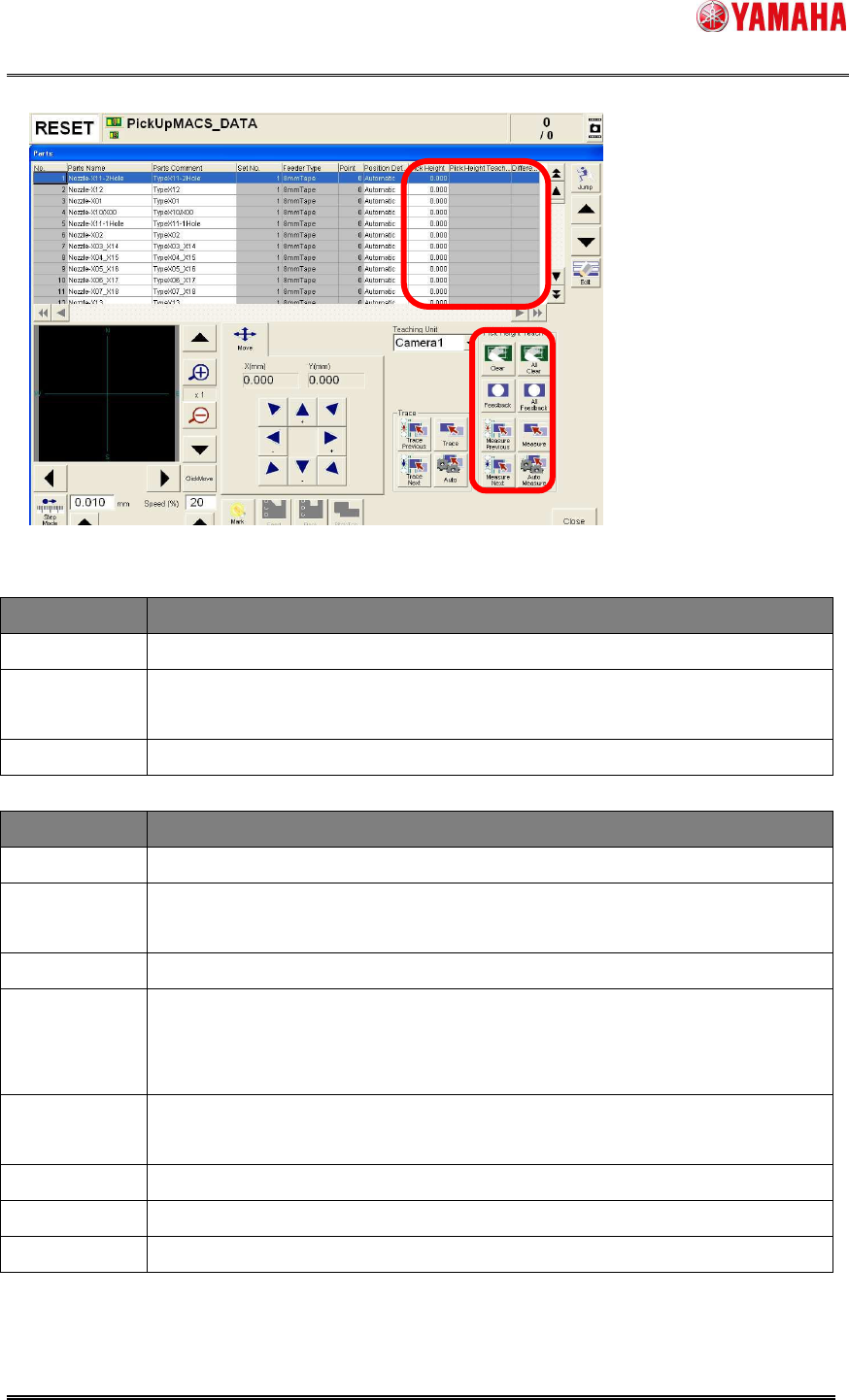
Fig 3.1 Teach screen with Pick Height Teaching
<Contents on the grid>
Item Description
Pick Height
Pick height currently specified. You can edit this item directly.
Pick Height
Teach Result
Measured result of pick height. If measurement is failed or undone, this
item is shown with blank.
Difference
Difference between the original pick height and teaching height.
<Buttons on the right bottom>
Item Description
Measure
Pick height is measured for the parts selected on the grid.
Measure
Previous
Pick height is measured for the one before the selected parts on the grid.
Measure Next
Pick height is measured for the one next to the selected parts on the grid.
Auto Measure
When the [Measure Previous] or [Measure Next] button is pressed with
this button, pick height is measured for the next or previous parts in order
continuously.(Continuous teaching)
Feedback
When this button is pressed, teaching result is applied to pick height of the
selected parts.
All Feedback
All teaching results are applied to pick height of all parts.
Clear
Teaching result of selected parts is cleared.
All Clear
All teaching results are cleared.
< Caution >
- These items are grayed out when the feeder or nozzle of selected parts is unsupported.
At executing [Auto Measure], such feeders and nozzles are skipped.
SMT Software Engineering Group
IM Operations YAMAHA MOTOR CO., LTD
MDOC-SOFT50389
6/18
- Teaching results are maintained until board data is read.
< Note >
- Pick height teaching is performed one by one.
- It takes about 5 to 6 seconds per point.
3.2 Pick Height Take Over Function
When [TakeOver PickHeight] is enabled in the machine setting, “Pick Height” is taken over
to other board data, so that you don’t need to perform pick height teaching for every board
data.
To take over pick height, the target parts need to be used for production, or the board data
is saved after pick height feedback. Target pick height is written and read through a
takeover file at reading board data, or when the feeder is removed and attached.
File name
Feeder_(Feeder ID)@(Parts Name).sts
File contents ・Pick Height
* When the “Parts Data Auto Tuning” function is used, the tuning data is
also included.
Reading (take
over) timing
・When board data is read
・When feeder is attached
Take over
condition
・[Feeder ID] and [Parts Name] match
・Feeder is attached at reading board data.
・Writing conditions are not satisfied at attaching feeder.
Writing timing ・Before board data is read.
・Power OFF
・When the target feeder is removed
Writing
condition
・Some parts are mounted in auto-running.
or
・The [Feedback] button is pressed or [Pick Height] is edited, then the
board data is saved.
Delete timing
and condition
・When board data is read. (When server path is undefined, and takeover
files are over 2000, the older files are deleted.)
< Note >
・ File saving path is “D:¥Machine¥Status¥PartsTakeOver¥”, and can be changed on the
[Software Setting] – [Monitor] – [Parts Data Take Over] dialog.
・ When reading or writing of takeover file is failed, “Ea12994:
Failed to write parts data
take over file” or “Ea12995:
Failed to read parts data take over file” is recorded in the
error log.

SMT Software Engineering Group
IM Operations YAMAHA MOTOR CO., LTD
MDOC-SOFT50389
7/18
3.3 Error Message
The below is the error messages added for this function.
Error No. Title Cause and Solution
2793
PICK HEIGHT
TEACH FILE
READ ERROR
Failed to read following file.
Restore the machine data with System Backup.
Re-install the software.
2794
PICK HEIGHT
TEACH FILE
WRITE ERROR
Unable to write the setting file of Pick Height Teach.
Remove read-only, and try it again.
Restore the machine data with [System Backup] - [Restore], and
try it again.
2980
PICK HEIGHT
TEACH FAILED
Causes
- Nozzle is clogged, so that change of vacuum level will not be
detected correctly.
- There is an unknown object that can bother the measurement.
- Surface of the measure point is uneven.
- The target feeder or tape is not attached.
Solutions:
- Clean the nozzle.
- Check the measure point.
- Check the condition of the target feeder and tape.
2981
FEEDER GUIDE
RECOGNITION
FAILED
Causes:
- The recognition position is unclean.
- The recognition mark data is not correct.
Solutions:
- Clean the position, and ensure no unknown object is there.
- Check the mark data.