00198368-01_UM_SIPLACESX12-DockingStation_DE_EN_ZH.pdf - 第75页
User manual Docking station for SIPLACE SX component trolleys 4 Operation Edition 02/2018 4.4 Tearing down feeder modules 75 4.4 T earing down feeder modules T o avoid unthreading the t apes manually before tea rdown, us…
4 Operation User manual Docking station for SIPLACE SX component trolleys
4.3 Docking and undocking the component trolley Edition 02/2018
74
4.3.1 Docking the SIPLACE SX component trolley onto the docking station
4
Push the component trolley into the docking station, until it is locked by the pneumatic cylin-
der.
– The green button (item 3 in fig. 4.1 - 1
, page 69) and the white button (item 2 in fig. 4.1 - 1,
page 69
) will flash briefly. Once the component trolley is locked into place properly, the white
button will shine continuously (component trolley unlocking function).
– If the component trolley is not properly locked into place, the white button will flash.
– If the feeder modules are locked into place properly, the green button will shine.
4.3.2 Undocking the SIPLACE SX component trolley from the docking station
4
In order to unlock the component trolley, the feeder modules must be locked into place.
Make sure that the green button (item 3 in fig. 4.1 - 1
, page 69) shines.
Press the white button (item 2 in fig. 4.1 - 1, page 69 ). The component trolley will be released.
Pull the component trolley back and out of the docking station.
WARNING
Risk of injury to hands!
While docking, do not reach into the areas between component trolley and docking sta-
tion.
WARNING
Risk of injury to hands!
While docking, do not reach into the areas between component trolley and docking sta-
tion.
User manual Docking station for SIPLACE SX component trolleys 4 Operation
Edition 02/2018 4.4 Tearing down feeder modules
75
4.4 Tearing down feeder modules
To avoid unthreading the tapes manually before teardown, use the black button (item 3 in fig. 4.1
- 1, page 69). The tapes are moved back and out of the docking station.
4
Cut the cover foil for the feeder modules which you want to tear down.
Press the black button.
– Those tapes for which the cover foil has been cut will be moved back and out of the docking
station.The feeder modules can now be removed.
PLEASE NOTE
Cutting the cover foil
Only those component tapes move back and out, which have had their cover foil cut be-
forehand.
5 Maintenance and service User manual Docking station for SIPLACE SX component trolleys
5.1 Compressed air connection Edition 02/2018
76
5 Maintenance and service
The docking station is almost maintenance-free. Only the following tasks need to be done.
5.1 Compressed air connection
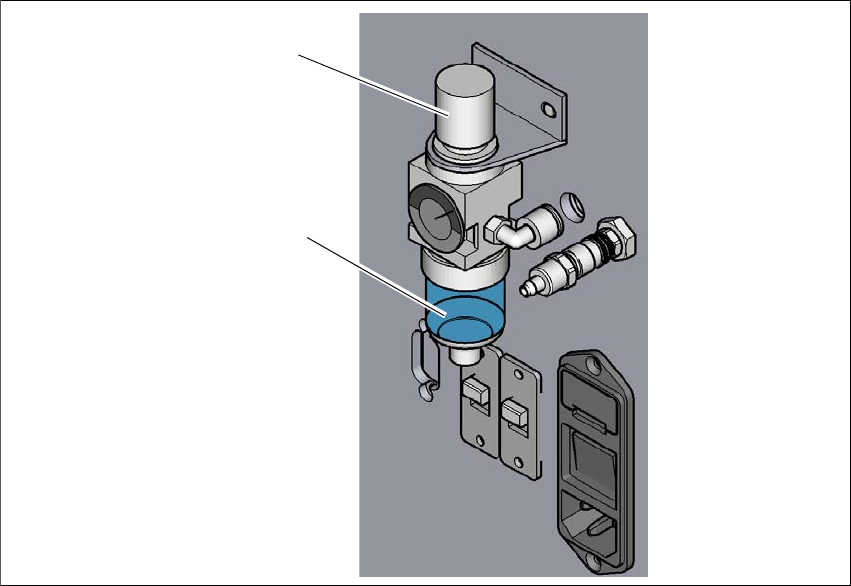
Check the correct setting of the manometer at least once a week. The possible settings can be
found in the technical data.
At the same time, check the condensation tank underneath the manometer. Empty it if water has
collected there. Since the formation of condensation depends greatly on the quality of the com-
pressed air, this interval may need to be shortened or even extended.
After starting with a weekly check, set the interval according to your needs.
5
Fig. 5.1 - 1 Compressed air connection
(1) Manometer
(2) Condensation tank
2
1