Galaxy EX Safety Features.pdf - 第7页
SA FETY FEA TU RES GENERAL Ch apte r Is sue 6, Jun 18 Tech ni cal Ref erenc e Manual 2.7 Lid Bo lt A pn eu mat ical ly ope rate d lid bo lt is fit ted to pre v ent th e f ron t prin thea d c o ver from be ing ra ised dur…
SAFETY FEATURES
GENERAL
2.6 Technical Reference Manual Chapter Issue 6, Jun 18
GENERAL
DEK printing machines incorporate safety features that provide a safe
operating environment for the operator and the machine.
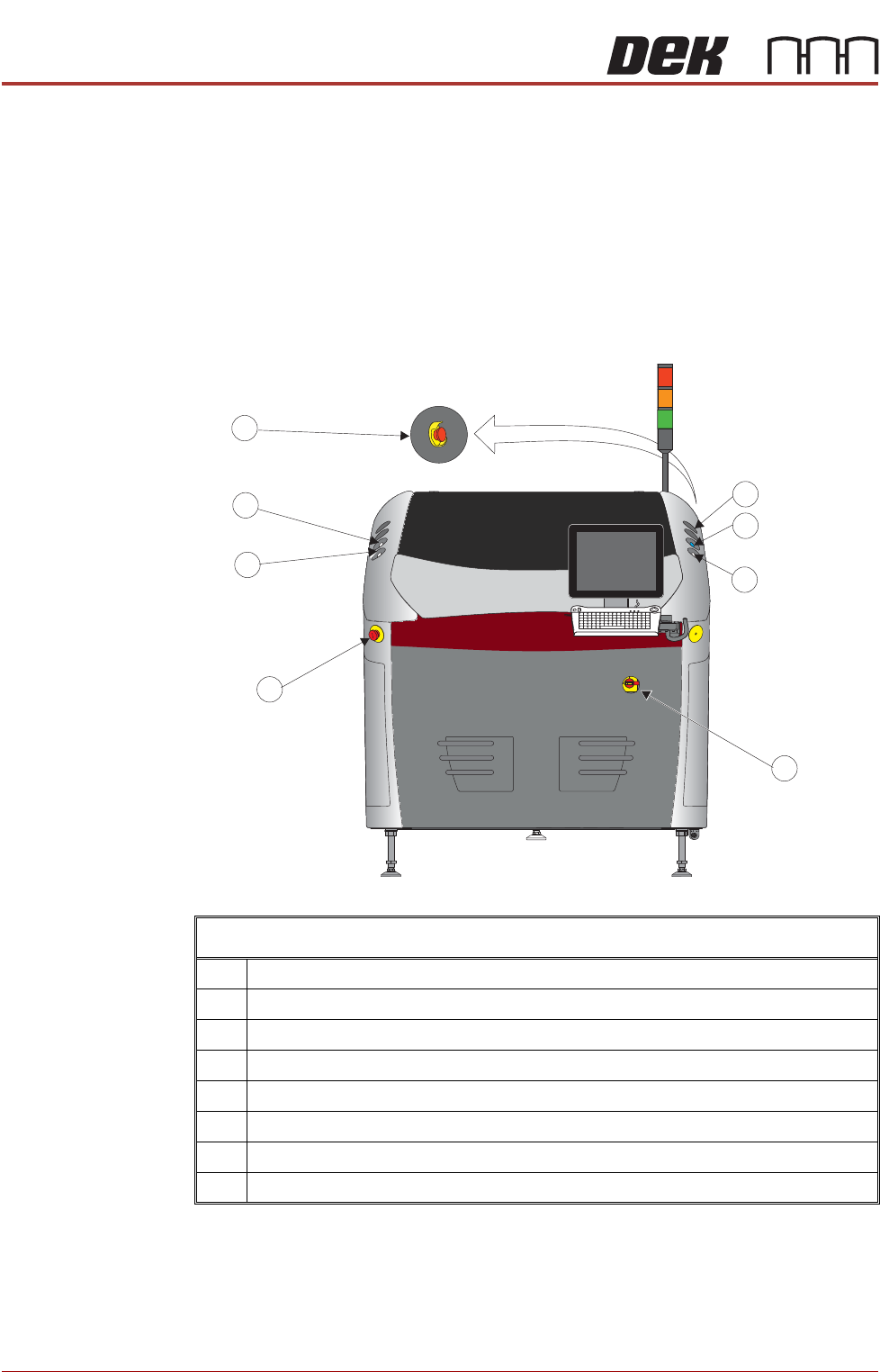
EMO The machine is fitted with two Emergency Machine Off push button control
switches (EMO’s) located at the front and rear of the machine. Operation of an
EMO shuts down the machine.
Cover The printhead cover is fitted with a cam interlock switch to protect personnel
from internal moving parts.
Printer Cover Design - View on Front
1 Start Button
2 System Button
3 Right Jog Button
4 Mains Isolator Switch
5 Emergency Off (EMO)
6 Left Jog Button
7 Internal Light
8 EMO (at the rear)

SAFETY FEATURES
GENERAL
Chapter Issue 6, Jun 18 Technical Reference Manual 2.7
Lid Bolt A pneumatically operated lid bolt is fitted to prevent the front printhead cover
from being raised during the print cycle.
• The lid bolt is withdrawn and the printhead cover may be raised:
• When Open Cover is requested by software
• When pause or stop is selected during a print cycle
• When the EMO is pressed
Safety Devices The safety features designed into this machine are for the protection of all
operator and maintenance personnel. ASM strongly recommend safety
devices are never overridden.
SAFETY FEATURES
GENERAL
2.8 Technical Reference Manual Chapter Issue 6, Jun 18
Two Button
Control Switches
The two button control switches or jog switches are positioned such as to
maintain maximum safety for the operator whilst solvent priming or paper
feeding with the printhead cover open. This requires both buttons to be
depressed simultaneously for the function to become active. The use of these
buttons is dependent on the function selected on the machine monitor. During
normal operation these buttons control paper feed and solvent prime
operations. When in maintenance mode, the two button control switches
control the following diagnostics:
• Print Carriage
• Squeegee Assembly/ProFlow Assembly
• Camera Axes
• Rail System
• Screen Alignment
• Rising Table
Only one button is required to drive the selected mechanism, the two buttons
are used to drive the mechanism in opposite directions, ie jog forward or jog
back.
Emergency
Shutdown
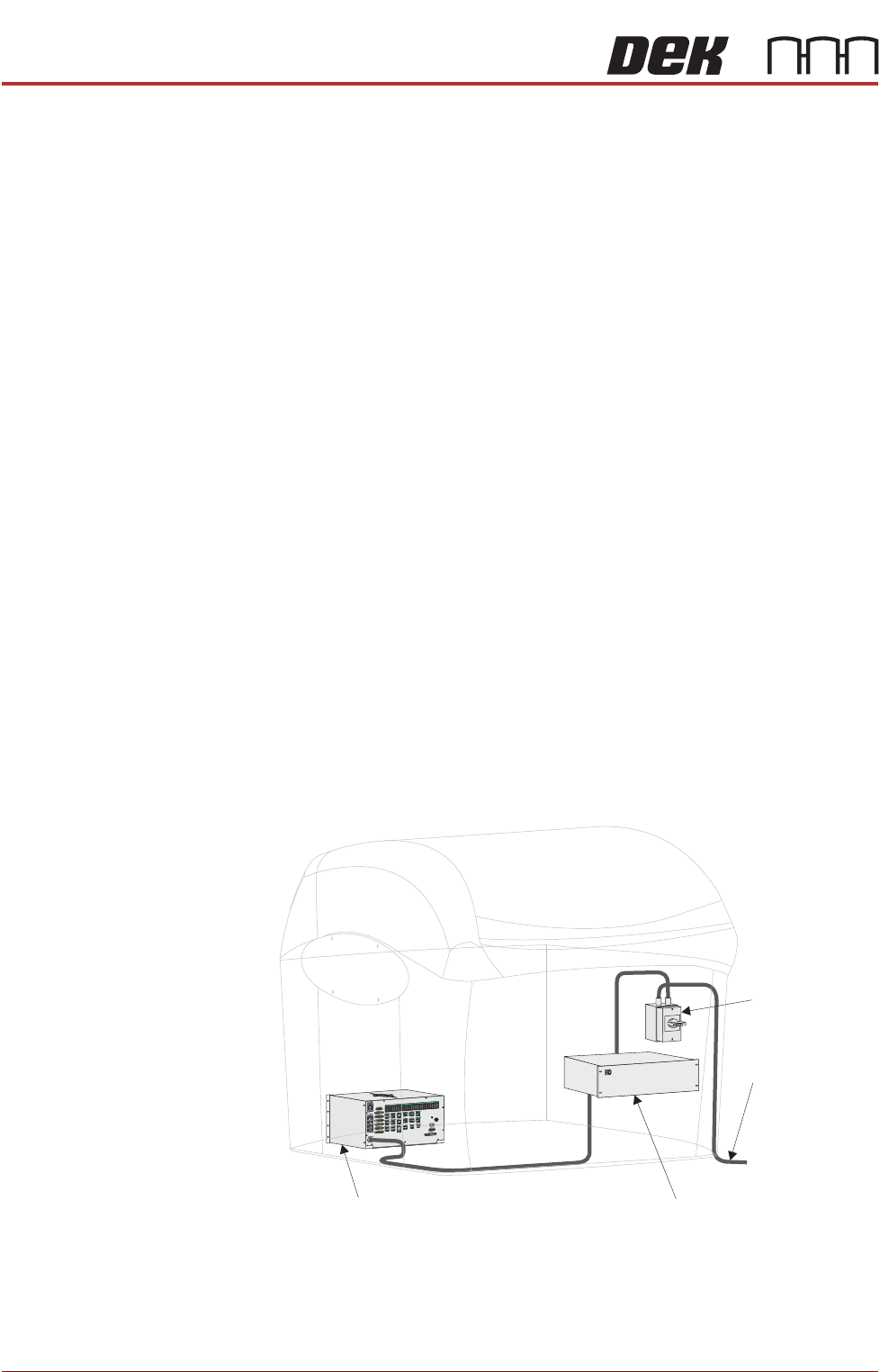
If an emergency stop is initiated via the EMO, all power and pneumatics to the
machine are removed. Electrical power remains to the M39 EMO enclosure
via the mains isolator but is removed from there to the M37 power supply unit.
Switching mains isolator to OFF removes electrical power from the M39 EMO
enclosure. Pneumatic supply is also closed off and any pressurised air
remaining within the machine’s system is vented via the pneumatic dump
valve.
Figure 2-1 Mains Electrical Supply
From Factory
Mains Supply
Mains Isolator
Switch
M37 Power Supply Enclosure
M39 EMO Enclosure