JUKI FX-3R MAINTENANCE GUIDE.pdf - 第59页
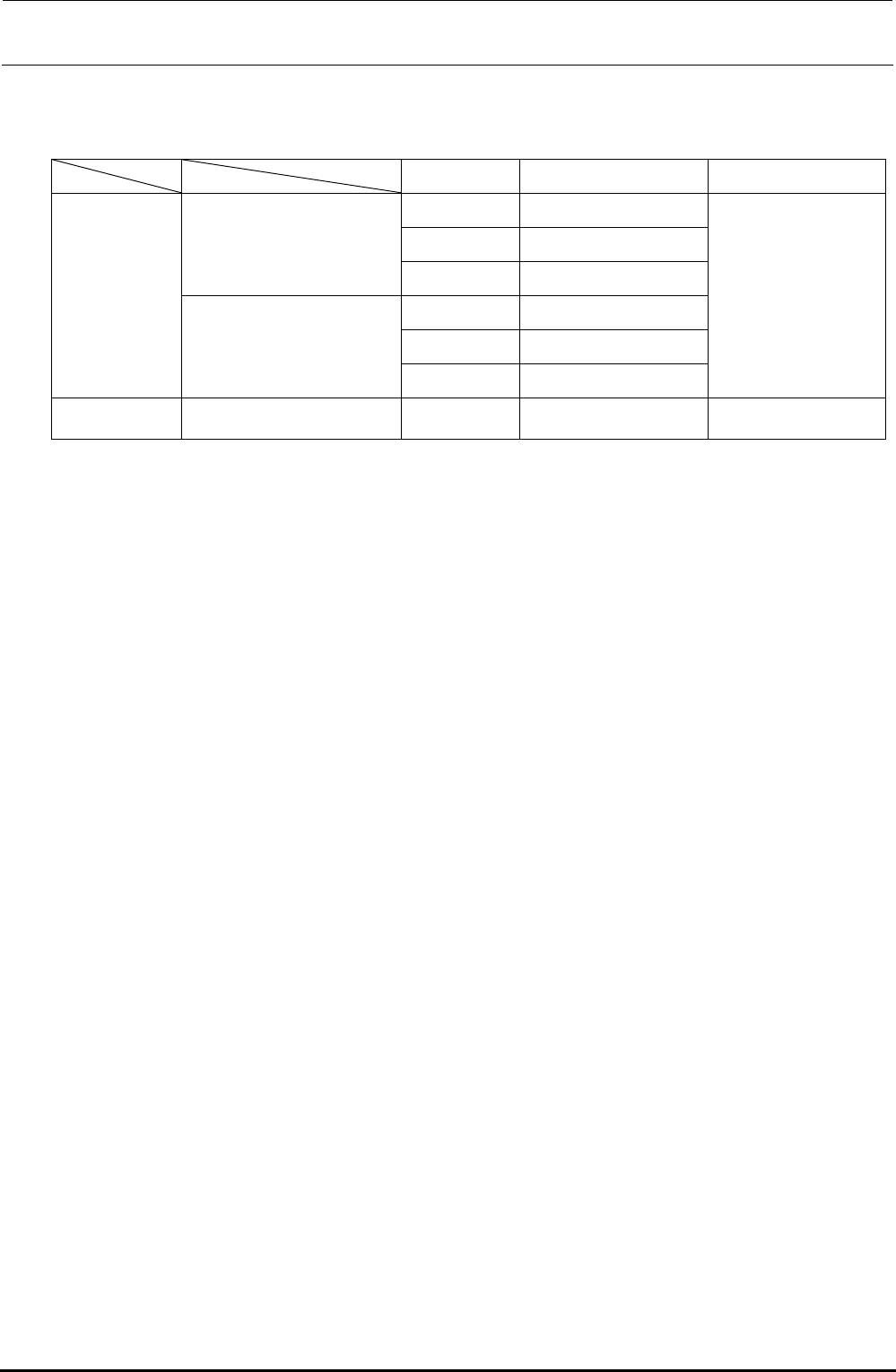
FX-3R Maintenance Guide 5-6 Rev. 1.00 [List of Replacement Parts] Table 5-5-2-1 WAIT/STOP/C-OUT Sensors Part No. Part name Remarks 40047772 WAIT-L SENSOR ASM 40047774 STOP-L SENSOR AS M For transport unit L 40047773 COUT…
FX-3R Maintenance Guide
5-5
Rev. 1.00
5-5. Replacing the WAIT, STOP, and C-OUT Sensors
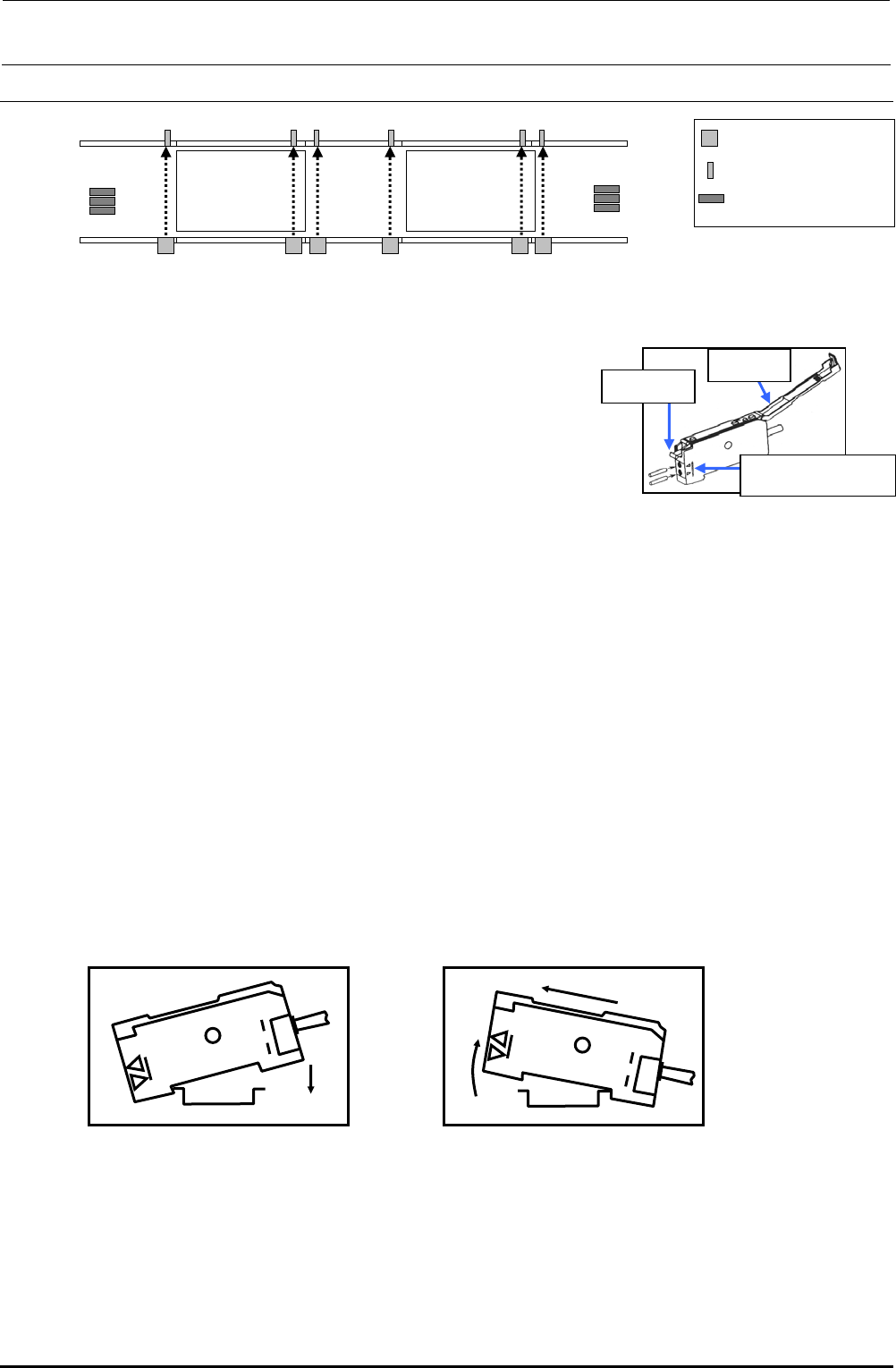
Figure 5-5-1 Placement of Sensors (Left → Right Transport)
5-5-1. Replacing the Fiber
1) Remove the fiber from the transport rail.
2) Lay down the fiber fixing lever of the sensor amplifier to pull
out the fiber.
3) Detach the fiber from the WAIT sensor bracket.
4) When installing new fibers, reassemble the
components in the order of step 3) to 1).
∗ Insert the fiber until it reaches the far position of the
amplifier unit. For the fiber insertion length, refer to
the reference mark for the fiber insertion length.
∗ After replacement, perform the steps described in section 5-5-3, "Adjusting the Sensitivity of
the WAIT/STOP/C-OUT Sensor".
5-5-2. Replacing the Amplifier Unit
<How to mount the amplifier unit>
1) Insert the groove (part A) on the front of the amplifier unit into the DIN rail.
2) Push the rear of the amplifier unit (part B) to fit it completely.
<Detaching the amplifier unit>
1) Push the unit strongly forward (c). The front lock is then released.
2) As shown in the Figure, pull up the unit (d) to detach it.
∗ After replacement, perform the steps described in Subsection 5-5-3, "Adjusting the Sensitivity
of the WAIT/STOP/C-OUT Sensor".
L-STATION R-STATION
WAIT-L WAIT-R
STOP-L COUT-L
STOP-R
COUT-R
WAIT-R
STOP-R
COUT-R
WAIT-L
STOP-L
COUT-L
Sensor emitting area
Sensor receiving area
Amplifier
Operation
cove
r
Fiber fixing
leve
r
Fiber insertion length
reference mark
Figure 5-5-1-1 Sensor Amplifier
A
B
Figure 5-5-2-1
Mounting the Sensor Amplifier
d
c
Figure 5-5-2-2
Detaching the Sensor Amplifier
FX-3R Maintenance Guide
5-6
Rev. 1.00
[List of Replacement Parts]
Table 5-5-2-1 WAIT/STOP/C-OUT Sensors
Part No. Part name Remarks
40047772 WAIT-L SENSOR ASM
40047774 STOP-L SENSOR ASM
For transport unit L
40047773 COUT-L SENSOR ASM
40047775 WAIT-R SENSOR ASM
40047777 STOP-L SENSOR ASM
L specification
For transport unit R
40047776 COUT-R SENSOR ASM
Fiber unit is an
accessory of the
sensor amplifier.
XL specification
Common to all transport units
HD002850000
SENSOR
Sensor only
FX-3R Maintenance Guide
5-7
Rev. 1.00
5-5-3. Adjusting the Sensitivity of the WAIT/STOP/C-OUT Sensor
L specification
<Changing the output>
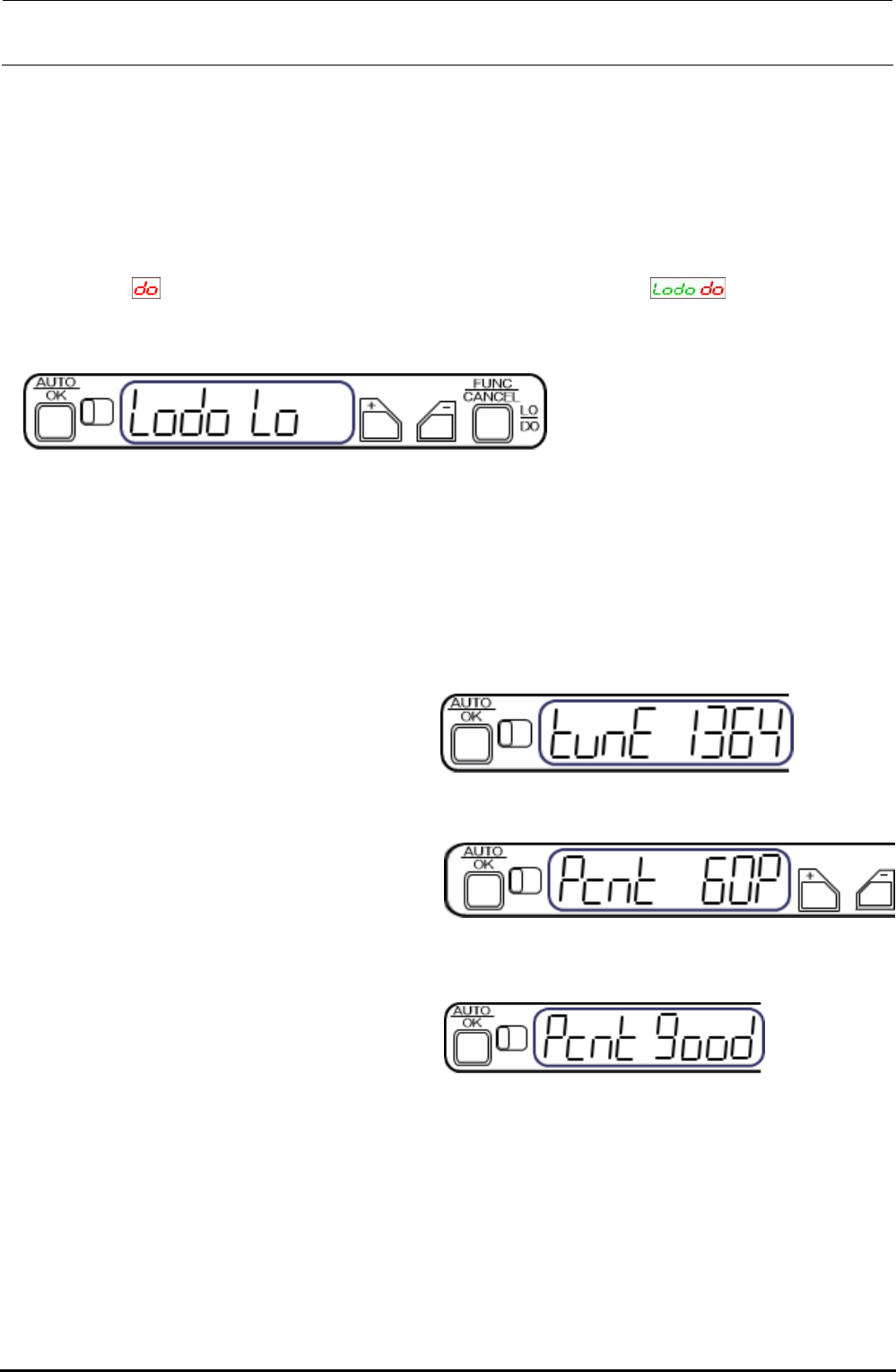
The output change-over setting is changed from LO (output is turned ON when the light is received)
to DO (output is turned ON when the light is interrupted).
1) Keep the [FUNC/CANCEL] button pressed for 3 sec. or longer.
2) Select
with the [+] or [−] button. (Digital indicator on amplifier, )
3) Pressing the [AUTO/OK] button will complete the output change-over setting. (Note: When the
above indicator is left without any operation, the indicator is returned to the normal indication.)
Figure 5-5-3-1 Sensor Amplifier
<Percentage tuning>
Specify a percentage (%) based on the current light receiving level. This level is determined to the
set value.
∗ Driven rail can be located at any position during percentage tuning setting.
• The set value is determined to “60%”.
1) Press the [AUTO/OK] button once
momentarily.
Figure 5-5-3-2 [AUTO/OK] Button
2) Set a threshold value level percentage
with the [+] or [−] button.
CAUTION: At this time, do not shut
down the sensor.
Figure 5-5-3-3 Setting of Threshold Value
• The threshold value is 60%.
3) Press the [AUTO/OK] button.
“Pcnt good” is indicated when the tuning
has been completed.
Figure 5-5-3-4 Completion of Tuning
∗ If an error occurs during tuning, take the actions shown below.
If an error is shown during tuning, press the [FUNC/CANCEL] button, and then press the
[CANCEL] button. Review the status, and then perform the percentage tuning again or restart the
tuning.
∗ Do not put any workpiece during tuning.
∗ Every time the auto width adjustment is performed, the sensor amplifier is then reset. 60%-set
value is changed according to each transport width.