Install_EN_00196423-01.pdf - 第112页
5 U nins ta llati on In st alla tio n an d Co nf igura tio n G uide SIP LAC E Expl ore r 5. 4 R emov e Edit ion 05/ 200 9 E N 112 5 F ig. 5 - 1 1 Un ins tallati on c omp leted → Cl ick on Fini sh to close t he SIPLA CE E…
Installation and Configuration Guide SIPLACE Explorer 5 Uninstallation
Edition 05/2009 EN 5.4 Remove
111
5.4 Remove
5
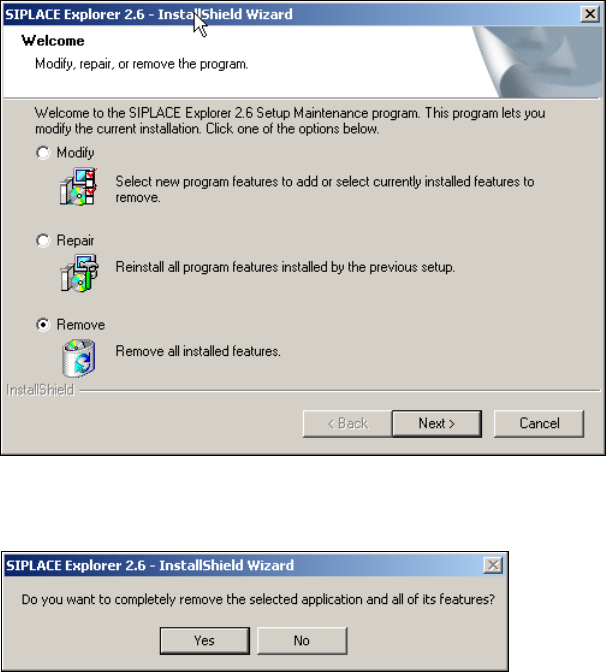
Fig. 5 - 9 SIPLACE Explorer 2.6 - install shield wizard
→ Click on Remove and then on Next to continue.
5
Fig. 5 - 10 Uninstallation query: confirm deletion of file
→ Confirm deletion with Yes.
The uninstallation process will be performed. SIPLACE Explorer V2.6 uninstallation has been
completed. 5
5 Uninstallation Installation and Configuration Guide SIPLACE Explorer
5.4 Remove Edition 05/2009 EN
112
5
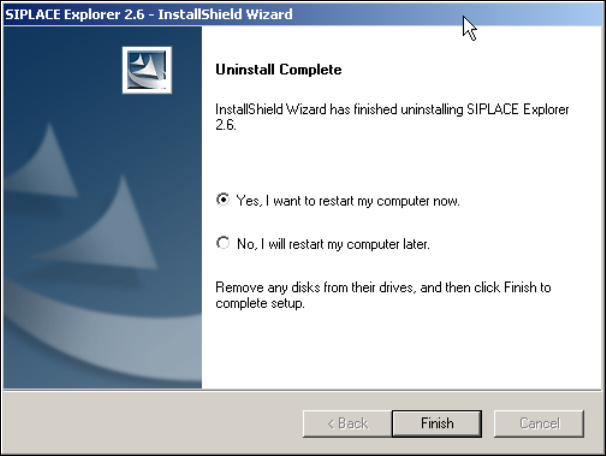
Fig. 5 - 11 Uninstallation completed
→ Click on Finish to close the SIPLACE Explorer 2.6 - InstallShield Wizard.
→ After you have rebooted your computer, SIPLACE Explorer 2.6 will no longer be available.

Installation and Configuration Guide Index
SIPLACE Explorer Edition 05/2009 EN
113
Index
A
Add Equipment
. . . . . . . . . . . . . . . . . . . . . . . . . .63
Add Line
. . . . . . . . . . . . . . . . . . . . . . . . . . . . . . .85
Add User
. . . . . . . . . . . . . . . . . . . . . . . . . . . . . . .91
Administrator Privileges
. . . . . . . . . 28, 37, 38, 42
Adobe Reader 7.0
. . . . . . . . . . . . . . . . . . . . . . . .27
Available For
. . . . . . . . . . . . . . . . . . . . . . . . . . . .65
C
Calendar
. . . . . . . . . . . . . . . . . . . . . . . . . . . . . . .66
Changing Tomcat Port Number
. . . . . . . . . . . . .55
Choose Destination Location, SIPLACE Explorer
Setup
. . . . . . . . . . . . . . . . . . . . . . . . . . . . . .32
Choose Folder’ Dialog Box,
SIPLACE Explorer Setup
. . . . . . . . . . . 32, 35
Client LAN
. . . . . . . . . . . . . . . . . . . . . . . . . . . . . .15
Configuration
. . . . . . . . . . . . . . . . . . . . . . . . . . . .57
Configuration of the System Database
. . . . . . .102
Configurations
. . . . . . . . . . . . . . . . . . . . . . . . . . .15
Configure Production Line
. . . . . . . . . . . . . . . . .63
Configuring Production Lines
. . . . . . . . . . . . . . .84
Configuring Your Web Server
. . . . . . . . . . . . . . .46
Connect to the MS SQL Server
. . . . . . . . . . . .102
Connection to Database
. . . . . . . . . . . . . . . 68, 80
Creation of Custom Applications
. . . . . . . . . . . . .57
D
Database Connection Wizard
. . . . . . . . . 100, 102
Database Settings
. . . . . . . . . . . . . . . . . . . . . . .100
DB Administrator
. . . . . . . . . . . . . . . 72, 73, 96, 97
DB Administrator Login
. . . . . . . 71, 72, 73, 95, 96
DB Error
. . . . . . . . . . . . . . . . . . . . . . . . . . . 68, 81
DB Maintenance
. . . . . . . . . 71, 72, 73, 95, 96, 97
Default Maintenance Schedule
. . . . . . . . . . . . . .71
Default User Rights
. . . . . . . . . . . . . . . . . . . . . . .93
Default Web Server
. . . . . . . . . . . . . . . . . . . . . . .55
Deinstallation
. . . . . . . . . . . . . . . . . . . . . . . . . .105
Deinstallation Process
. . . . . . . . . . . . . . . . . . .111
Development Environment
. . . . . . . . . . . . . . . . .25
Development Environment, Installation Option
. .33
E
Edit Line List
. . . . . . . . . . . . . . . . . . . . . . . . . . . 59
Edit Logbook Entries
. . . . . . . . . . . . . . . . . . . . . 90
F
Factory Calendar
. . . . . . . . . . . . . . . . . . . . . . . . 88
Factory Configuration Utility
. . . . . . . . . . . . 25, 79
Factory Configuration Utility -
Add Production Lines
. . . . . . . . . . . . . . . . . 85
Factory Configuration Utility - DB Maintenance
95
Factory Configuration Utility - Factory Calendar
88
Factory Configuration Utility - Production Lines
85
Factory Configuration Utility - reports
. . . . . . . . 89
Factory Configuration Utility - SMTP Server
. . . 94
Factory Configuration Utility - User Details
. . . . 92
Factory Configuration Utility - Users
. . . . . . . . . 91
Factory Configuration Utility
Windows Start Menu
. . . . . . . . . . . . . . . . . 44
Factory Configuration Utility, Installation Option
33
Factory Configuration Utility, Starting
. . . . . . . . 79
Factory Database
. . . . . . . . . . . . . . . . . . . . . . . 95
Factory Host
. . . . . . . . . . . . . . . . . . . . . . . . . . . 84
Factory Website
. . . . . . . . . . . . . . . . . 17, 90, 100
Firewall
. . . . . . . . . . . . . . . . . . . . . . . . . . . . . . . 48
G
Generate Website
. . . . . . . . . . . . . . . . . . . . . . . 98
Generate website - Factory Configuration Utility
98
Generating the Website
. . . . . . . . . . . . . . . . . . 75
I
import line configuration
. . . . . . . . . . . . . . . . . . 34
Import OIS Lines
. . . . . . . . . . . . . . . . . . . . . . . . 60
Initial Installation, SIPLACE Explorer 2.6
28, 37, 42
Installation Complete,
SIPLACE Explorer Setup
. . . . . . . . . . . 36, 41
Installation Variants
. . . . . . . . . . . . . . . . . . . . . . 19
Installing SIPLACE Explorer
. . . . . . . . . . . . . . . 25