00190529-02.pdf - 第27页
SI PLACE 80 F Retrofitting Instructions ICPW 20 Nozzle Changer for 1 C Head Edition 11 / 97 Fig . 1.4 Position of the modules after refit Starting Up 1.7 NOTE Check the software statuses of the station and of the line ag…
Edition
11
/
97
SIPLACE
80
F
Retrofitting
Instructions
ICPW
20
Nozzle
Changer
for
IC
Head
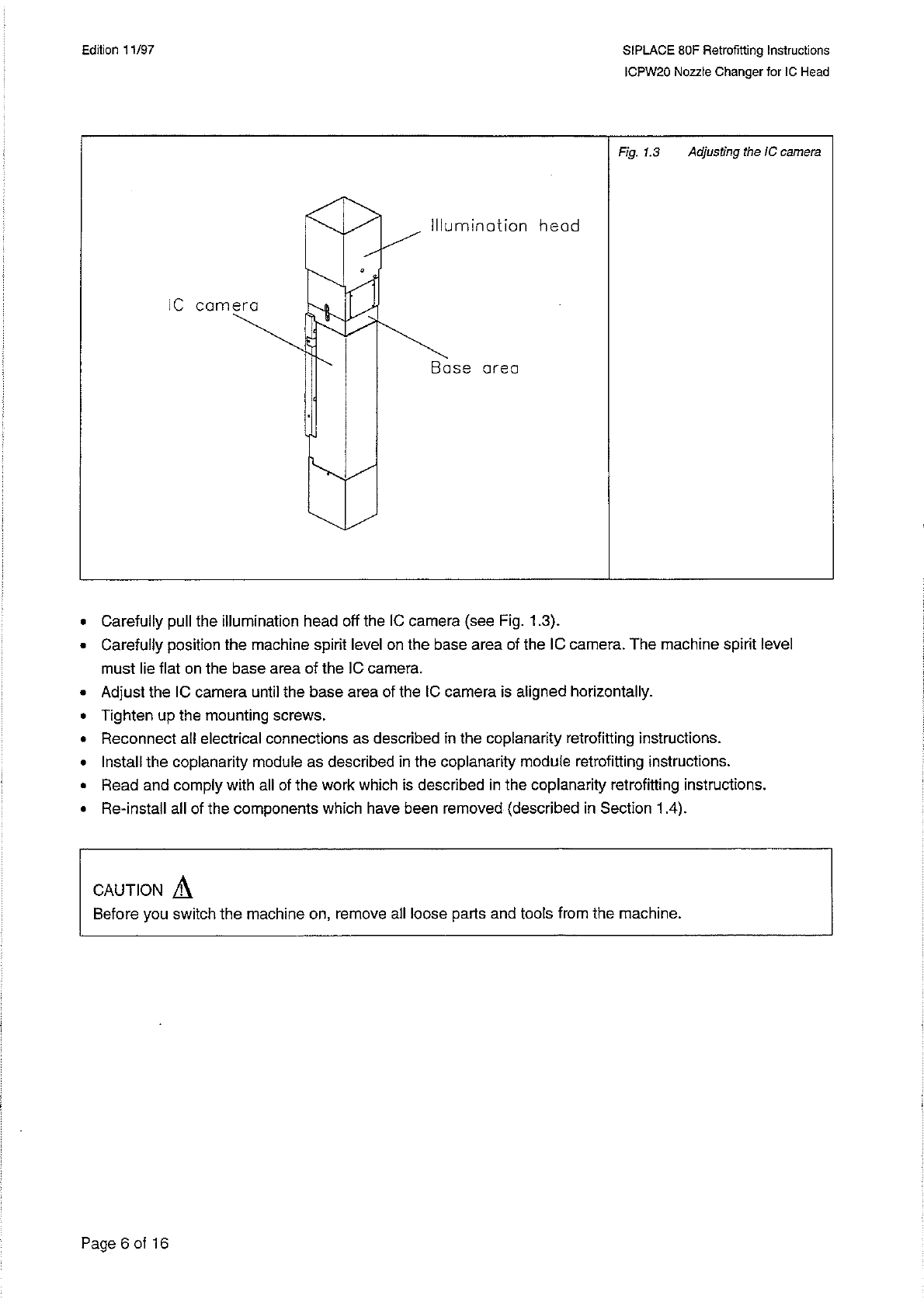
Fig
.
1.3
Adjusting
the
IC
camera
•
Carefully
pull
the
illumination
head
off
the
IC
camera
(
see
Rg
.
1.3
)
.
•
Carefully
position
the
machine
spirit
level
on
the
base
area
of
the
IC
camera
.
The
machine
spirit
level
must
lie
flat
on
the
base
area
of
the
IC
camera
.
•
Adjust
the
IC
camera
until
the
base
area
of
the
IC
camera
is
aligned
horizontally
.
•
Tighten
up
the
mounting
screws
.
•
Reconnect
all
electrical
connections
as
described
in
the
coplanarity
retrofitting
instructions
.
•
Install
the
coplanarity
module
as
described
in
the
coplanarity
module
retrofitting
instructions
.
•
Read
and
comply
with
all
of
the
work
which
is
described
in
the
coplanarity
retrofitting
instructions
.
•
Re
-
install
all
of
the
components
which
have
been
removed
(
described
in
Section
1.4
)
.
A
CAUTION
Before
you
switch
the
machine
on
,
remove
all
loose
parts
and
tools
from
the
machine
.
Page
6
of
16
SI
PLACE
80
F
Retrofitting
Instructions
ICPW
20
Nozzle
Changer
for
1
C
Head
Edition
11
/
97
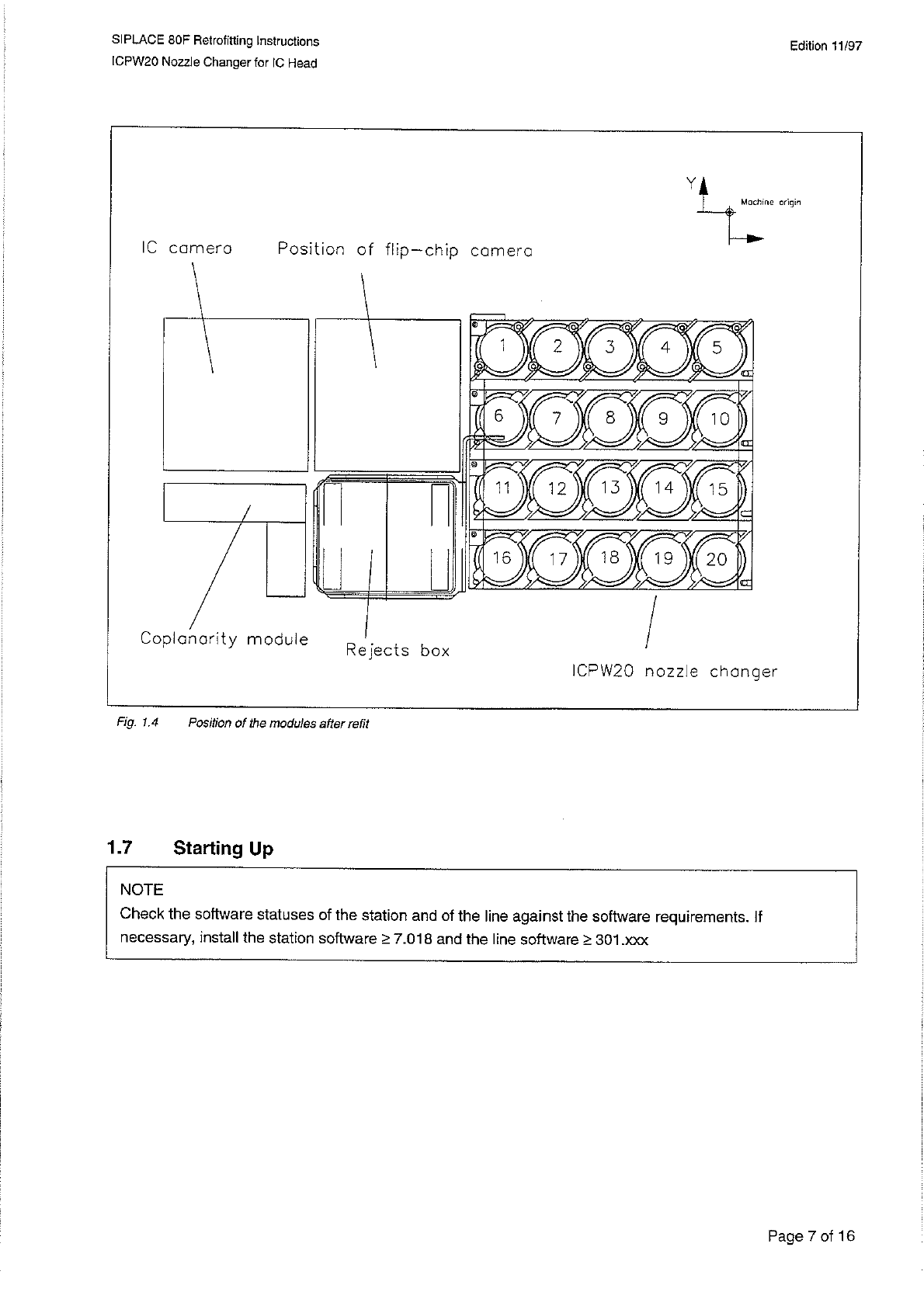
Fig
.
1.4
Position
of
the
modules
after
refit
Starting
Up
1.7
NOTE
Check
the
software
statuses
of
the
station
and
of
the
line
against
the
software
requirements
.
If
necessary
,
install
the
station
software
>
7.018
and
the
line
software
>
301
.
xxx
Page
7
of
16
SI
PLACE
80
F
Retrofitting
Instructions
ICPW
20
Nozzle
Changer
for
1
C
Head
Edition
11
/
97
1
-
7
-
1
Configuring
the
Nozzle
Changer
Open
the
configuration
editor
for
the
SIPLACE
80
F
.
Select
the
ICPW
20
nozzle
changer
(
S
_
SIP
」
G
)
.
Within
the
station
editor
assign
the
nozzle
types
used
to
the
individual
magazines
.
—
Standard
assignments
Magazine
1
Division
/
Garage
1
=
416
Division
/
Garage
2
=
417
Division
/
Garage
3
=
418
Division
/
Garage
4
=
419
—
Optional
Magazine
2
Magazine
3
Magazine
4
For
allocations
,
see
Fig
.
1.4
Save
the
configuration
file
.
Change
to
the
data
manager
and
compile
the
configuration
file
(
Stations
/
<
Name
>
.
st
)
.
Check
the
error
message
file
(
.
error
)
Division
/
Garage
6
up
to
Division
/
Garage
10
Division
/
Garage
11
up
to
Division
/
Garage
15
Division
/
Garage
16
up
to
Division
/
Garage
20
1.7
.
2
Consistency
Check
for
All
Set
-
Ups
If
you
have
set
up
more
than
1
magazine
you
will
need
to
carry
out
a
consistency
check
.
•
Start
within
data
manager
the
consistency
check
for
all
existing
set
-
ups
.
•
Check
the
consistency
check
errors
file
(
MK
_
KE
.
error
)
.
1.7
.
3
Transferring
the
Nozzle
Changer
to
the
Station
•
Start
the
line
computer
and
the
SIPLACE
80
F
station
computer
.
•
Make
a
reference
run
with
the
station
.
The
nozzle
changer
is
transferred
with
the
machine
data
to
the
stati
-
on
.
Page
8
of
16