00198536-02_AI_Mixed-Mode_TX2iV1_TX2V2_de_en.pdf - 第105页
4 Appendix 4.1 Excerpts from the Service Manual Assembly Instructions / Montageanleitung SIPLACE TX2i V1 SIPLACE TX2 V2 Option Mixed-Mode 01/2019 105 4 Appendix 4.1 Excerpts from the Service Manual The following chapters…
3 Installation
3.5 Performing final work
104 Assembly Instructions / Montageanleitung SIPLACE TX2i V1 SIPLACE TX2 V2 Option Mixed-Mode 01/2019
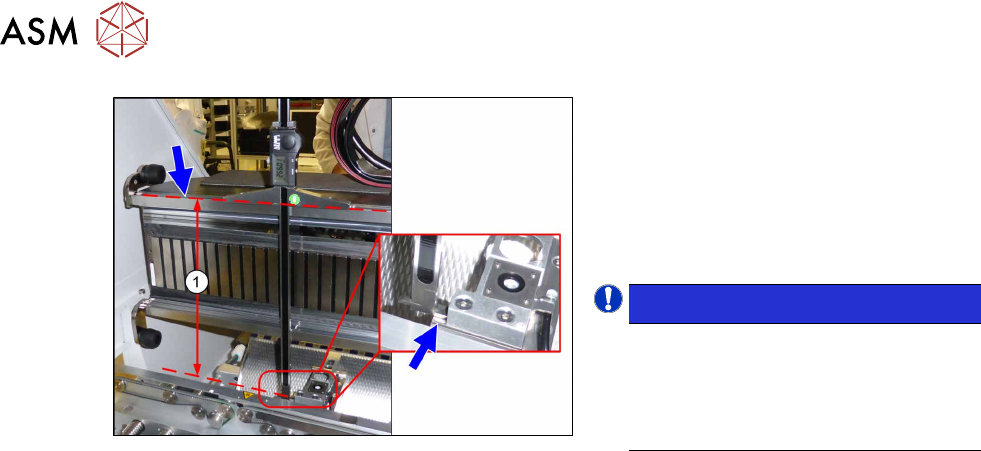
Fig.45: Setting the height of the nozzle station
(taking the standard nozzle station as example)
► Measure the distance(1) between the
contact surface of the nozzle station
and the top edge of the upper guide rail
of the gantry.
SIPLACE TX2i V1: 266.0+0.1/‑0.3mm
SIPLACE TX2 V2: 268.0+0.1/‑0.3mm
► If required, use shim plates.
NOTICE!
Alternatively, you can measure from
the top edge of the lower guide rail of
the gantry.
SIPLACE TX2i V1: 105.0+0.1/‑0.3mm
SIPLACE TX2 V2: 107.0+0.1/‑0.3mm
.
► Now fit the nozzle changer and nozzle station.
3.5 Performing final work
► Finish all mechanical tasks (fitting covers etc.) and start the machine.
► Acknowledge the warning which appears when you first start the station SW.
► Check the autoconfig., to make sure that the vacuum pump option has been set.
► Check the head configuration in the autoconfig.
4 Appendix
4.1 Excerpts from the Service Manual
Assembly Instructions / Montageanleitung SIPLACE TX2i V1 SIPLACE TX2 V2 Option Mixed-Mode 01/2019 105
4 Appendix
4.1 Excerpts from the Service Manual
The following chapters are excerpts from the service manual for your machine. If required, further
information is provided there.
●
Service manual SIPLACE TX-Series V1 [DE:00198149‑xx] [EN:00198150‑xx]
●
Service manual SIPLACE TX-Series V2 [DE:00198538‑xx] [EN:00198539‑xx]
4.1.1 Replacing the trailing interface
4.1.2 SIPLACE TX V1
4.1.2.1 Replacing the Trailing Cable Interface
Parts, equipment and tools
●
Trailing interface 1 [03115810-xx]
●
Trailing interface 2 [03115814-xx]
NOTICE
SIPLACE TX micron machines
The functionality level of the trailing interface must be at least -02 for SIPLACE TX micron
machines.
Overview
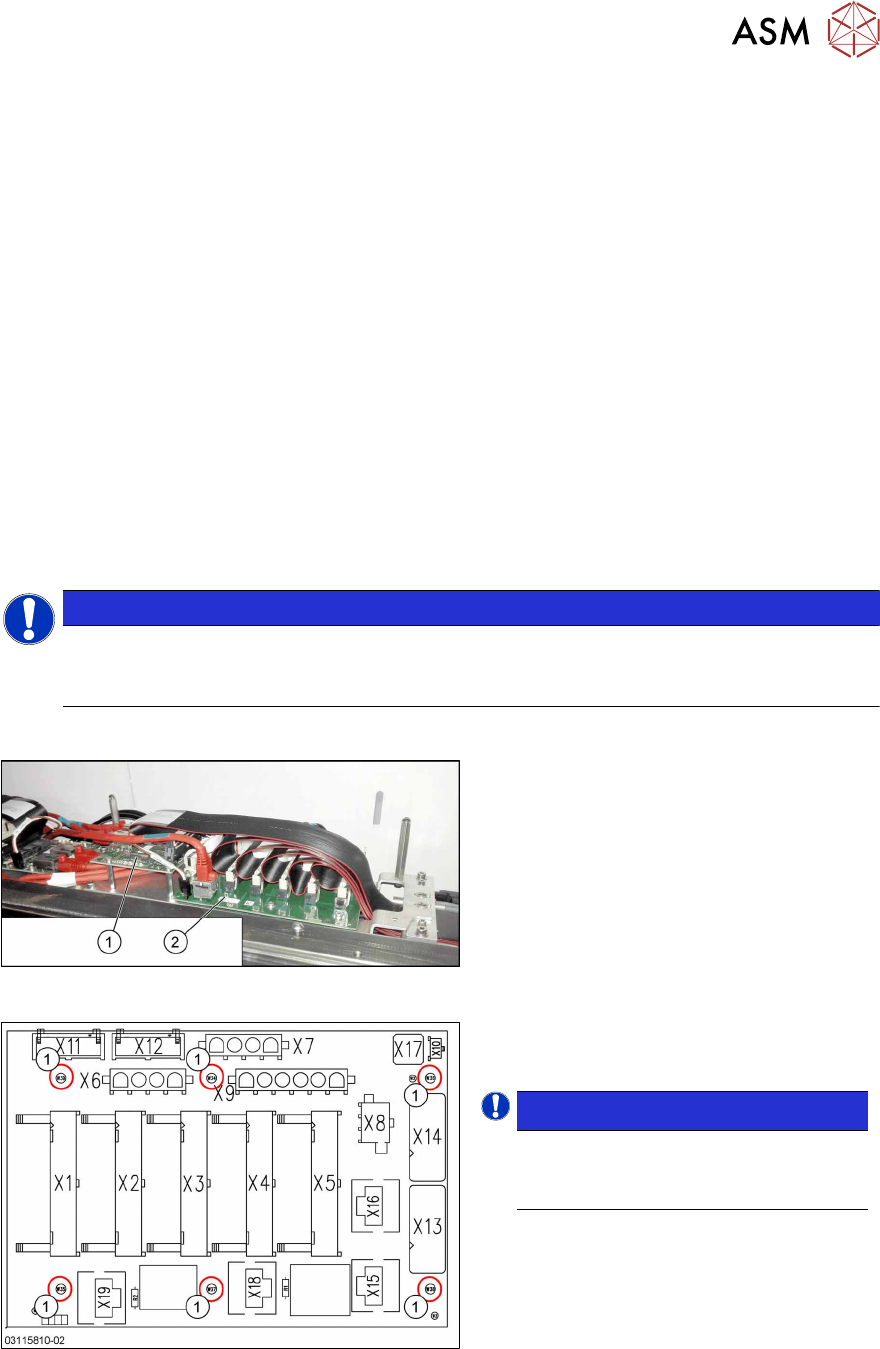
Fig.46: Vision base interface and trailing cable interface
1. Vision base interface (VBI)
2. Trailing cable interface
Fig.47: Trailing interface
Trailing interface [03115810-xx]
1. Six fastening screws
NOTICE!
Inverse layout
The layout of the two trailing interfaces
is the same, but inversely.
.
4 Appendix
4.1 Excerpts from the Service Manual
106 Assembly Instructions / Montageanleitung SIPLACE TX2i V1 SIPLACE TX2 V2 Option Mixed-Mode 01/2019
Removal
► Switch off the machine, disconnect it from the power supply and secure it to prevent
unauthorized reactivation.
1.2 "Preparatory work..." [}77]
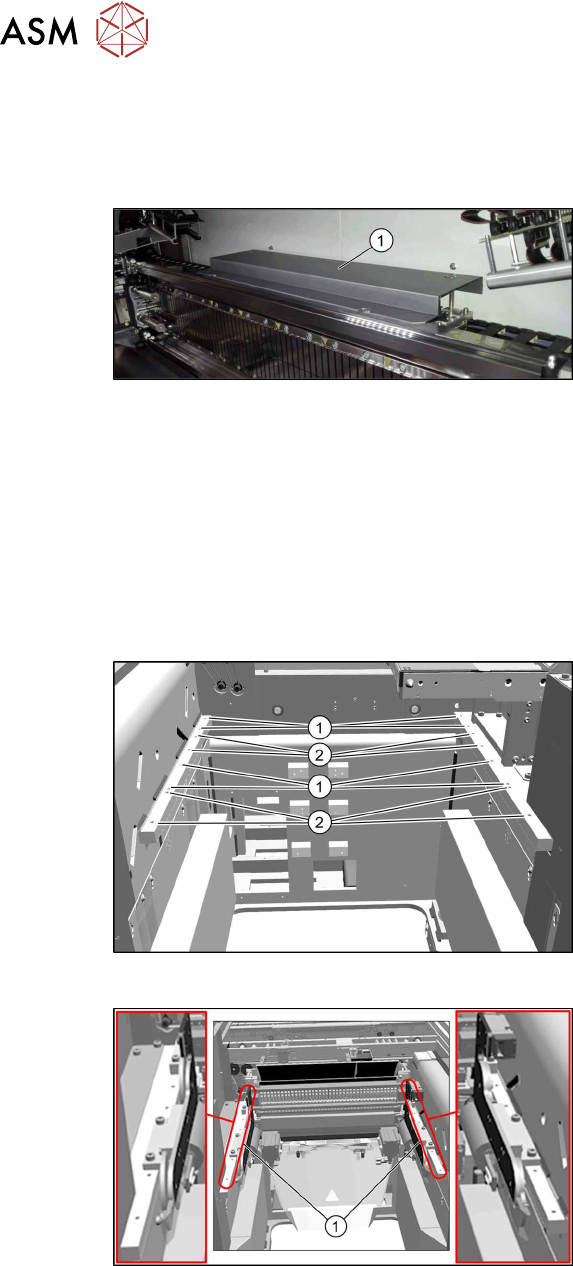
Fig.48: Cover
► Remove the screws fastening the
cover(1) on the trailing cable interface
and remove the cover.
► Unplug the electrical connections to the trailing interface. You may want to mark the position
to make clear assignment easier later on.
► Remove the six screws fastening the trailing interface and remove the interface from the
machine.
Installation
► Follow the removal instructions in reverse order for installation.
4.1.2.2 Installation Positions of COT Insert (Table Positions)
Fig.49: Installation positions
The inner and outer mounting positions de-
pend on the machine type.
The following installation positions apply to
the SIPLACE TX-Series:
1. COT insert at inner position:
SIPLACE TX1, TX2: location 2
SIPLACE TX2i: location 1 and 2
2. COT insert at outer position:
SIPLACE TX1, TX2: location 1
Fig.50: Example: inner position
Example:
1. COTi central unit mounted at inner
position