SIPLACE S-23 HM User Manual.pdf - 第7页
7 supply for th e star axes o f the placeme nt heads is reduced. Turn the but- ton to relea se it. Component counter The compone nt counter sho ws the number of comp onents that have been processed. Displays and controls…
6
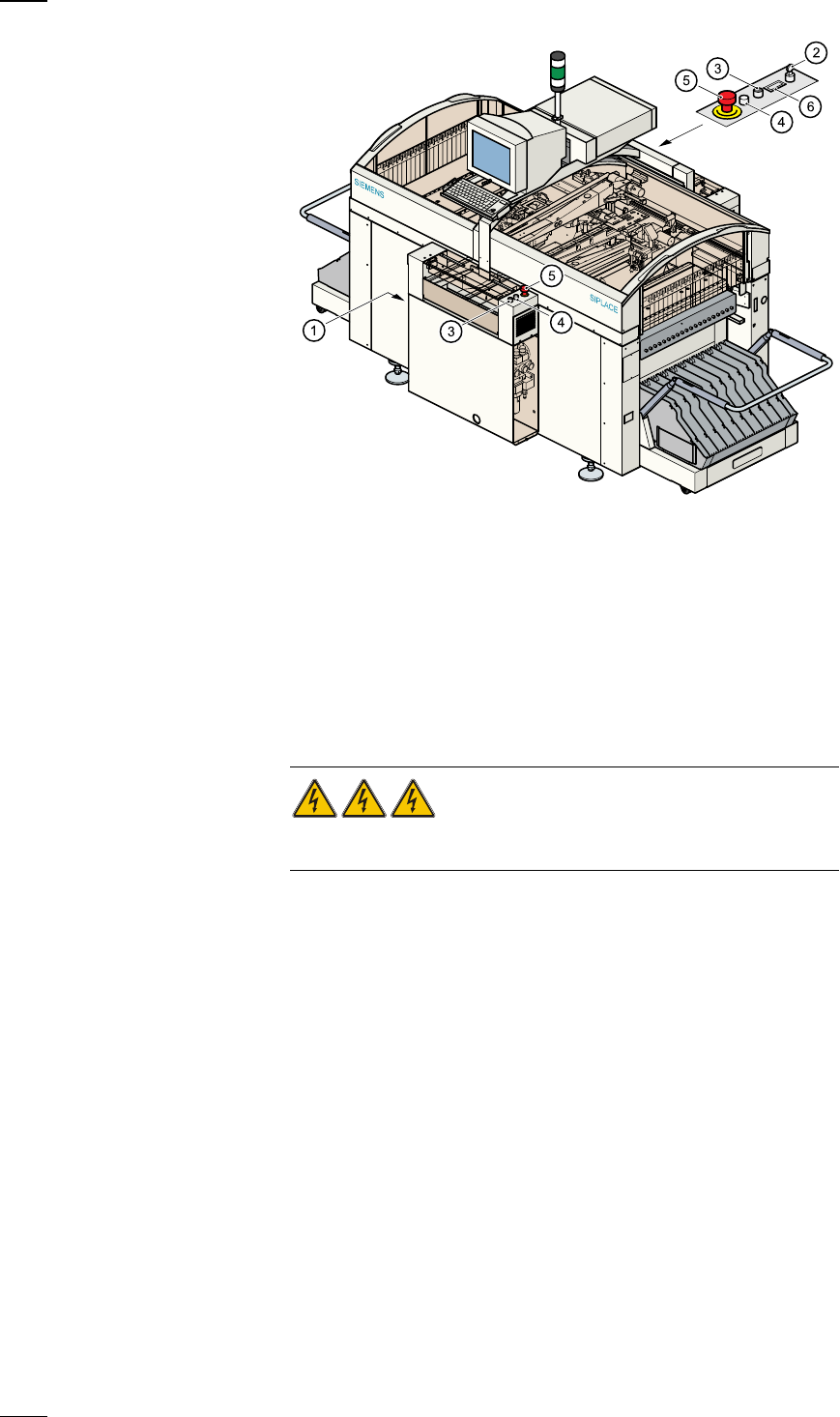
Main switch
The main switch is used to switch the power supply to the placement sys-
tem on and off.
RISK OF DEATH
Certain parts inside the placement system continue to carry potentially
lethal voltages even when switched off at the main switch.
Key switch
The key switch is normally set to the "0" position during operation. The key
should be removed and kept in a safe place. Only authorised personnel
may turn it to the "I" position (line engineer mode), and then only for cer-
tain maintenance or servicing work.
Stop button
This button is used to stop placement on the placement system.
Start button
Use this button to start the placement system after switching on or elimi-
nating a fault.
Emergency stop mushroom-head push-button
The emergency stop mushroom-head push-button latches in place when it
is pressed. The power supply to the gantry axes, component changeover
tables, conveyor belts and cutting devices is interrupted and the power
a
Main switch (red with yellow enclosure)
s
Key switch
d
Stop button (black)
f
Start button (white)
g
Emergency stop mushroom-head push-button
h
Component counter
7
supply for the star axes of the placement heads is reduced. Turn the but-
ton to release it.
Component counter
The component counter shows the number of components that have been
processed.
Displays and controls
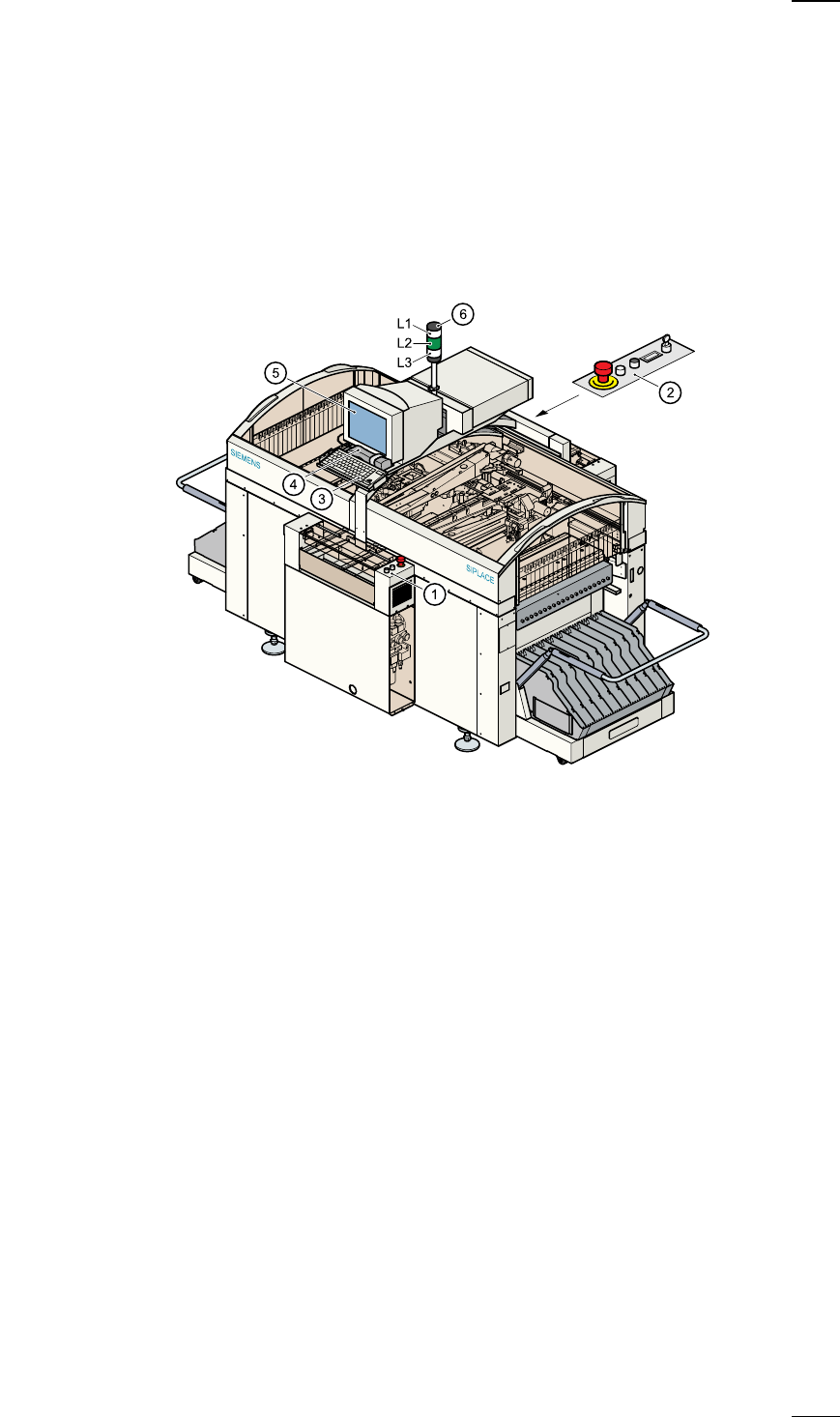
The following diagram shows the displays and controls.
Description of the displays and controls
All the controls can be reached by anyone who is more than 1.60 m tall.
Touchscreen
As an alternative to the trackball you can position the mouse pointer on
the screen and operate it by touching the screen with your finger. The
resolution is 640 x 480 pixels.
Keyboard with integral trackball
The keyboard and trackball are located beneath the screen. The keyboard
can be raised and lowered.
a
Controls, input side
s
Controls, output side
d
Keyboard with integral trackball
f
Component barcode reader
g
Touchscreen
h
Main fault indicator
L1 White fault indicator lamp: gantry 2, location 3
L2 Green operating status lamp
L3 White fault indicator lamp: gantry 1, location 1
8
Component barcode reader (option)
There is a compartment for a Datalogic DL 910 component barcode
reader between the keyboard and the screen. The barcode reader
enables the components to be set up and topped up quickly and reliably.
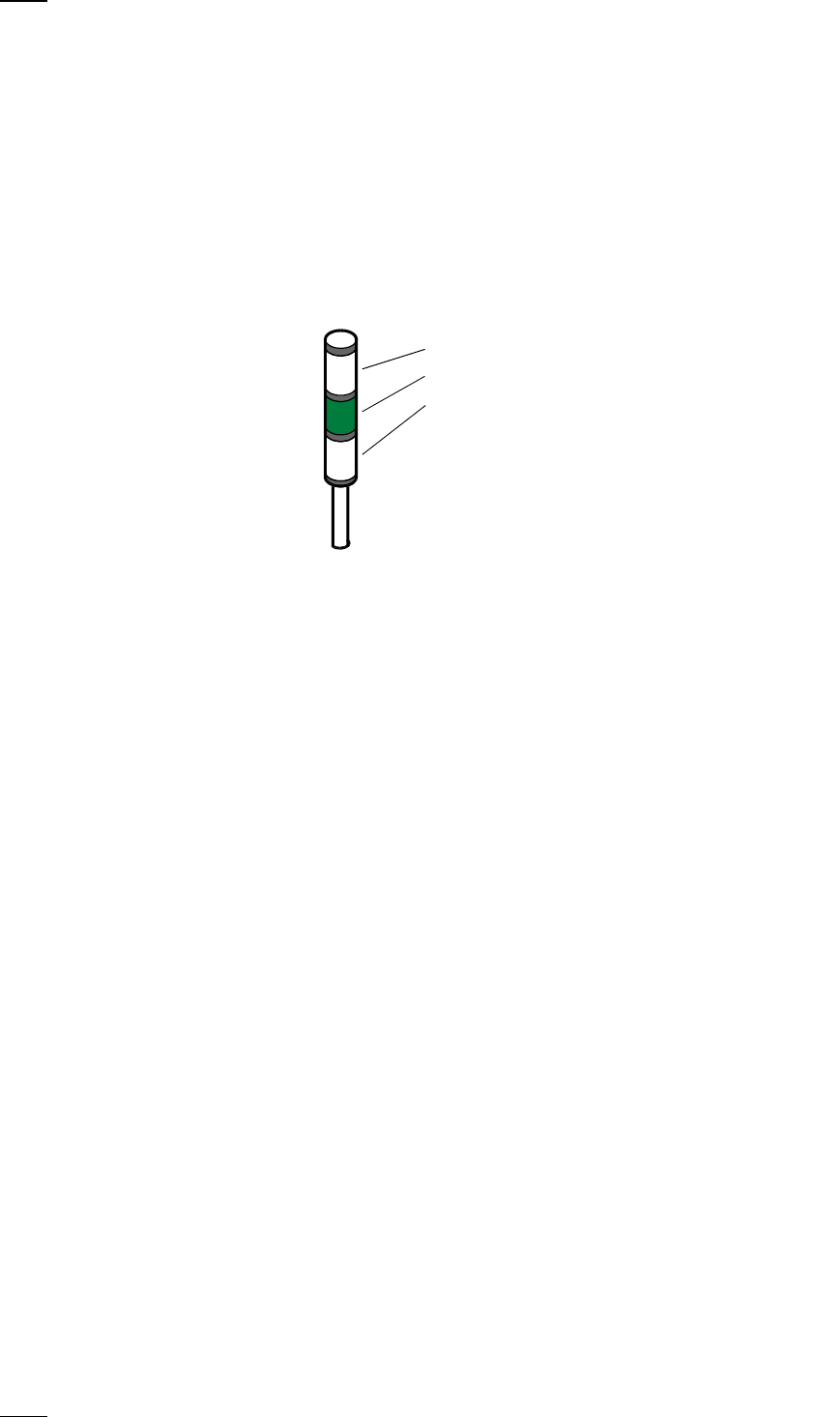
Main fault indicator
The sequence of colours of the indicator lamp is white (L1) - green (L2) -
white (L3). It signals different operating statuses and faults on the place-
ment system.
Functional description of the main fault indicator
Main fault indicator
General operating statuses
–
Operating status lamp (green) on continuously
The placement system is in service
–
Operating status lamp (green) flashes
The placement system is waiting for a PCB on the input belt or the place-
ment system is waiting until the output belt is free.
–
Top white fault indicator lamp L1 flashes
One or more tracks are empty on the right-hand side of the placement
system. The placement system continues to place any remaining compo-
nents.
–
Bottom white fault indicator lamp L3 flashes
One or more tracks are empty on the left-hand side of the placement sys-
tem. The placement system continues to place any remaining compo-
nents
–
Top white fault indicator lamp (L1) on continuously - green operating sta-
tus lamp (L2) off
An error has occurred on the right-hand side of the placement system ->
the placement system has stopped.
–
Bottom white fault indicator lamp (L3) on continuously - green operating
status lamp (L2) off
An error has occurred on the left-hand side of the placement system ->
the placement system has stopped.
–
Both white fault indicator lamps (L1 and L3) on continuously - green oper-
ating status lamp off
An error has occurred that affects the entire placement system -> the
placement system has stopped.
L1: Fault indicator lamp (white)
L2: Operating status lamp (green)
L3: Fault indicator lamp (white)