SOM-1747-003.pdf - 第12页
11 Tg0969-PM-SO 0310-001 5.1 "Save / Load" T ab [Place Hd / Noz] Button : W hen pressed, this button enables the op- erator to save the placement head/nozzle data on a floppy disk or load the data from the corr…
10 Tg0969-PM-SO0310-001
5.1 "Save / Load" Tab
5.1 "Save / Load" Tab
The corresponding tab sheet enables the operator to save or load the
placement data from the floppy in the drive of the front service panel.
••
••
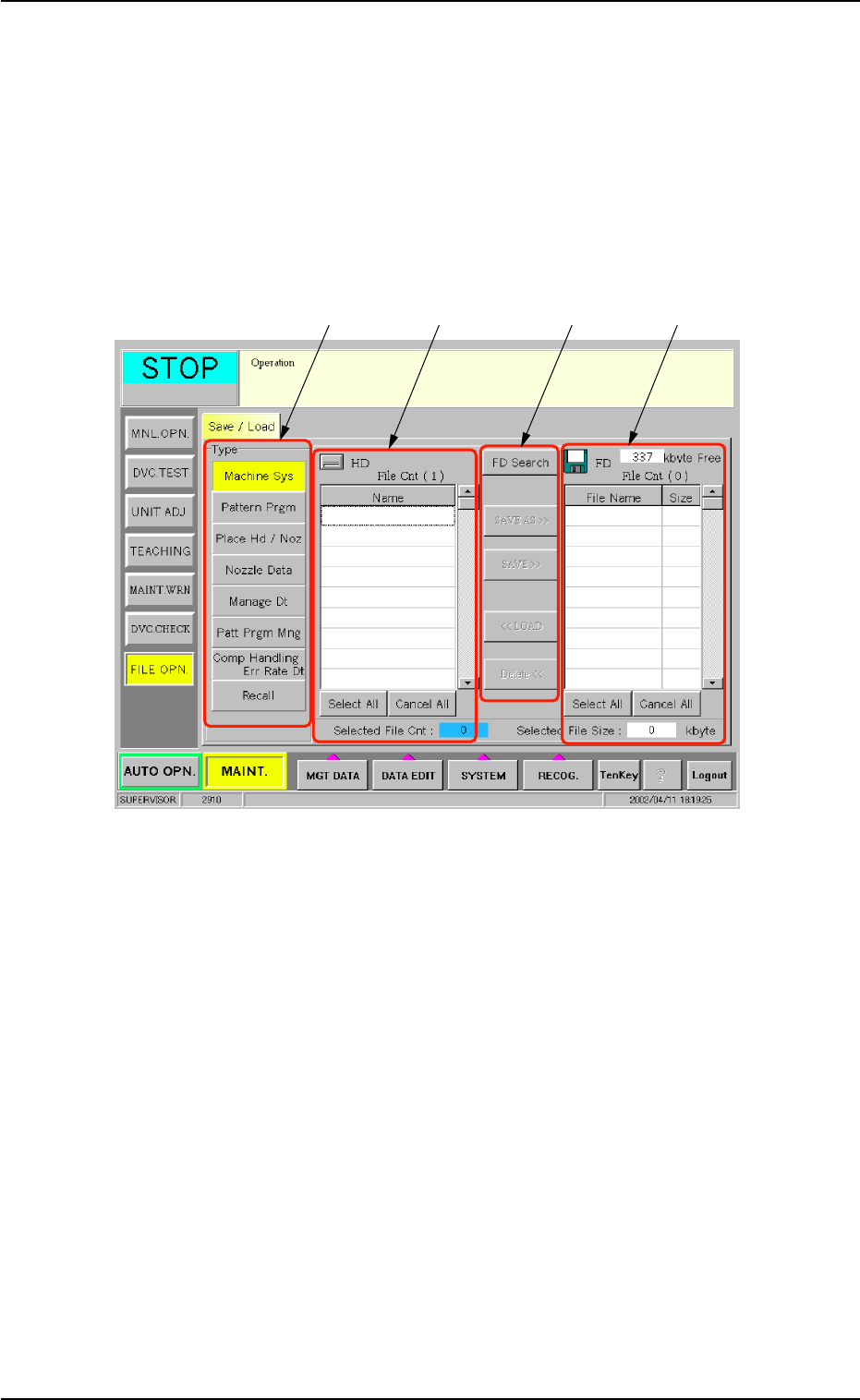
• Sheet Layout
When the [Save / Load] tab is pressed in the "FILE OPN." window
(submenu), the following tab sheet appears.
Fig. 5 "Save / Load" Tab Sheet
••
••
• Sheet Composition
*1 "Type" Group Box
The following buttons are provided in this group box.
[Machine Sys] Button : When pressed, this button enables the
operator to save the machine system
data on a floppy disk or load the data
from the corresponding floppy disk to the
hard disk of the machine.
[Pattern Prgm] Button : When pressed, this button enables the
operator to save the pattern program
data on a floppy disk or load the data
from the corresponding floppy disk to the
hard disk of the machine.
*1
*2
*3
*4

11 Tg0969-PM-SO0310-001
5.1 "Save / Load" Tab
[Place Hd / Noz] Button : When pressed, this button enables the op-
erator to save the placement head/nozzle
data on a floppy disk or load the data from
the corresponding floppy disk to the hard
disk of the machine.
[Nozzle Data] Button : When pressed, this button enables the op-
erator to save the nozzle data on a floppy
disk or load the data from the correspond-
ing floppy disk to the hard disk of the ma-
chine.
[Manage Dt] Button : When pressed, this button enables the op-
erator to save the management data on
a floppy disk.
It is impossible to load a management
data file from the corresponding floppy
disk to the hard disk of the machine.
[Patt Prgm Mng] Button : When pressed, this button enables the op-
erator to save the pattern program man-
agement data on a floppy disk.
It is impossible to load a pattern program
management data file from the corre-
sponding floppy disk to the hard disk of
the machine.
[Comp Handling Err Rate Dt] Button:
When pressed, this button enables the
operator to save the component handling
error rate data on a floppy disk.
It is impossible to load a component han-
dling error rate data file from the corre-
sponding floppy disk to the hard disk of
the machine.
[Recall] Button: When pressed, this button saves the
recalled data on a floppy disk.
The recalled data cannot be read from
the floppy disk to the machine side.
*2 List of Files on Hard Disk
When one of the data type buttons (*1) is pressed, the correspond-
ing data files on the hard disk of the machine are listed.
When a line of listed file is pressed, the file is selected.
When a line of the selected file is pressed again, it cancels the
selection.
When the [Select All] button is pressed, all listed files are selected
at a time.
When the [Cancel All] button is pressed, the selection of all listed
files is canceled.

12 Tg0969-PM-SO0310-001
5.1 "Save / Load" Tab
*3 Operation Buttons
The following buttons are provided.
[FD Search] Button : When pressed, this button searches and
loads the data from the floppy disk in the
drive of the front service panel.
[SAVE AS >>] Button : When pressed, this button saves the data
file(s) selected in "*2" (List of Files on Hard
Disk) as a new one on the floppy disk in the
drive of the front service panel.
[SAVE >>] Button : When pressed, this button saves the data
file(s) selected in "*2" on the floppy disk in
the drive of the front service panel.
When a file having the same name is found
on the floppy disk, it is replaced with the
newly saved one.
[<< LOAD] Button : When pressed, this button loads the data
files from the floppy disk in the drive of the
front service panel to the machine side.
[Delete <<] Button : When pressed, this button deletes the data
files selected in "*4" (List of Data Files on
Floppy Disk).
*4 List of Files on Floppy Disk
When one of the data type buttons (*1) is pressed, the correspond-
ing data files are loaded and listed from the floppy disk in the drive
of the front service panel.
• How to select files or cancel the selection
The following describes how to select files from the list panes (Lists
of Files on Hard Disk and Floppy Disk) and cancel the selection.
When a line of listed data file is pressed, the file is selected.
When a line of the selected file is pressed again, it cancels the
selection.
When the [Select All] button is pressed, all listed files are selected
at a time.
When the [Cancel All] button is pressed, the selection of all listed
files is canceled.