TM3200.Schedule task result displays_Manual.pdf - 第4页
SMT Software Engineering G roup IM Operations Y AMAHA MOTOR CO., L TD. MD OC-SOFT50138 4/13 3.2. Monitor Display Schedul e Task Result L ist i s displayed o n t he [M onitor] – [Sc hedule T ask] tab wi th this fun…
SMT Software Engineering Group
IM Operations YAMAHA MOTOR CO., LTD.
MDOC-SOFT50138
3/13
3. Detail
3.1. Action when the Schedule Task error is detected
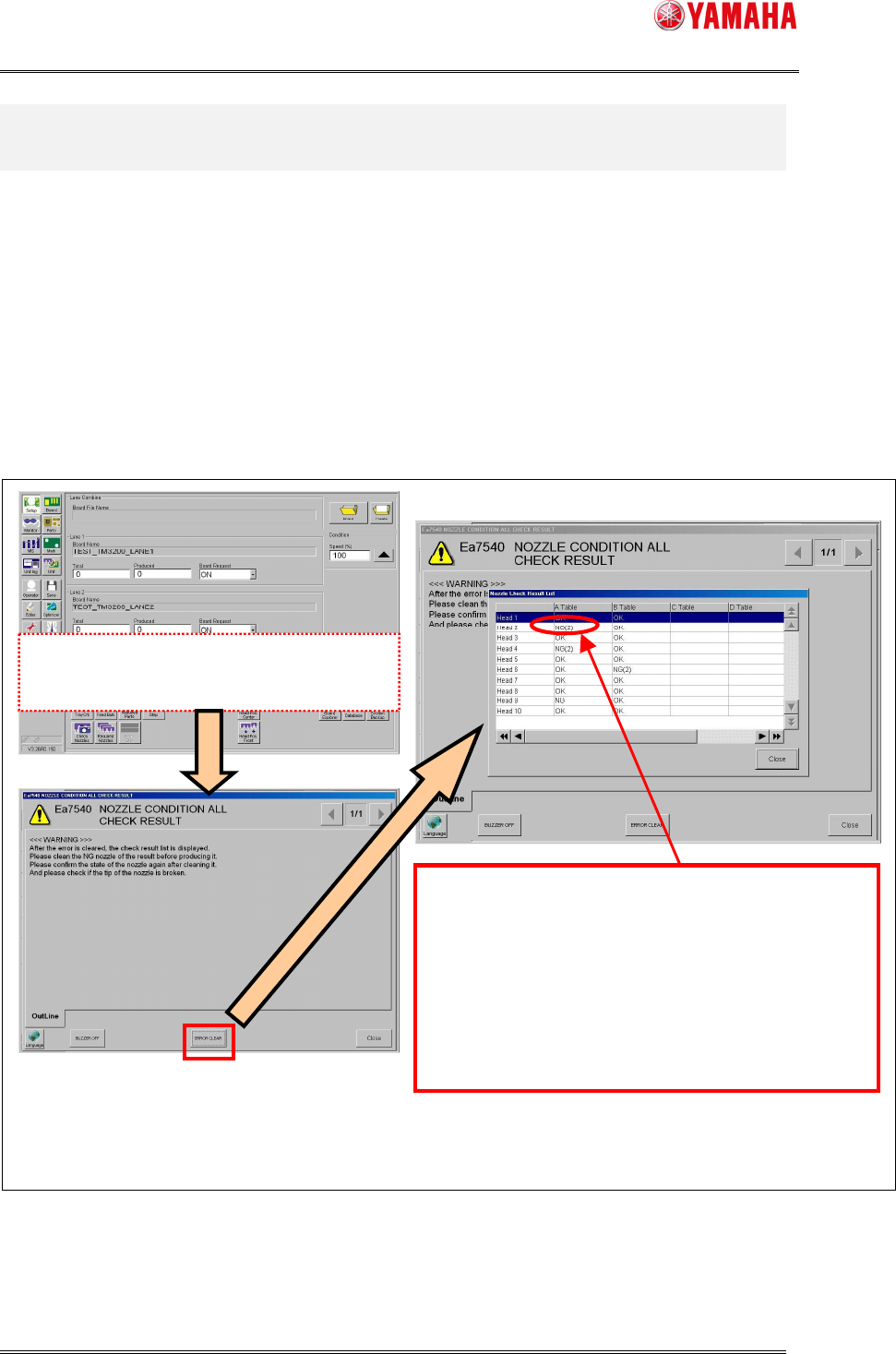
After the Schedule Task process of all tables, the following messages are displayed if an error
is detected with the head or the nozzle.
The “Nozzle Check Result List” dialog is displayed when "ERROR CLEAR" button is tapped on
the Ea7540 message screen. (Refer to the following chart image.)
When more than one Schedule Task is executed at the same time, their warning messages
are displayed after all Schedule Tasks finishes.
Fig.3.2 Operation image at the error detection
Schedule Task is finished.
There were error heads.
When the error is detected with the several kinds
of nozzle,
Error nozzle number is displayed in parentheses.
On the "Schedule Task monitor screen" described later,
you
can confirm which nozzle has the error.
The line of the head which is not checked is blank.
The Schedule Task Result message
When error head or nozzle exists after the executio
n
of all tables, this error message is displayed.
The Check Results List dialog is displayed
SMT Software Engineering Group
IM Operations YAMAHA MOTOR CO., LTD.
MDOC-SOFT50138
4/13
3.2. Monitor Display
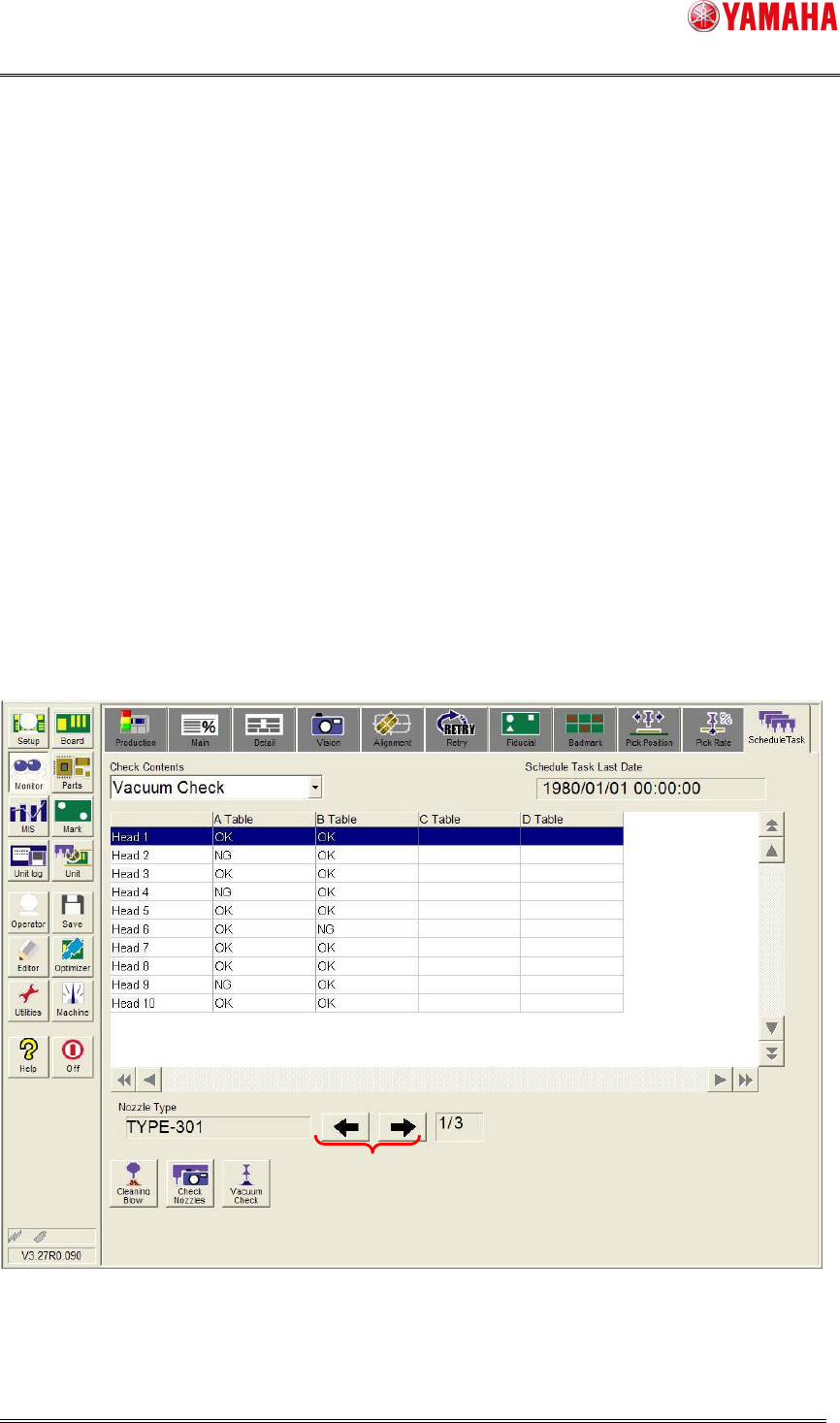
Schedule Task Result List is displayed on the [Monitor] – [Schedule Task] tab with this
function.
On this screen, a result of Schedule Task is displayed, and you can see which nozzle
number and head number is checked and detected with errors.
When the information of nozzle type which executed the Schedule Task can not insert on
one page (when there are plural pages), it can change the screen display by pushing the arrow
button of the screen lower right (5).
The list of Schedule Task results is displayed about the result that executed the check last.
The Schedule Task result information is kept until next Schedule Task start. (Each unit of
“Check Contents”.)
The Schedule Task result information is cleared when the machine power ON and reload the
board data.
Fig.3.3 Schedule Task monitor screen
(1) (2)
(3)
(4)
(5)
(6)
SMT Software Engineering Group
IM Operations YAMAHA MOTOR CO., LTD.
MDOC-SOFT50138
5/13
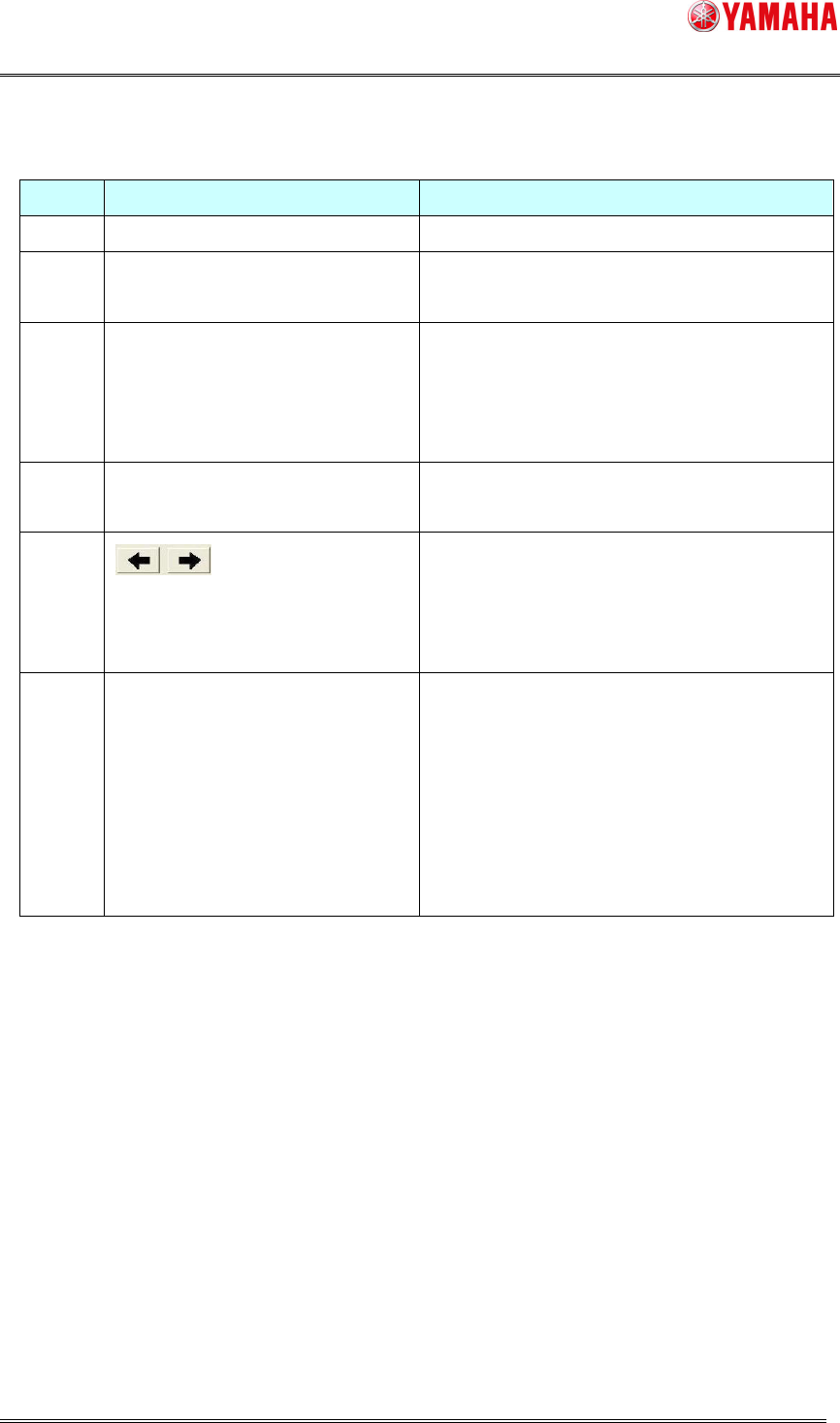
[ Explanation of the Schedule Task monitor screen ]
Number
Item name Explanation
(1) Check Contents This can change the Schedule Task actions.
(2) Schedule Task Last Date The last executing date of each Schedule Task is
displayed.
(3) List of Schedule Task results Each Schedule Task result is displayed.
“OK” : Schedule Task is completed normally.
“NG” : Schedule Task is finished with error.
“Blank” : The Schedule Task is not executed.
(4) Nozzle Type The nozzle type that executed the Schedule Task is
displayed.
(5) This can change pages by tapping this button when
there is more than one checked nozzle.
When there is only one page, this buttons are not
effective.
(6) Current page / Maximum page Current page number and maximum page number
are displayed.
<Attention>
The maximum page is the number of the total
nozzle types which are checked by the Schedule
Task actions.
This is not displayed, when there is only one page.