Printer 600 Machine PC.pdf - 第18页
0$&+,1( 3& 3&,% 5.18 Technical Reference Manual Chapter Issue 3 May 03 Jumper Link Fu nctions Link St atus Function Result LKA1 Omitted Base Addres s Sele ct Sets a uniq ue boa rd slot addre ss LKA2 Fitte…
0$&+,1(3&
3&,%
Chapter Issue 3 May 03 Technical Reference Manual 5.17
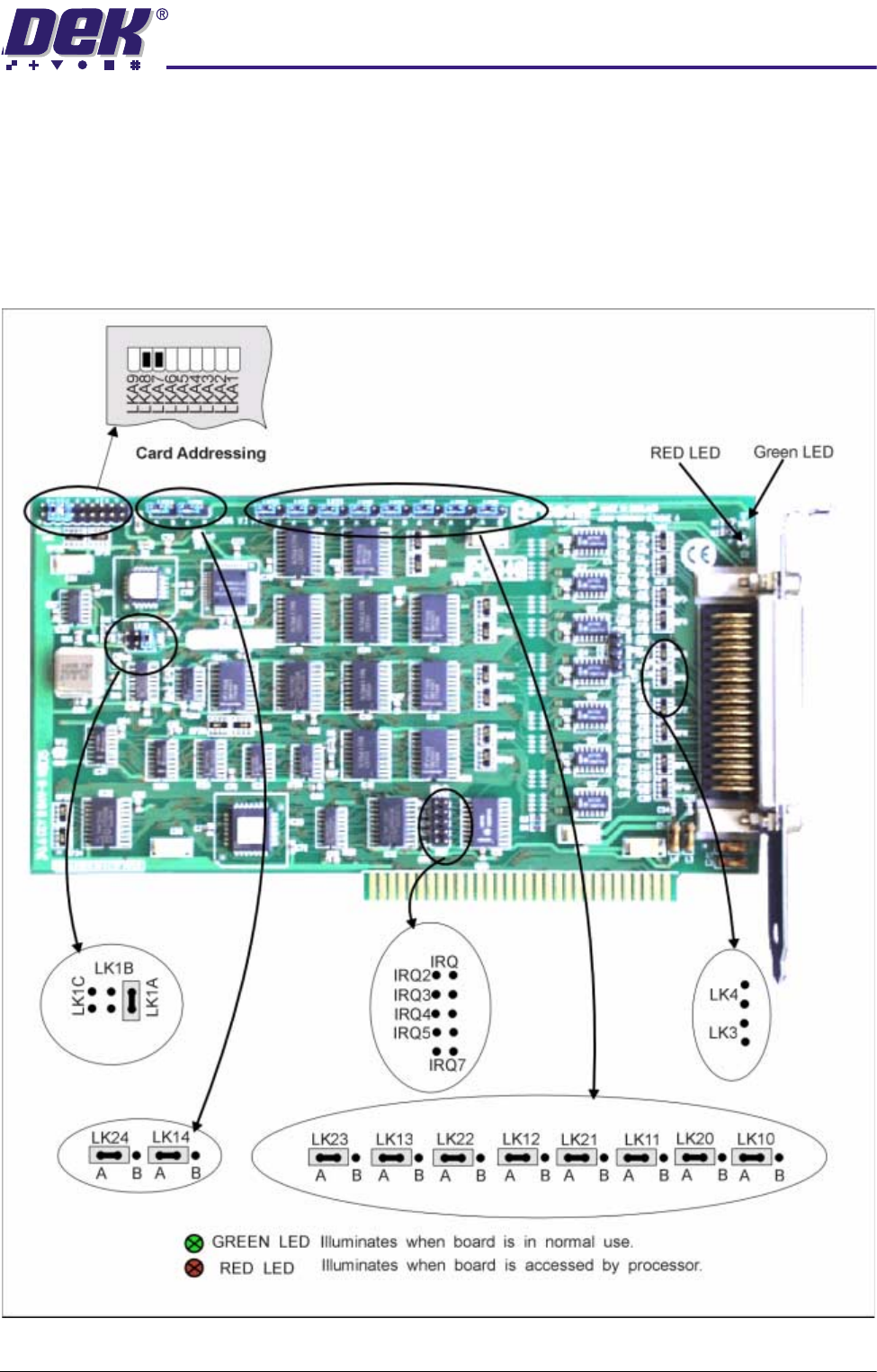
PCIB 40 The PCIB40 card is fitted to card slot position ISA 9 if the AutoFlex tooling
option is fitted to the machine. PCIB40 is a 40 channel I/O board, divided into
five sub groups of 8 bits. The card provides addressing signals to the five cards
(X1-X5) within the Y15 enclosure. These cards in-turn drive the electromag-
netic coils which hold the tooling pins in place. The power and clamp output
signals are utilized to enable power to the coils and to signal to the driver cards
the extent of power used eg, power on/off and power low/high respectively
Figure 5-9 PCIB 40 Card Layout
0$&+,1(3&
3&,%
5.18 Technical Reference Manual Chapter Issue 3 May 03
Jumper Link Functions
Link Status Function Result
LKA1 Omitted
Base Address Select Sets a unique board slot address
LKA2 Fitted
LKA3 Fitted
LKA4 Omitted
LKA5 Omitted
LKA6 Omitted
LKA7 Omitted
LKA8 Omitted
LKA9 Omitted
LK1A Fitted
Counter 0 Clock
Frequency Select
Clock input is 1MHz
LK1B Omitted
LK1C Omitted
LK3 Omitted
Counter 1 and 2 Output Select Facility not used
LK4 Omitted
LK10 A
Power Up Output State
Group 0 outputs set to 1
LK11 A Group 1 outputs set to 1
LK12 A Group 2 outputs set to 1
LK13 A Group 3 outputs set to 1
LK14 A Group 4 outputs set to 1
LK20 A
Power Up Control
Group 0 outputs enabled by software
LK21 A Group 1 outputs enabled by software
LK22 A Group 2 outputs enabled by software
LK23 A Group 3 outputs enabled by software
LK24 A Group 4 outputs enabled by software
IRQ2 Omitted
Interrupt Select Facility not used
IRQ3 Omitted
IRQ4 Omitted
IRQ5 Omitted
IRQ7 Omitted
0$&+,1(3&
&+$11(/56&2006&$5'
Chapter Issue 3 May 03 Technical Reference Manual 5.19
4 CHANNEL RS232 COMMS CARD
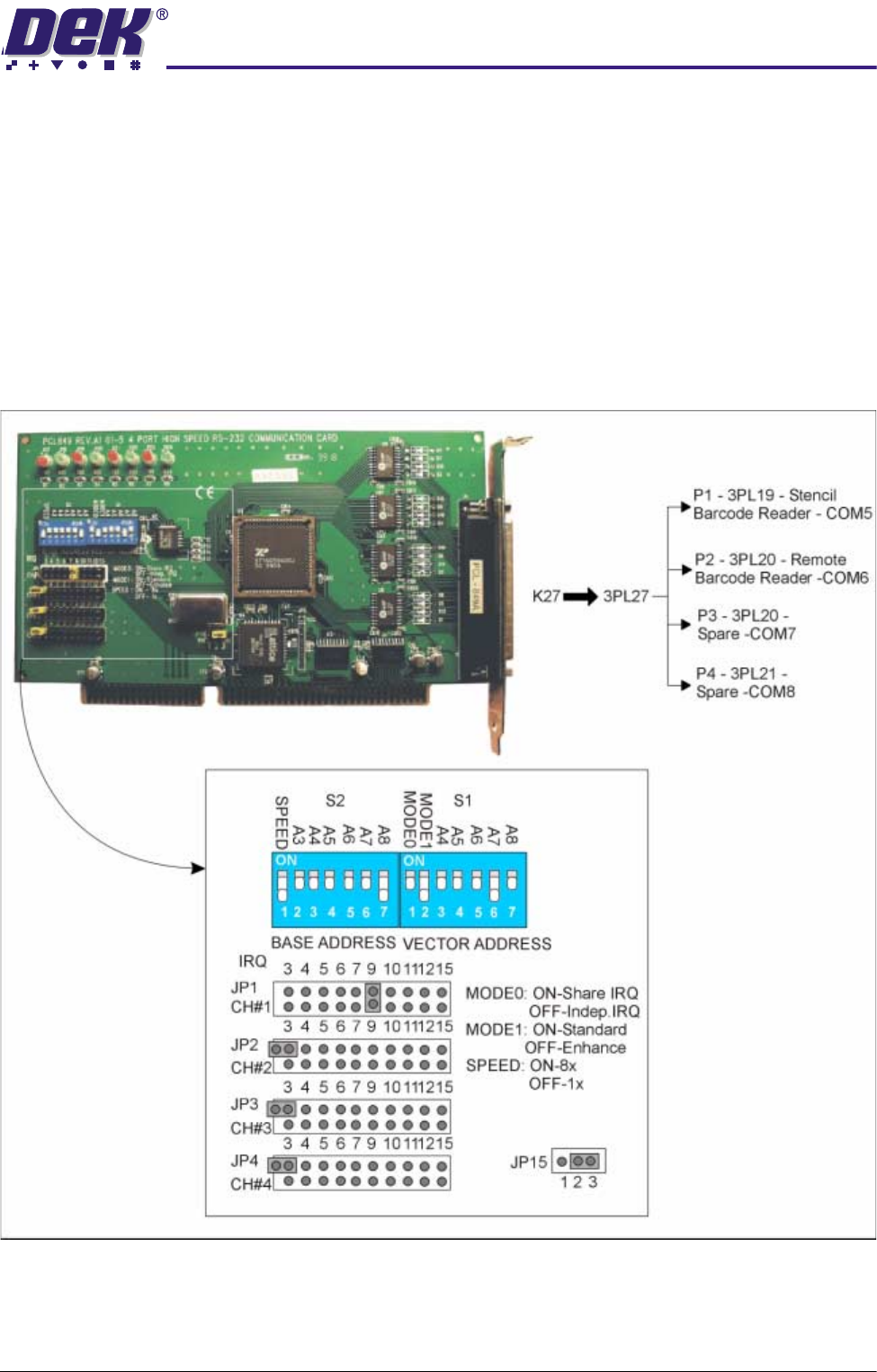
The RS232 4 channel communications card, fitted to slot ISA 7, is used to
interface with external communication devices such as the stencil barcode
reader (COM5) and the remote barcode reader (COM6). This card uses a
shared interrupt (IRQ) level for the available options. The output socket 3SK27
is broken out into individual comms channels via a four by nine way ‘D’ plug
octopus cable. The cable and output channel identification, DIP switch and
jumper link settings are shown below.
NOTE
This card is not fitted to all machines.
Figure 5-10 4 Channel RS232 Comms Card