00198610-02_VD_712.1_R19-1_DE_EN.pdf - 第30页
Station Software 712.1 (R19-1) / Version Description 05/2019 Edition 30 – For tape feeders: The nominal pickup position is dis played as red and dotted crossha irs in the Positions correction teaching dialog and the Chec…
Station Software 712.1 (R19-1) / Version Description 05/2019 Edition
29
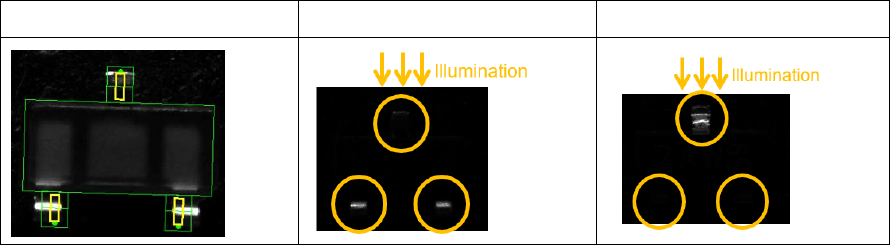
Example
SOT23
SOT23 – Face up
SOT23 – Face down
When the face down recognition wizard is started and no other process is selected, the option will
be used automatically if the requirements mentioned above apply.
If a face down recognition has already been taught in the wizard for the current camera type with
an older Vision version, this will continue to be used by Vision version 5.6.1 if you do not explicitly
select the new option.
If the new option is selected for the current camera type with Vision version 5.6.1, older versions
continue to apply the previously set method. This also applies if the option is selected for other
camera types than SST48 or SST49 with Vision version 5.6.1.
5.15.4 Flux Inspection
Compatible mode: Hidden
A new flux inspection has been introduced to check if components have been dipped or not. For
this, a reference image is captured before dipping. After dipping, the inspection compares the
current image with the reference image.
The flux inspection can be enabled in SIPLACE Pro or in the SIPLACE Vision Editor under Special
measurement options for the following component shapes:
– BGA
– Non-standard
– CCGA
The difference between dipped and not dipped components strongly depends on the color of the
flux and the appearance of the ball. A minimum ball diameter is set as default and this value will be
checked during teaching. In individual cases, you can switch off the check and test whether the flux
used can also be recognized with smaller ball diameters.
5.16 Miscellaneous Improvements and Enhancements
– Cover Lock for SX-Series Placement Machines
The existing cover lock configuration for the TX-series placement machines is supported for the
SX-series placement machines, as well. The used I/O port is named Protective cover locked
in the I/O Ports page on the GUI.
Compatible mode: Hidden
– The JTF-ML2 can be combined with the C&P20 P2 placement head on SIPLACE TX V2
placement machines.
Compatible mode: Complete
– If a nozzle is e.g. contaminated or sticky, this affects the placement reliability and may lead to
frequent pickup and Vision errors. The station software now detects such situations and
displays a corresponding detailed error. Possible solutions like cleaning, rejecting, changing the
nozzle or disabling the segment are offered.
Compatible mode: Complete
Station Software 712.1 (R19-1) / Version Description 05/2019 Edition
30
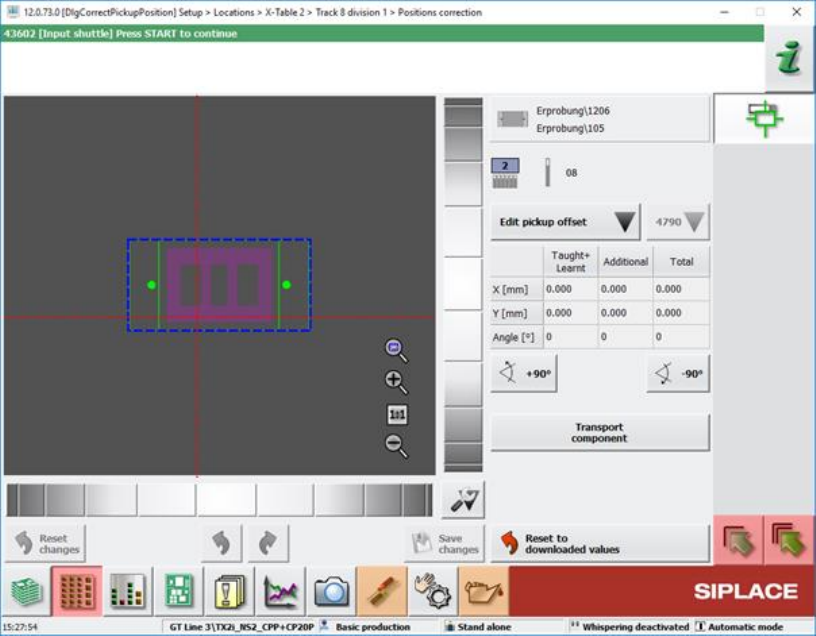
– For tape feeders:
The nominal pickup position is displayed as red and dotted crosshairs in the Positions
correction teaching dialog and the Check tape position at pickup position of track machine
function dialog.
Figure 5-9: Positions correction teaching dialog
The pickup position is determined by the current Pickup position feeder setting and the
Fiducial measurement result which may be zero if neither fiducial nor pocket recognition are
specified.
Compatible mode: Complete
– Optimized selection controls for the touch screen.
The selection of a tray inside an MTC, WPC or generic automatic tray (i.e. JTF) widget can be
done by zooming in when the user touches the widget.
Compatible mode: Complete
– Windows 10 can be used for station computers on SIPLACE SX V2 placement machines.
Station Software 712.1 (R19-1) / Version Description 05/2019 Edition
31
6 Hardware Specifications
6.1 Supported Feeder Types
The following feeders are supported by the 712.1 station software version:
Feeder Modules from ASM Assembly Systems
– 4 mm – 104 mm X-feeder
– 8 mm - 88 mm E (E-series only)
– 2x8 mm X-feeder
– 16 mm XN-feeder
– Surftape AX (8 mm, 12 mm, 16 mm)
– LED feeder TE
LED feeder HS
– SIPLACE Glue Feeder
– SIPLACE JTF-S (X-series S and SX1/SX2 V2 only)
– SIPLACE JTF-M (X-series S, X4i S micron and SX1/SX2 V2 only)
– SIPLACE JTF-ML (TX-series only)
– SIPLACE JTF-ML2 (TX-series only)
– JTF-MW E (E-series only)
– Arbitrary Carrier X
– Conveyor Carrier X
– Carrier X (XTH) (X2, X3, X4 on location 2 and 4 only)
– Carrier SX (SX1/SX2 with Twin Head and CPP head only)
– Stick feeder with X-adapter
– MTC2 (X2, X3, X4 on location 2 and 4, X2 S, X3 S, X4 S on location 2)
– WPC5/WPC6 (SX1/SX2, X-series S on location 2)
– SIPLACE Wafer Systems (CA-series only)
Processing Modules from ASM Assembly Systems
– MeasuringFeeder X
– Label feeder with X-adapter
– Reject conveyor with X-adapter
– Linear Dipping Unit X
– Linear Dipping Unit 2 X
– Linear Dipping Unit E (E-series only)
– Splice sensor X-feeder