Printer 600 Pneumatic Module.pdf - 第12页
31( 80$7,&0 2'8 /( 31(80$7,& '(9,&(6 24.12 Technical Reference Manual Chapter Issue 3 May 03 Manifold Sol enoid V alves T ype 3/2 A body mounted sol enoid valve, type 3/2 is f itted to the manif o…
31(80$7,&02'8/(
31(80$7,&'(9,&(6
Chapter Issue 3 May 03 Technical Reference Manual 24.11
Manifold Solenoid
Valves Type 5/2
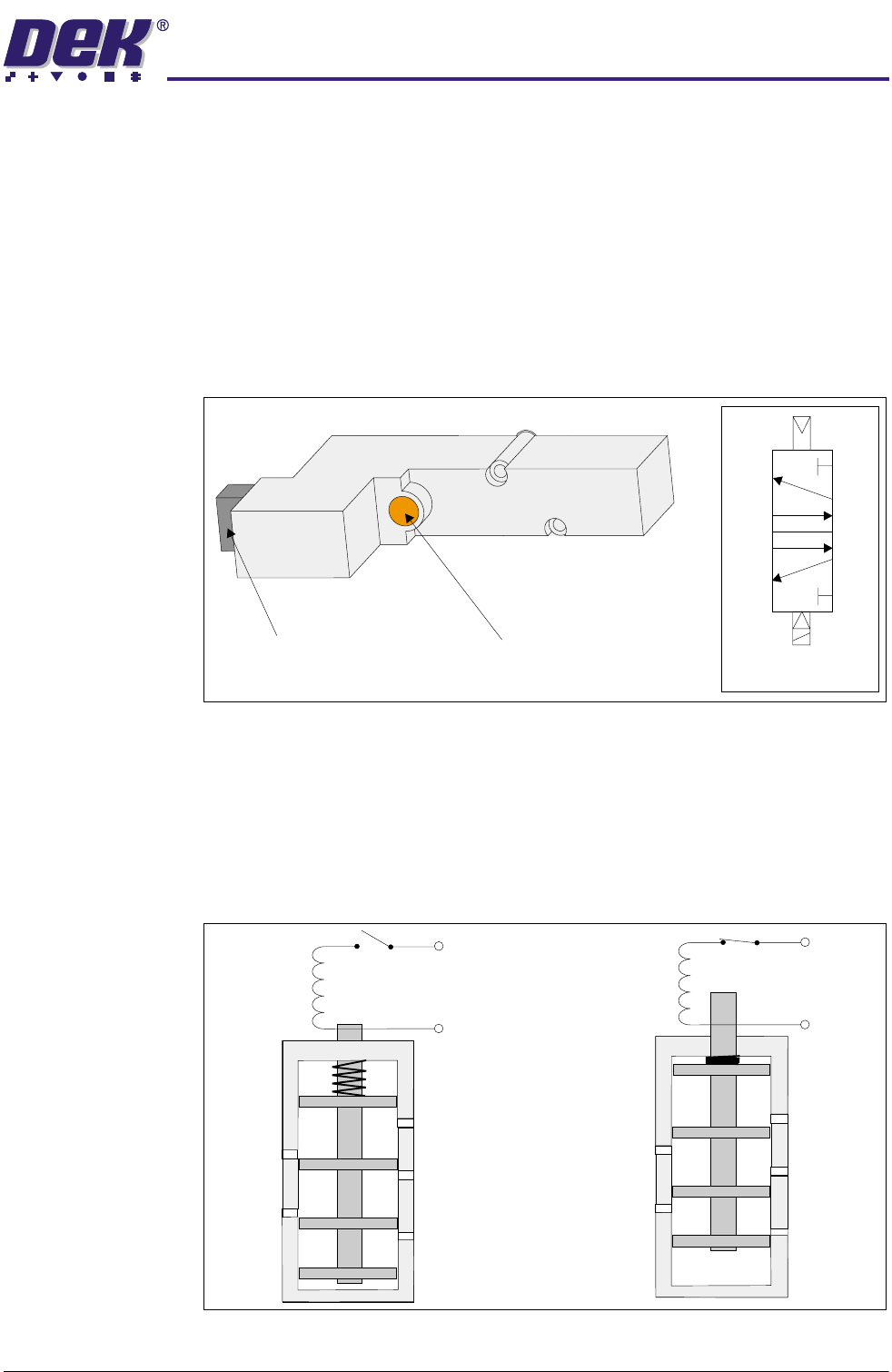
A body mounted solenoid valve, type 5/2 is fitted to the manifold. This type of
solenoid is used with a double acting cylinder.
NOTE
Although the board stop is not a double acting cylinder, a type 5/2 solenoid is
used in this instance to be in place for the option of a remote board stop.
The solenoid controls the distribution of compressed air to a pneumatic cylinder
to provide mechanical work. The solenoid is activated by a 24V signal which is
identified by an illuminated red Led within the solenoid.
An orange manual override button allows the solenoid to be activated to test
correct operation.
Figure 24-11 Solenoid and Symbol
In the rest state, with the solenoid switched off, the plunger (armature) is held
out under spring pressure, connecting the ports as shown in Solenoid Cross
Section figure.
When the solenoid is switched on, the plunger is pulled upwards against the
spring. This causes the port connections to change as shown in figure.
Figure 24-12 Solenoid Cross Section
Symbol
3
2
4
1
5
Red LED
(inside solenoid unit)
Manual Override Button
3
3
1
1
5
5
4 (A)
4 (A)
2 (B)
2 (B)
+ 24V
0V
+ 24V
0V
31(80$7,&02'8/(
31(80$7,&'(9,&(6
24.12 Technical Reference Manual Chapter Issue 3 May 03
Manifold Solenoid
Valves Type 3/2
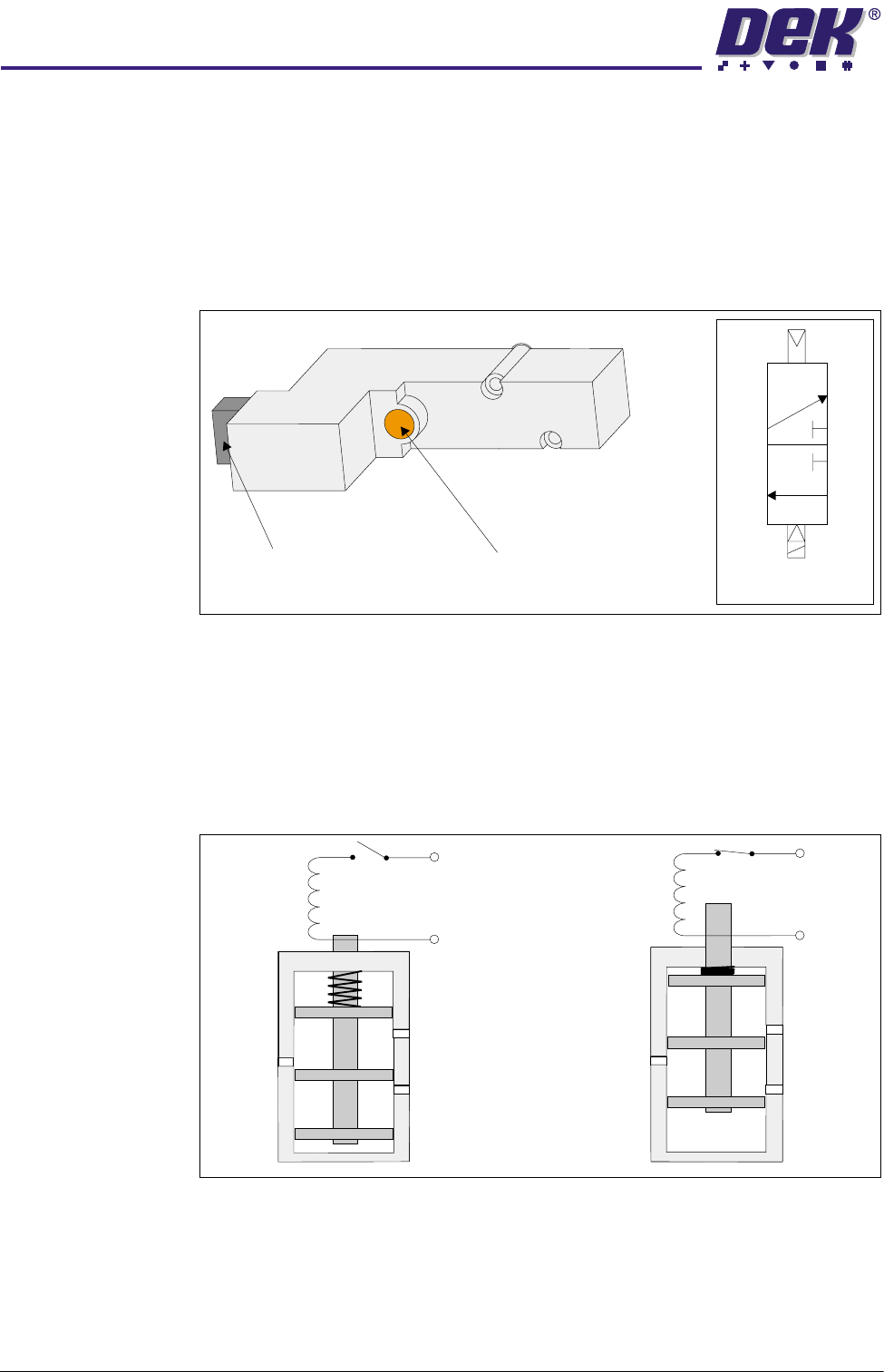
A body mounted solenoid valve, type 3/2 is fitted to the manifold. This type of
solenoid is used with a single acting cylinder.
The solenoid controls the distribution of compressed air to a pneumatic cylinder
to provide mechanical work. The solenoid is activated by a 24V signal which is
identified by an illuminated red Led within the solenoid.
An orange manual override button allows the solenoid to be activated to test
correct operation.
Figure 24-13 Solenoid and Symbol
In the rest state, with the solenoid switched off, the plunger (armature) is held
out under spring pressure, connecting the ports as shown in Solenoid Cross
Section figure.
When the solenoid is switched on, the plunger is pulled upwards against the
spring. This causes the port connections to change as shown in figure.
Figure 24-14 Solenoid Cross Section
Symbol
3
2
1
Red LED
(inside solenoid unit)
Manual Override Button
3
3
1
1
2 (B)
2 (B)
+ 24V
0V
+ 24V
0V
31(80$7,&02'8/(
31(80$7,&'(9,&(6
Chapter Issue 3 May 03 Technical Reference Manual 24.13
In-line Flow
Controller Valve
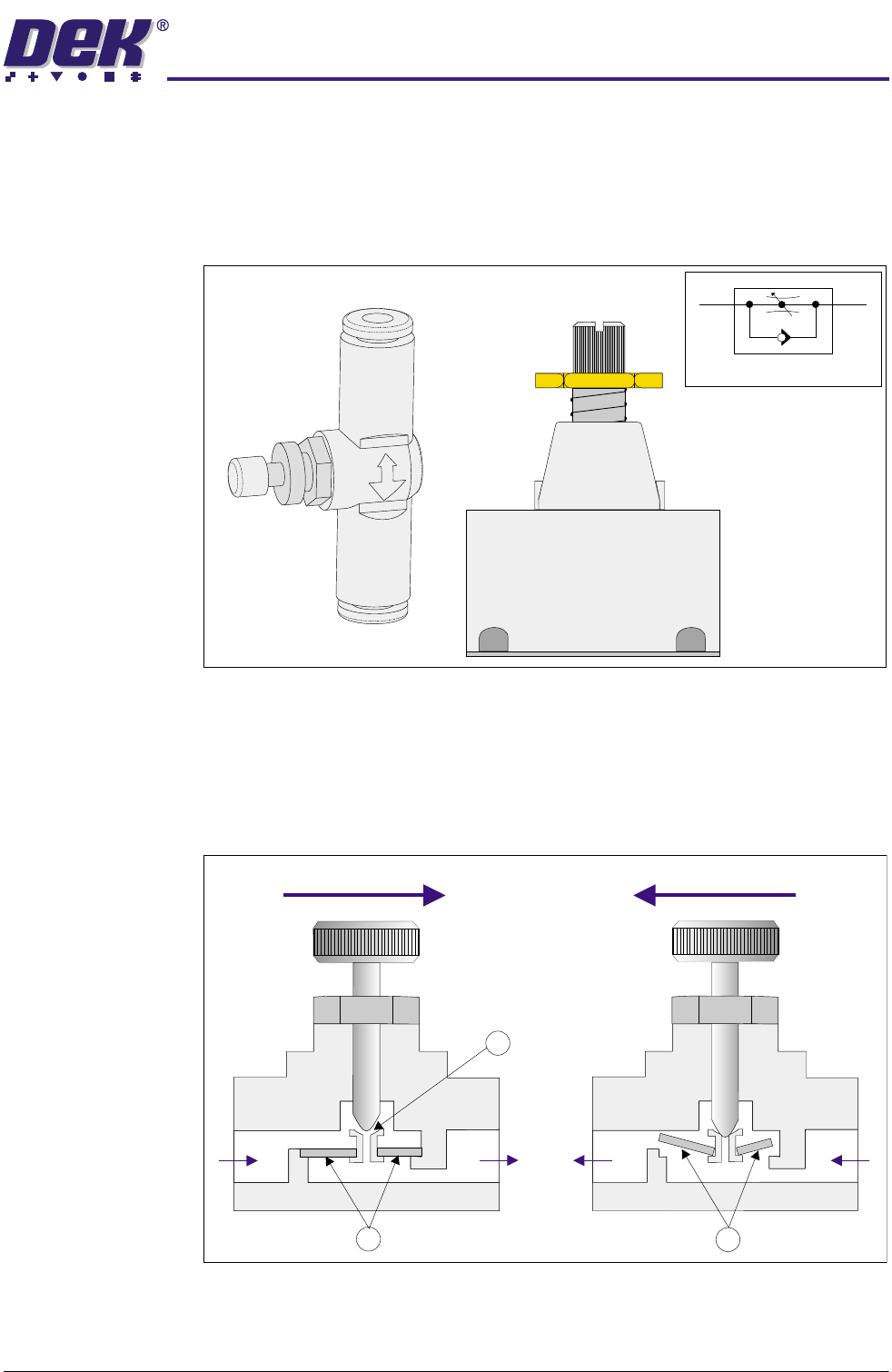
A flow controller valve (also known as a speed control valve) is connected in-
line with the single line of both the board stop and vacuum tooling. This restricts
the air flow and thus governs the upper speed limit for the pin lift/lower and
board stop lift, or the amount of vacuum for vacuum tooling. Air is throttled when
passing through the valve in one direction, but can flow freely in the other
direction.
Figure 24-15 In-line Flow Controllers and Symbol
Air entering at Port A is blocked by the check valve (1) and can only flow through
the regulated cross-section (2) before exiting at Port B, therefore controlling or
throttling the speed. Returning air entering at Port B lifts the check valve (3) and
flows freely through to Port A.
Figure 24-16 In-line Flow Controller Cross Section
Symbol
Airflow
Airflow
AABB
1
2
3