Printer 600 Pneumatic Module.pdf - 第8页
31( 80$7,&0 2'8 /( 31(80$7,& '(9,&(6 24.8 Technical Reference Manual Chapter Issue 3 May 03 Gauge Each re gulator ass embly has a gauge to in dicate the opera ting pressu re. Each gauge has a scal…
31(80$7,&02'8/(
31(80$7,&'(9,&(6
Chapter Issue 3 May 03 Technical Reference Manual 24.7
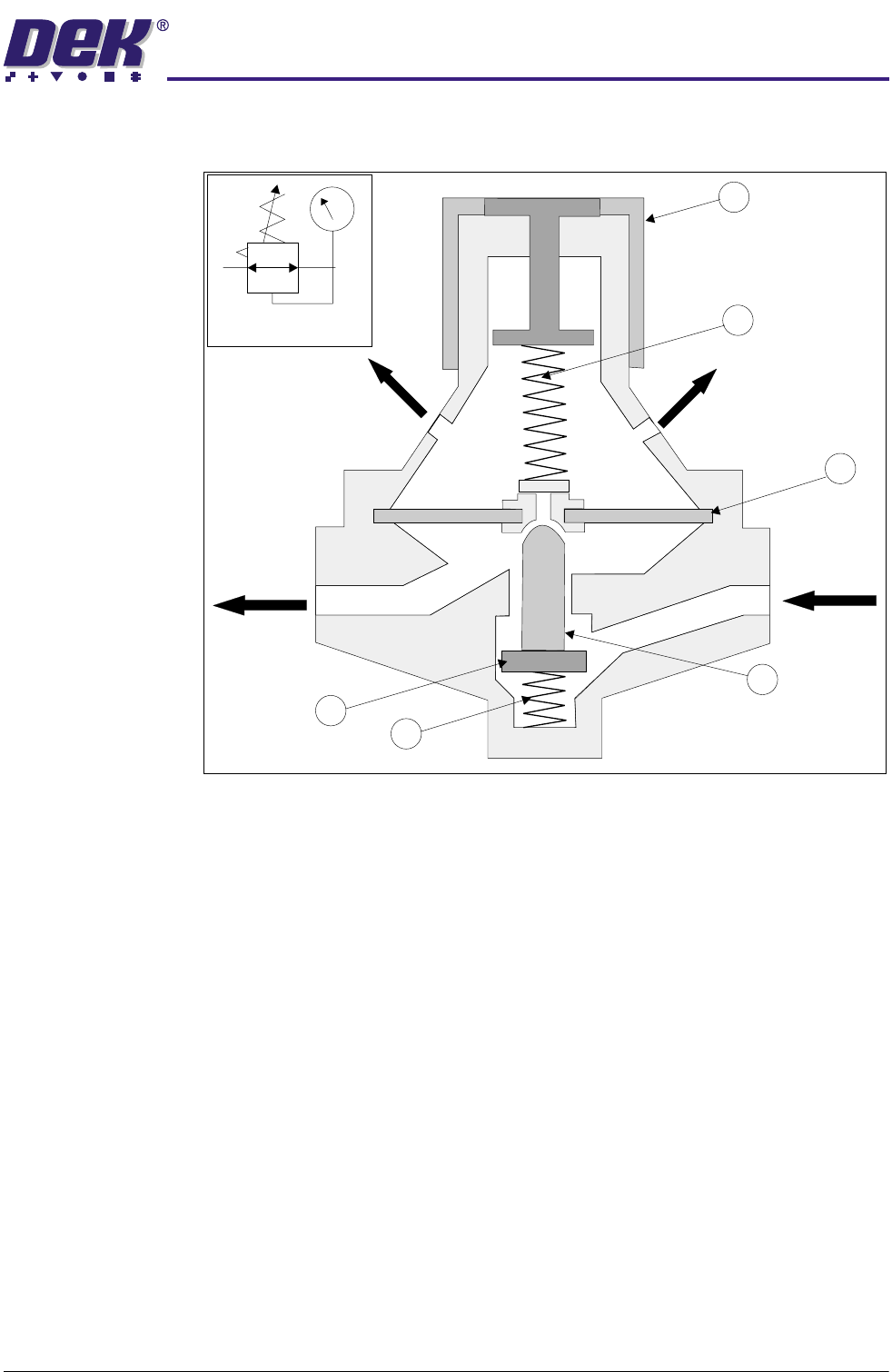
Regulator The regulator keeps the operation pressure virtually constant regardless of
fluctuations in line pressure and air consumption.
Figure 24-5 Regulator Cross Section and Symbol
The input pressure must always be higher than the output pressure. The output
pressure acts on one side of the diaphragm (1). A spring (2) acts on the other
side adjusted by knob (3).
The system is at equilibrium when the pressure at the outlet acting on the
diaphragm equals the spring (2) pressure opposing it.
If the output pressure increases, the upward force on the diaphragm increases
causing the valve (4) to close, thus reducing the throughput until output is again
at equilibrium with the spring force.
If (due to an increase in consumption) the output pressure drops and the spring
force exceeds the upward force on the diaphragm, valve (4) opens increasing
the throughput.
Regulation of the preset output pressure is a continual opening and closing of
the valve seat. To prevent flutter, spring damping (5) is provided below the valve
disc (6). If the output pressure increases considerably, the diaphragm is
pressed against the spring, the centrepiece opens and the compressed air flows
to atmosphere through the vent holes.
1
2
3
4
5
6
Vent Hole
Outlet
Inlet
Vent Hole
Symbol
31(80$7,&02'8/(
31(80$7,&'(9,&(6
24.8 Technical Reference Manual Chapter Issue 3 May 03
Gauge Each regulator assembly has a gauge to indicate the operating pressure. Each
gauge has a scale to read both psi and bar, except the mains air input gauge
which reads MPa. 1bar = 0.1MPa.
Sensor An adjustable pressure sensor, part of the mains air regulator assembly and set
to 3bar, senses whether the compressed air input is at the minimum level
required. See Sensors and Motors Chapter for further information.
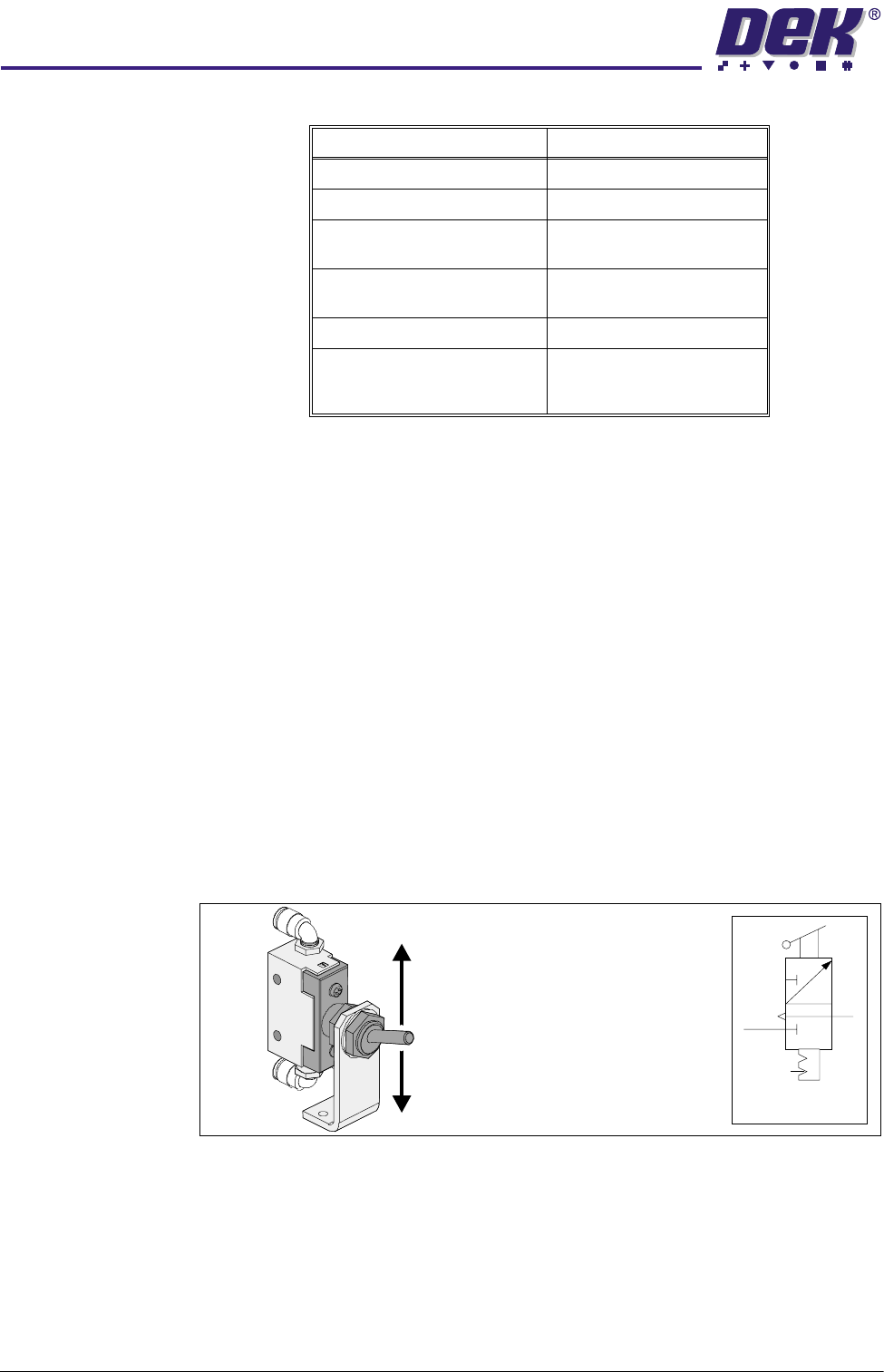
Toggle Switch The toggle switch acts as a two way manual switching device for activating and
de-activating the chase screen clamps.
NOTE
The toggle switch is not fitted to all machines.
Activating the switch (down position) connects the compressed air flow to Port
A of each of the four single acting cylinders (version 1 type).
De-activating the toggle switch (up position) cuts off the compressed air to each
actuator, automatically retracting the piston by spring action.
Figure 24-6 Toggle Switch
Regulator Setting
Main Air Input 5 bar nominal
Paste Dispenser 3 bar (43 psi) maximum
Screen Cleaner Solvent
(Blue USC)
1 bar (14.5 psi) maximum
Screen Cleaner Solvent
(Vortex)
0.1 bar
Board Clamps 4.5 bar (62.25psi) nominal
ProFlow - Software Regulator
ProFlow Idle Pressure
ProFlow Paste Pressure
0.2 bar
0.2 - 4 bar
Symbol
De-activate Clamps (OFF)
Activate Clamps (ON)
(Switch Position)
31(80$7,&02'8/(
31(80$7,&'(9,&(6
Chapter Issue 3 May 03 Technical Reference Manual 24.9
Single Acting
Cylinders
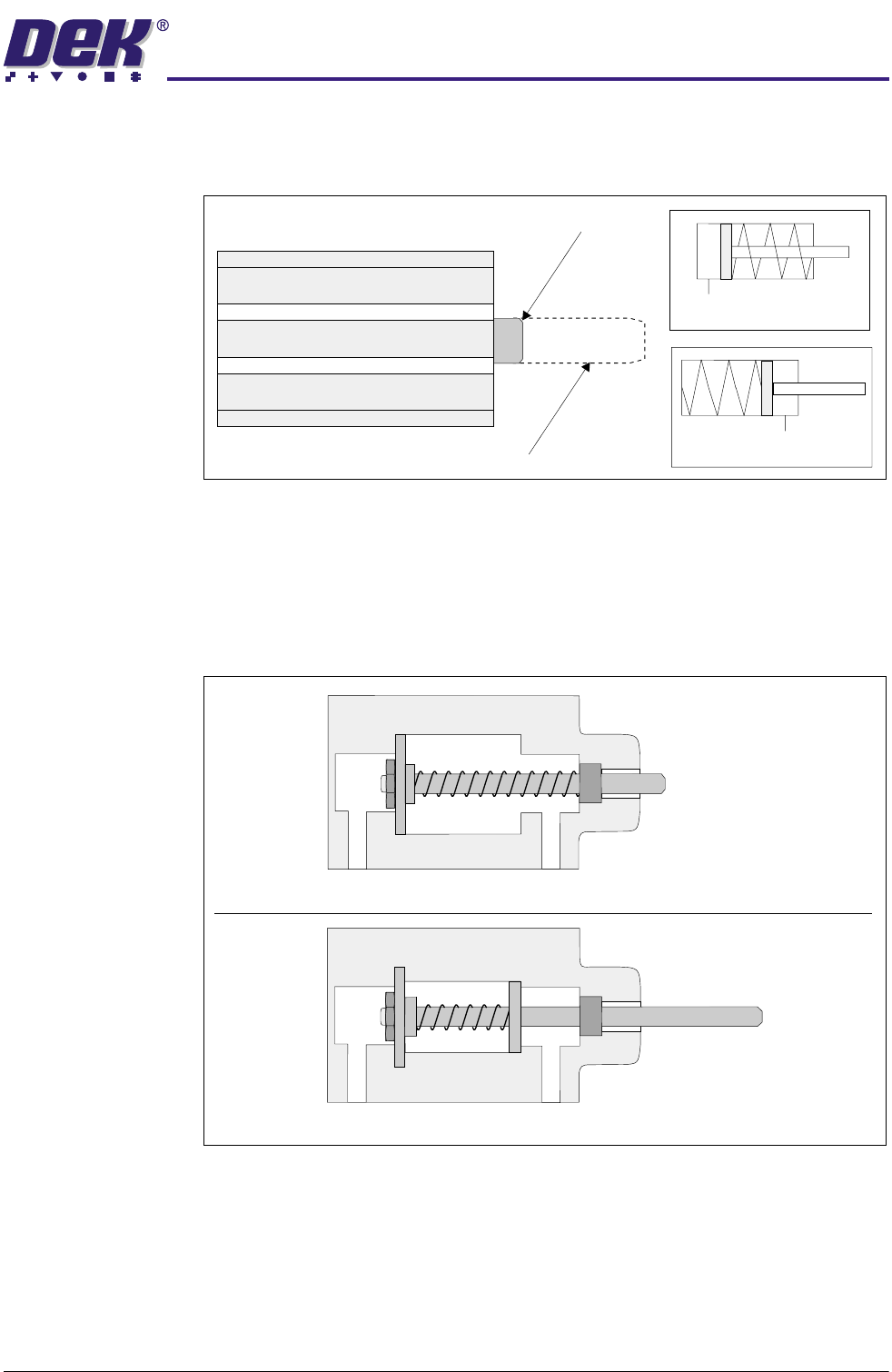
Single acting cylinders only require compressed air for movement in one
direction. The movement of the piston in the other direction is effected by a
spring. There are two versions of the single acting cylinder fitted to the machine.
Figure 24-7 Single Acting Cylinder and Symbol
Version 1 - With air connected to Port A, compressed air extends the piston.
When the air is disconnected the spring retracts the piston (cylinder rest state).
Version 2 - With air connected to Port B, compressed air retracts the piston.
When the air is disconnected the spring extends the piston (cylinder rest state).
Figure 24-8 Single Acting Cylinder Cross Section
Extended
Retracted
Version 1 (Symbol)
Version 2 (Symbol)
Port A
Port B
Version 1
Version 2
Port A
Port B