00196737-04_IM_eWinXP_SSW70x_DE_EN.pdf - 第9页
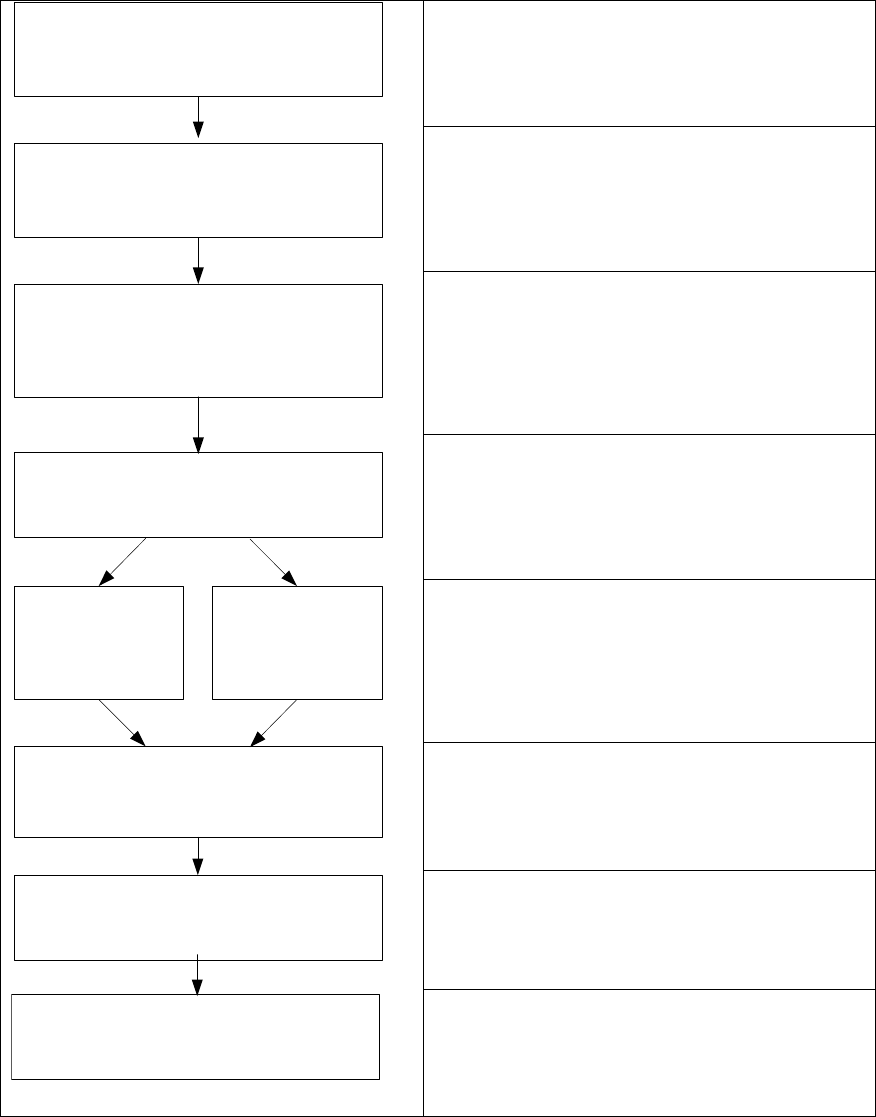
Windows XP Embedded SP2 / Installation Manual Ausgabe 05/2011 Edition 4 Installation for CPU 627 and CPU 627B/827B 4.1 Overview See section 4.2 . See section 4.2 . Installing the operation system Windows XP embedded, see…

Windows XP Embedded SP2 / Installation Manual Ausgabe 05/2011 Edition
3.2.1.2 Machine/Vision computer (in one-computer operation)
Name SIMATIC Box PC 627B
CPU / clock frequency Core 2 Duo T7400 / 2,16 GHz
RAM 1 GB
Harddisk Yes
External DVD drive Yes
Internal DVD drive No
Serial interfaces 1
USB interfaces and
external USB hub
Yes
Network 2x 100 MBit
Table 3-3: Machine/Vision computer hardware SIPLACE SX1/2
Name SIMATIC Box PC 827B
CPU / clock frequency Core 2 Duo T7400 / 2,16 GHz
RAM 2 GB
Harddisk Yes
External DVD drive No
Internal DVD drive Yes
Serial interfaces 1
USB interfaces Yes
External USB hub Yes (X-series) / No (SX4)
Network 2x 100 MBit
Table 3-4: Machine/Vision computer hardware SIPLACE X-series and SX4
8
Windows XP Embedded SP2 / Installation Manual Ausgabe 05/2011 Edition
4 Installation for CPU 627 and CPU 627B/827B
4.1 Overview
See section 4.2.
See section 4.2.
Installing the operation system Windows XP
embedded, see section 4.3.
See section 4.3.2.
See section 5.
Install Boot CD/DVD
Choose computer configuration
CD SIPLACE XP embedded Configurator
Calibrate Touchscreen
BIOS settings on the machine/Vision
computer
Perform automatic BIOS settings
Back up the machine data
BIOS update on the machine/Vision
computer
Perform automatic BIOS update
BOOT CD/DVD
CPU 627
BOOT CD/DVD
CPU 627B/827B
Restore the initial configuration
See section 6.
9

Windows XP Embedded SP2 / Installation Manual Ausgabe 05/2011 Edition
4.2 Performing automatic BIOS update/settings on the machine
computer and Vision computer
The image files for the automatic BIOS update/BIOS settings and the corresponding installation
instruction (readme file) are available on the V1.0 BIOS CD that can be ordered via the service
technician or downloaded from the SIPLACE Download Center.
NOTICE
Please note that the BIOS settings are different for the 60x and the 70x station software!
10