M20_Ope_E.pdf - 第488页
Chapter 16 Dispenser 16-18 Item Contents Recommended value Discharge Press. Change At dispense corrections, the correction value is set as the ratio when the dispense am ount (hemisphere volume) is set as "1". …
Chapter 16 Dispenser
16-17
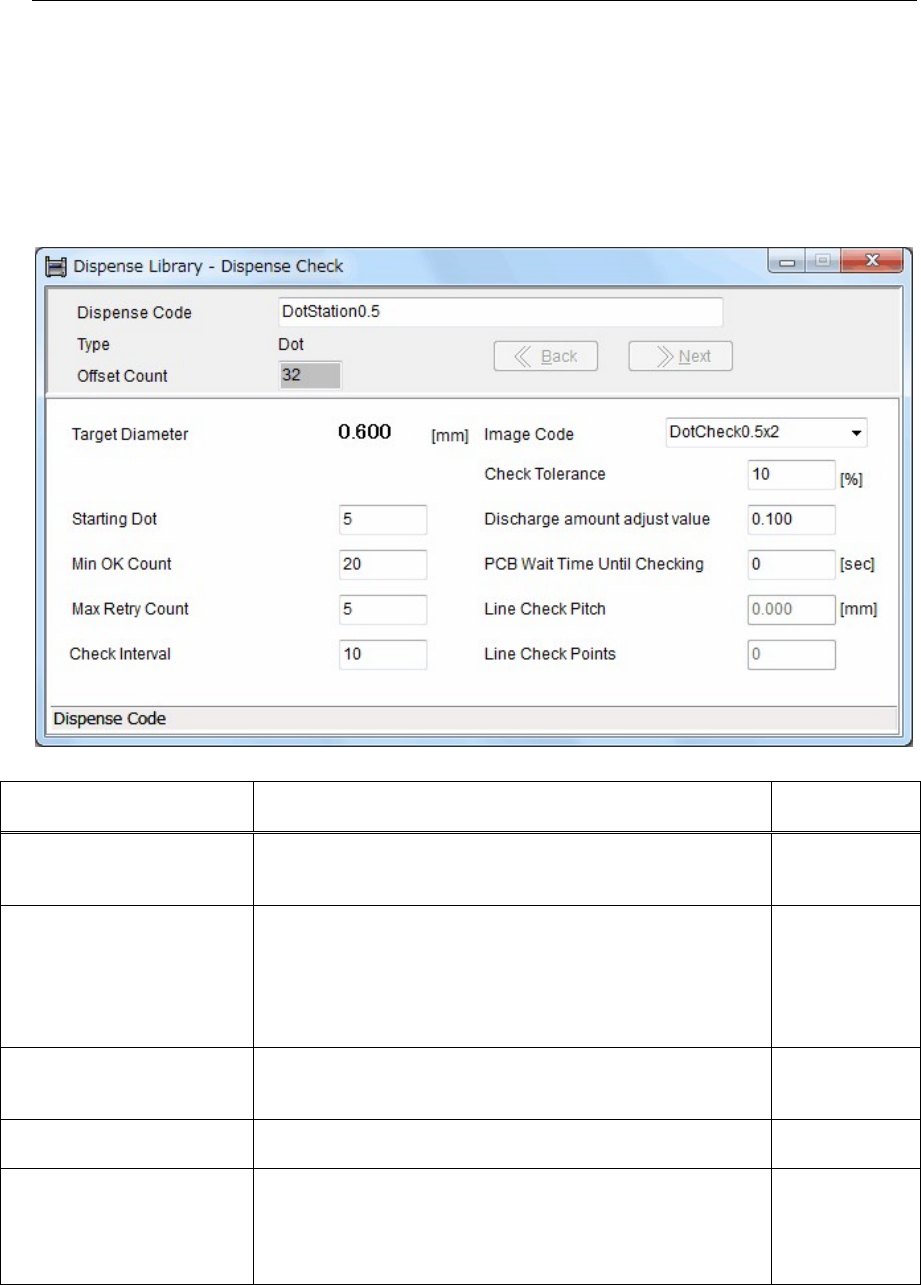
16-3-1-3 Dispense Library - Dispense Check setting
Menu: Dispense Data > Dispense Library - Dispense Check
Action:
① Double-click [Dispense Code] of the dispense data to display the Dispense Library - Dispense Check
window.
Additionally, when clicking “Tool>Advanced Setting” of the System menu at the upper portion of
the window, the Dispense Library - Dispense Check window will appear.
② In this window, you can set dispense check parameters.
Item Contents
Recommended
value
Starting Dot
Specify what dispense point the dispense check is started.
Note that the dispense diameter and dispense shape of several
points after the dispense has started do not become stable.
5 (th point)
Min OK Count
When the image process of the dispense points more than this
count is determined as OK, the result is determined as OK. The
image process results of the dispense points are then
accumulated (averaged) to output the final results.
The reference dispense points for the dispense check are 2/3 of
the total count.
20 points
Max Retry Count
Specify maximum counts for the dispense correction.
(Retry counts) When this count is "0", only the dispense check
is performed and the correction is not performed.
5 (counts)
Check Interval
Specify a PCB interval, at which the dispense check is
performed.
Example: 10
(PCBs)
Check Tolerance [%]
A tolerance value that the dispense check is determined as OK.
When the accumulated (averaged) dispense area enters the
range of this check tolerance value (±), this is determined as
OK. The dispense area to be used as reference is calculated
from [Target Diameter] of the Image Library (image data).
10 (%)
Chapter 16 Dispenser
16-18
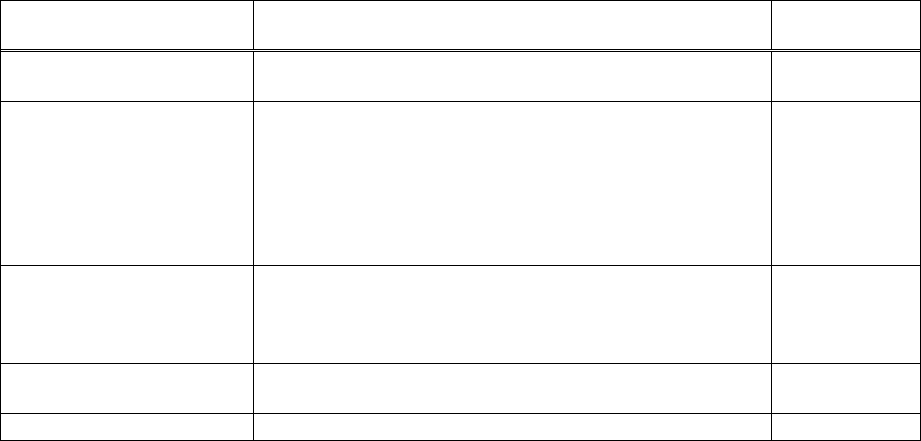
Item Contents
Recommended
value
Discharge Press. Change
At dispense corrections, the correction value is set as the ratio
when the dispense amount (hemisphere volume) is set as "1".
0.050 to 0.100
PCB Wait Time Until
Checking [Sec.]
If the PCB loading wait time exceeds the set value, the
dispense check is performed before the PCB count reaches the
value set in [Check Interval].
When the stop time becomes long if a component shortage or
trouble occurs in the pre-process or post-process equipment,
the dispense check is performed to make the dispense amount
stable.
0(sec)
Image Code
Select an image code of the Image Library (image data) for the
image process, and then enter it.
Additionally, double-clicking this cell will jump to the Image
Library (image data).
―
Line Check Pitch [mm]
Specify a pitch between line dispense check points.
Point No. 1 becomes the pitch from the start point.
4.000(mm)
Line Check Points Specify the number of points for the line dispense check. 4 (points)
Chapter 16 Dispenser
16-19
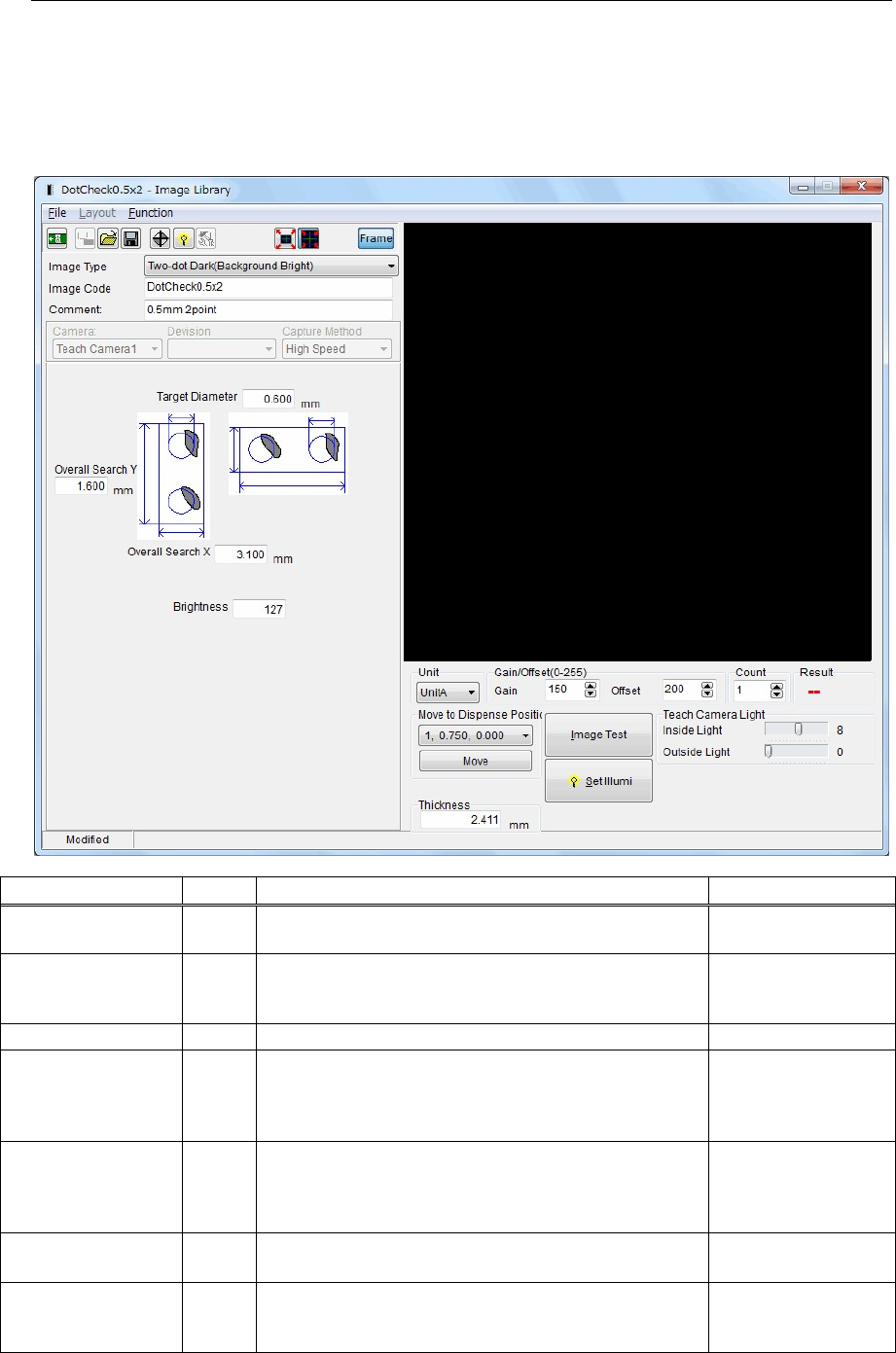
16-3-1-4 Image Library (image data) setting
Menu: Dispense data>Dispense Library - Dispense Check>Image Library
Action:
① Double-click the [Image Code] cell in the Dispense Library - Dispense Check window to display the
Image Library (image data) window.
② In this window, you can set the Image Library (image data) parameters.
Item Unit Contents Recommended value
Image Type ―
Specify a dispense image type.
Select dispense points and background type.
Two-dot Dark
(Background Bright)
Image Code ―
Enter an image code.
This image code will link with the image code in the
Dispense Library - Dispense Check window.
―
Comment ― Enter a comment. ―
Target Diameter mm
Enter a target dot dispense diameter (dispense diameter
to be adjusted in the adjustment of the dispense check).
Normally, the dispense diameter is larger than the outer
diameter of the nozzle.
Nozzle outer
diameter or more
Overall Search X mm
Input an area X where the dispense point is searched
for.
Target Diameter + 1
mm + dispense point
X offset pitch
(1.5mm)
Overall Search Y mm
Input an area Y where the dispense point is searched
for.
Target Diameter
+
1
mm
Brightness ―
Enter a brightness used to recognize the dispense
material that has been dispensed.
(0 to 255)/2 = 128 (Default value)
128