00197706-02_VB_SetupCenter7.1_DE_EN.pdf - 第28页
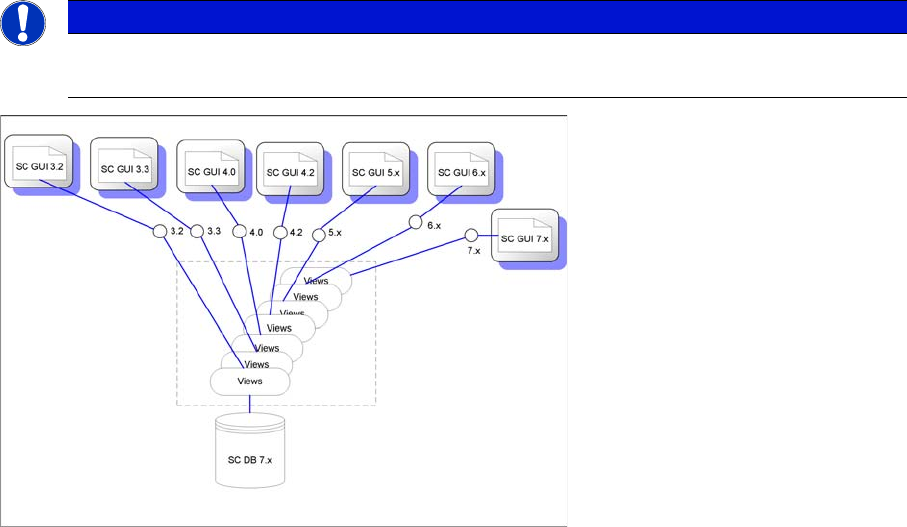
Introduction Recommendation 28 SIPLACE Setup Center 7.1 1.1 1 . 1 R e c o m m e n d a t io n Recommendation For a temporary operation (e. g. du ring an upgrade) it is possi ble to use different Setup C enter GUI ver - si…
Introduction
SIPLACE Setup Center 7.1 27
1
1 Introduction
Introduction
SIPLACE Setup Center is an application for performing setup verification on SIPLACE machines (online)
and in the pre-setup area (offline).
Setup verification is the term used for step-by-step verification of the flexible barcode label definition for
a component from the target setup to a track in the actual setup. SIPLACE Setup Center obtains the data
on the target setup through the SIPLACE Pro Interface (SPI). The component is identified by barcode
labels on the packaging unit, which SIPLACE Setup Center reads by means of a scanner system and
processes via a flexible barcode label definition. The track is then assigned to the component via the
track barcode on the machine or via the component verification button on the E- or X-feeder. The data
acquired during a setup verification is stored by SIPLACE Setup Center in a separate database.
SIPLACE Setup Center can currently handle packaging units that are uniquely identifiable and packag-
ing units that are assigned to a batch. The groups are differentiated by the fact that a packaging unit has
a unique barcode (UID) or a batch identification (ICL), such as a serial number. For technical reasons,
Setup Center cannot provide all functions with the same degree of user-friendliness in ICL mode, so we
recommend equipping packaging units with a unique identification.
SIPLACE Setup Center now supports online setup verification for all SIPLACE placement machines (ex-
cept F3 and S15). SIPLACE Setup Center also differentiates between unforced and forced setup verifi-
cation. Unforced setup verification is carried out without a connection to the station. This means there is
no compulsion to perform setup verification and the production process can take place without it. Forced
setup verification is carried out with a connection to the station and requires successful setup verification
before production. This is implemented as follows: once an order or a packaging unit changeover has
been downloaded, the machine deactivates all divisions in which there are packaging units for which no
setup verification data has been received. Before production can start, the line operator must have there-
fore successfully verified all components/batches necessary for the product. Forced online setup verifi-
cation is not supported by C series machines.
SIPLACE Setup Center also allows you to perform offline setup verification in the pre-setup area. The
offline setup verification is performed for the changeover table of a selected setup. After completing the
setup via the offline setup verification, the changeover table can be moved out of the pre-setup area and
over to the production line, where it can be logged on to the station via the "Changeover table manage-
ment". This once again supports all SIPLACE machines.
In contrast to previous setup verification systems, the SIPLACE Setup Center uses a radio scanner sys-
tem, which displays the current setup data for the user. The radio scanner system offers easy-to-follow
user prompts. The display gives the user information and is also used to control certain processes. The
menu structures are modeled on those used for the operation of mobile phones. In addition, the scanner
indicates the successful or unsuccessful completion of actions by various audible and visual signals.
CAUTION
Line ID no longer supported
The line ID used in Setup Center 2.0 and 2.1 is no longer supported and is replaced by the ma-
chine ID.
For this reason it is necessary to remove all existing barcode labels for online setup verification,
for example ‚Table Verification’, ,Refill’, ‚Shift Change’, ‚Component Search’ etc. and to over-
write these with new labels.
CAUTION
Unique Feeder ID no longer supported
The unique Feeder ID for S-feeders is no longer supported.
Introduction
Recommendation
28 SIPLACE Setup Center 7.1
1.1
1.1 Recommendation
Recommendation
For a temporary operation (e. g. during an upgrade) it is possible to use different Setup Center GUI ver-
sions.
NOTICE
New functions
The new functions are not available in the old Setup Center GUIs.
System Overview
SIPLACE Setup Center 7.1 29
2
2 System Overview
System Overview
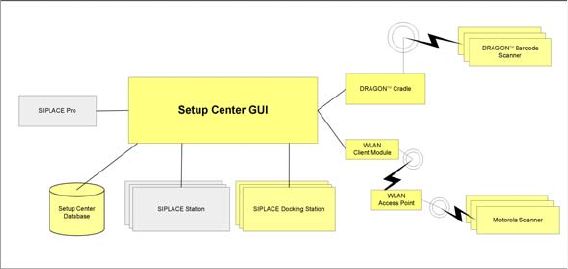
The SIPLACE Setup Center package comprises the following subsystems:
▪ Setup Center GUI
▪ Setup Center Database
▪ Barcode scanner
▪ Docking Station/Feeder Rack
SIPLACE Setup Center loads the target setup from SIPLACE Pro. After the download of a recipe at the
line, Setup Center automatically loads target setup during online setup verification. In the case of offline
setup verification, the operator selects the target setup manually.
During setup verification, packaging unit data are recorded via the barcode scanner, then checked
against the currently loaded target setup and finally stored in the Setup Center database. During the pro-
cess of forced setup verification, the setup verification data is transferred to the machine.