00197706-02_VB_SetupCenter7.1_DE_EN.pdf - 第40页
New Functions in Setup Center 7.1 Filter Options for Material Search Rewor ked 40 SIPLACE Setup Center 7.1
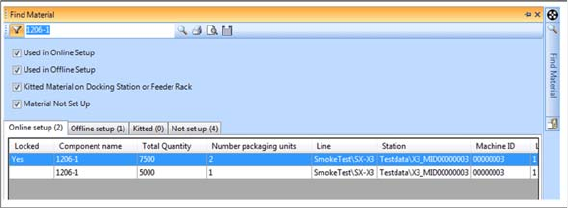
New Functions in Setup Center 7.1
Filter Options for Material Search Reworked
SIPLACE Setup Center 7.1 39
Function
► Open at Extras => Search Material....
► For detailed information, refer to the user manual "Setup Center 7.1" or the Online Help.
New Functions in Setup Center 7.1
Filter Options for Material Search Reworked
40 SIPLACE Setup Center 7.1

Restrictions
6.1.1 Database Views Restriction
SIPLACE Setup Center 7.1 41
6
6 Restrictions
Restrictions
6.1
6.1 Restriction
Restriction
6.1.1
6.1.1 Database Views
Database Views
6.1.2
6.1.2 Splice Points
Splice Points
▪ When using splice sensors don't repair damaged packaging units with splice because repair splice
points cannot be distinguished from the normal splice points.
6.1.3
6.1.3 Set-Up Sheet
Set-Up Sheet
▪ Setup Center prints barcodes exclusively of the type Code-39. This type masters the following valid
characters: 0123456789 [space character] ABCDEFGHIJKLMNOPQRSTUVWXYZ-.$/+%. Other
characters are displayed as gap in the barcode and the barcode printout are not readable.
▪ When SIPLACE Pro 5.0 SP1 SP1 is used, the setup lists printed out do not contain graphics of the
components.
6.1.4
6.1.4 Recovery Placement
Recovery Placement
▪ Due to the restart of the machine, the value for the consumption of already placed components on
the boards that are not finished yet is lost.
6.1.5
6.1.5 SIPLACE E-, X- and SX Docking Station
SIPLACE E-, X- and SX Docking Station
▪ Before starting Setup Center, all docking stations connected via the CAN bus must be online.
Only then it is possible for Setup Center to recognize the type of the docking station correctly.
▪ In order to verify the tracks of a changeover table with 30 tracks, the feeders must first be placed
onto tracks 31 to 60 of a 60 track wide changeover table in the docking station and then be verified.
After that, the feeders must be replaced onto the 30 track wide changeover table.
6.1.6
6.1.6 Mat Label
Mat Label
▪ The barcode parts are invariably described with a fixed description in the Barcode Rules Editor. How-
ever, the definition of MAT labels can be copied and changed as required.
6.1.7
6.1.7 Offline Verification of Partial Setups
Offline Verification of Partial Setups
Setup Center does not support the following SIPLACE Pro functions for "Offline verification of partial set-
up".
▪ Combined PCB
▪ Virtual PCB stack
▪ Quadlane
6.1.8
6.1.8 Maximum Number of Stations in the Line
Maximum Number of Stations in the Line
Setup Center allows a maximum number of 9 stations in a line.
If there are more than 9 stations, this could cause errors during the scanning of control barcodes.
6.1.9
6.1.9 Scanning of the Brightness Class Information Not Possible in Random Setup Mode
Scanning of the Brightness Class Information Not Possible in Random Setup Mode
If the setup to be verified uses the Random Setup functions (Arbitrary track, or Arbitrary track and level),
the brightness class information cannot be scanned with the barcode scanner. This results in a constant
failure of the required brightness class check for a component.
NOTICE
The data access via OIB interface is recommended.